Key Brackets disassembling tool instruction_V1
Views: 0 • Likes: 0
1. Background
The disassembling locations of key brackets for Reno2 is very narrow, which is difficult to disassemble. Service centers cannot find suitable tools to disassemble, repairing engineers may use metal tweezers or other tools, so it could result in battery safety risks and damage the key brackets. Therefore, OPPO will provide the professional tools to help the repairing engineers disassemble the key brackets easily.
2.Involved scenes/models/Faulty type
Reno2 and other module devices which have similar structure.
3.Applicable to
Global Service Centers.
4.Content
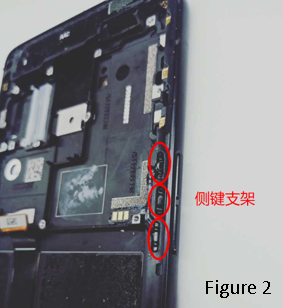
Key brackets disassembling tool (as shown in Figure 1, the material code: 3884060), volume key brackets (as shown in Figure 2).
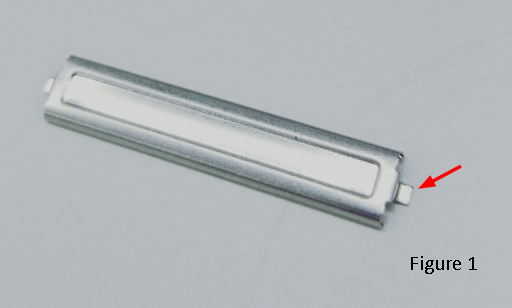
1. Plug any side of the convex bodies (as shown by the arrow in figure 1) into the disassembling locations of key brackets, and then disassemble.
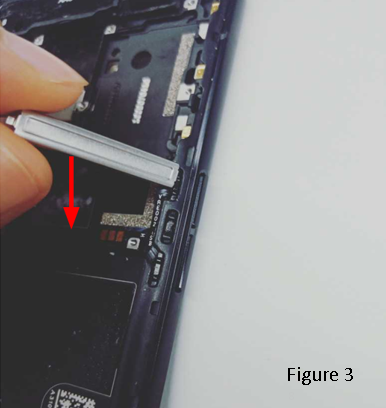
2. Press down the tool along the direction perpendicular to the screen, then pry up the side button brackets lightly (as shown in Figure 3). Do it in the same way for the Power key brackets.
5.Documentation Requirement
None
6.Frequently asked question(FAQ)
1. Is the tool suitable for other models?
A: Yes, it’s suitable for other module devices which have similar structure.
7.Document conduction follow up
None
8.Caution
Before disassembling the key brackets, dropping a small amount of alcohol to FPC of the key and waiting for 5~10s, avoiding to pull the FPC apart.
The disassembling locations of key brackets for Reno2 is very narrow, which is difficult to disassemble. Service centers cannot find suitable tools to disassemble, repairing engineers may use metal tweezers or other tools, so it could result in battery safety risks and damage the key brackets. Therefore, OPPO will provide the professional tools to help the repairing engineers disassemble the key brackets easily.
2.Involved scenes/models/Faulty type
Reno2 and other module devices which have similar structure.
3.Applicable to
Global Service Centers.
4.Content
Key brackets disassembling tool (as shown in Figure 1, the material code: 3884060), volume key brackets (as shown in Figure 2).
1. Plug any side of the convex bodies (as shown by the arrow in figure 1) into the disassembling locations of key brackets, and then disassemble.
2. Press down the tool along the direction perpendicular to the screen, then pry up the side button brackets lightly (as shown in Figure 3). Do it in the same way for the Power key brackets.
5.Documentation Requirement
None
6.Frequently asked question(FAQ)
1. Is the tool suitable for other models?
A: Yes, it’s suitable for other module devices which have similar structure.
7.Document conduction follow up
None
8.Caution
Before disassembling the key brackets, dropping a small amount of alcohol to FPC of the key and waiting for 5~10s, avoiding to pull the FPC apart.
Ad
Sponsored Deals
Advertisement · Hand-picked offers, refreshed regularly
These are paid/affiliate advertisements from our partner store and are not related to OPPO or OPPO spare parts.
Related Articles
Ad
Sponsored Deals
Advertisement · Hand-picked offers, refreshed regularly
These are paid/affiliate advertisements from our partner store and are not related to OPPO or OPPO spare parts.