Secrecy Auto Unlocker Tool Use Instruction
1. Introduction
Some engineer modes (such as *#808#) will be locked by default after handsets leaving factory, to prevent problems caused by user misoperation.
If there’s something wrong with user device and going to SC for repair, service staff need to unlock the engineer modes first before detecting and analyzing the device.
2. Tool information
2.1 Run the tool
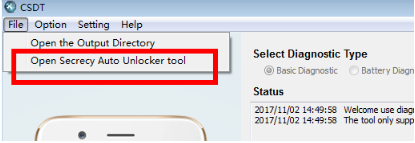
2.2 Interface introduction
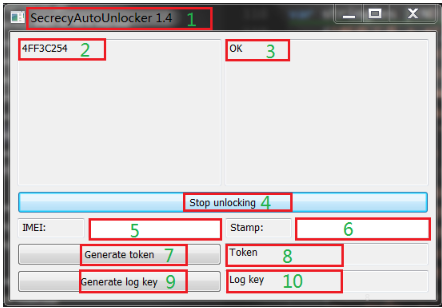
Main interface:
(1) Version information;
(2) Device ID;
(3) Unlock result;
(4) Start/stop unlocking
(5) IMEI input box
(6) Stamp input box
(7) Token generate
(8) Token
(9) Log key generate
(10) Log key
2.3 Use instruction
2.3.1 Online unlock
User brings the handset to SC, and service staff should open phone adb, then connect to computer.
Click (4) start unlocking, the tool will enter continued unlock status, and automatically unlock any handset connected to adb, and any handset unlock result will be displayed on (2) Device ID and (3) Unlock Result.
Re-click (4) stop unlocking, the unlock of handsets connected to adb will be stopped.
2.3.2 Offline unlock
If user is not in SC, offline unlock mode will be applicable to ensure that the handset can be detected by successful unlocking.
Enter *#9434# in dial pad of user handset, click AuthTokeDecrypt, then the token input box will come out.
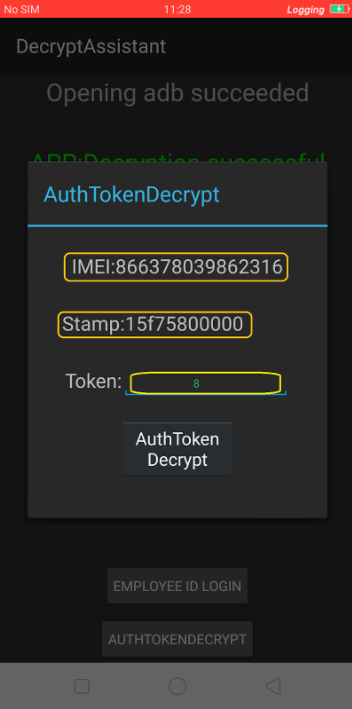
From the box, user IMEI and stamp information can be seen; respectively fill in (5) IMEI input box and (6) stamp input box, then click (7) Token generate. Input the token generated from the tool into the handset, and click AuthTokeDecrypt, then the handset is unlocked.
2.3.3 Unlock log save function
If the handset is locked, run log toolkit through inputting *#800# and click one of the settings option, “Please input authentication code” prompt box will pop up at this time. For example, If Audio log needs to be caught, the following prompt box will pop up; only the authentication code is input, it can be unlocked. And this code also needs to be required by tool.
If the handset is unlocked, the following prompt box will not pop up.
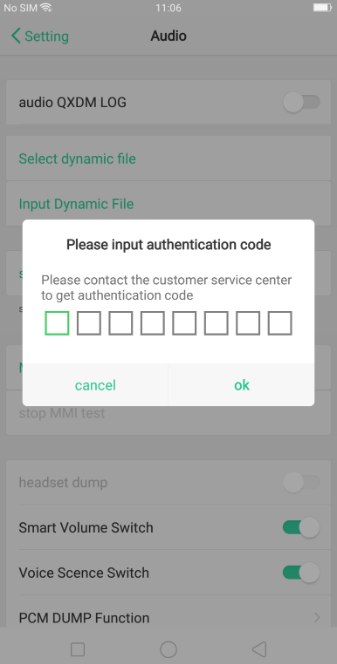
Fill user handset IMEI number in IMEI input box of the tool, click (9) log key generate, then the log key will be displayed on (10). Log save function will be activated after inputting the log key generated from the tool into the code box of handset, shown as above photo.
Attentions
3.1 Handset will be automatically unlocked once the CSDT tool has detected that there’s handset connecting to adb, and it’s unnecessary for service staff to enter the unlock interface to unlock.
3.2 For the token function, stamp will be changed with the time in handset. It needs to re-generate the token if the stamp has changed.
3.3 Engineer mode unlock function starts with model R11s, and the locked device is required to be unlocked by using this tool if engineer mode needs to be entered. After the handset is unlocked, it will be automatically locked after 24h SCREEN-ON time (screen-off time will not be calculated).
Sponsored Deals
Advertisement · Hand-picked offers, refreshed regularly
These are paid/affiliate advertisements from our partner store and are not related to OPPO or OPPO spare parts.
Related Articles
Sponsored Deals
Advertisement · Hand-picked offers, refreshed regularly
These are paid/affiliate advertisements from our partner store and are not related to OPPO or OPPO spare parts.