How to Lock the SIM Card in Your OPPO Smartphone?
How to Lock the SIM Card in Your OPPO Smartphone?
SIM PIN prevents your SIM card from being accessed by unauthorized people if your phone is lost or stolen. Once the SIM card lock is enabled, you need to enter it every time you turn on your device. If you enter an incorrect PIN 3 times, you need to enter PUK (PIN Unlock Code) to unlock your SIM card. If incorrect PUK is entered more than ten times, the SIM card will be permanently damaged. Check the easy way to set up SIM PIN or SIM Card lock here!
Situation: You want to set up a SIM card lock to protect your SIM card.
Applicable to: All OPPO Smartphones.
To set up SIM PIN, follow these steps:
1. Go to [Settings] > [Additional Settings] > [Device & Privacy] > [Set UP SIM Card Lock].
2. Toggle on [Lock SIM Card].
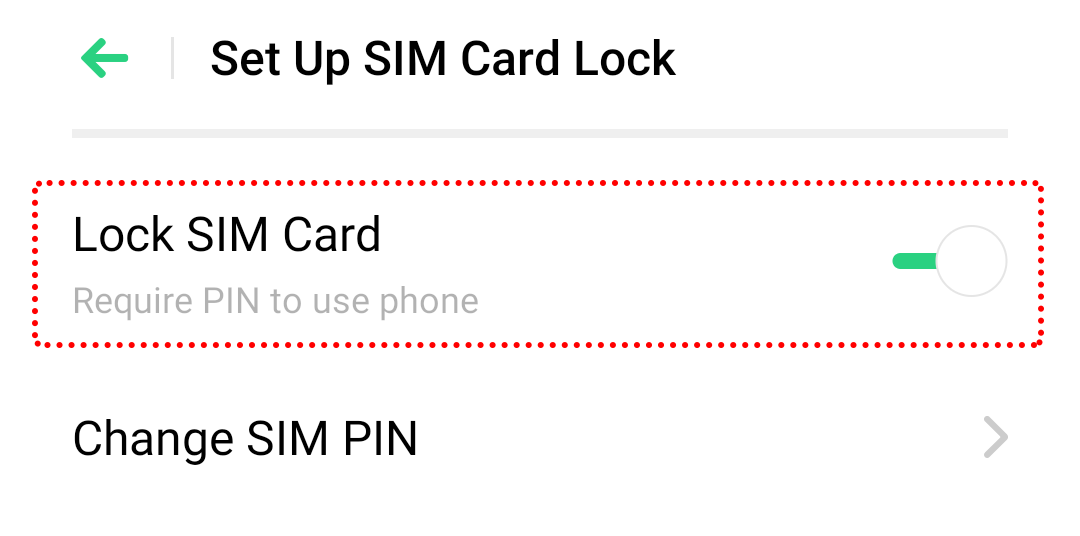
3. Enter the SIM PIN and tap [OK] on the top right corner.
* Pictures, settings, and paths might differ from those of your phone, but these won't affect the description in this article.
Sponsored Deals
Advertisement · Hand-picked offers, refreshed regularly
These are paid/affiliate advertisements from our partner store and are not related to OPPO or OPPO spare parts.
Related Articles
Sponsored Deals
Advertisement · Hand-picked offers, refreshed regularly
These are paid/affiliate advertisements from our partner store and are not related to OPPO or OPPO spare parts.