How to Delete Your Personal Data on HeyTap/OPPO Account
How to Delete Your Personal Data on HeyTap/OPPO Account?
Situation: You want to know how to delete your Personal Data on HeyTap/OPPO Account.
Applicable to: ColorOS 3.0 and above devices. Check your ColorOS version in [Settings] > [About Phone].
*HeyTap/OPPO Accounts are terms that can be used interchangeably.
Personal data includes:
-
Basic account information (profile photo, display name, real name, gender, etc.).
-
Account activity history (registrations, sign-ins, and profile modifications).
-
Theme downloads and favorite activities.
*You may choose what data you want to delete.
Using Computer
1. Please log in to your account using this link: https://id.heytap.com/static/userdata_index.html.
2. On your “Personal Data Management”, tap “Delete Personal Data”.
3. Enter your password again for security verification.
4. Choose the data you want to delete.
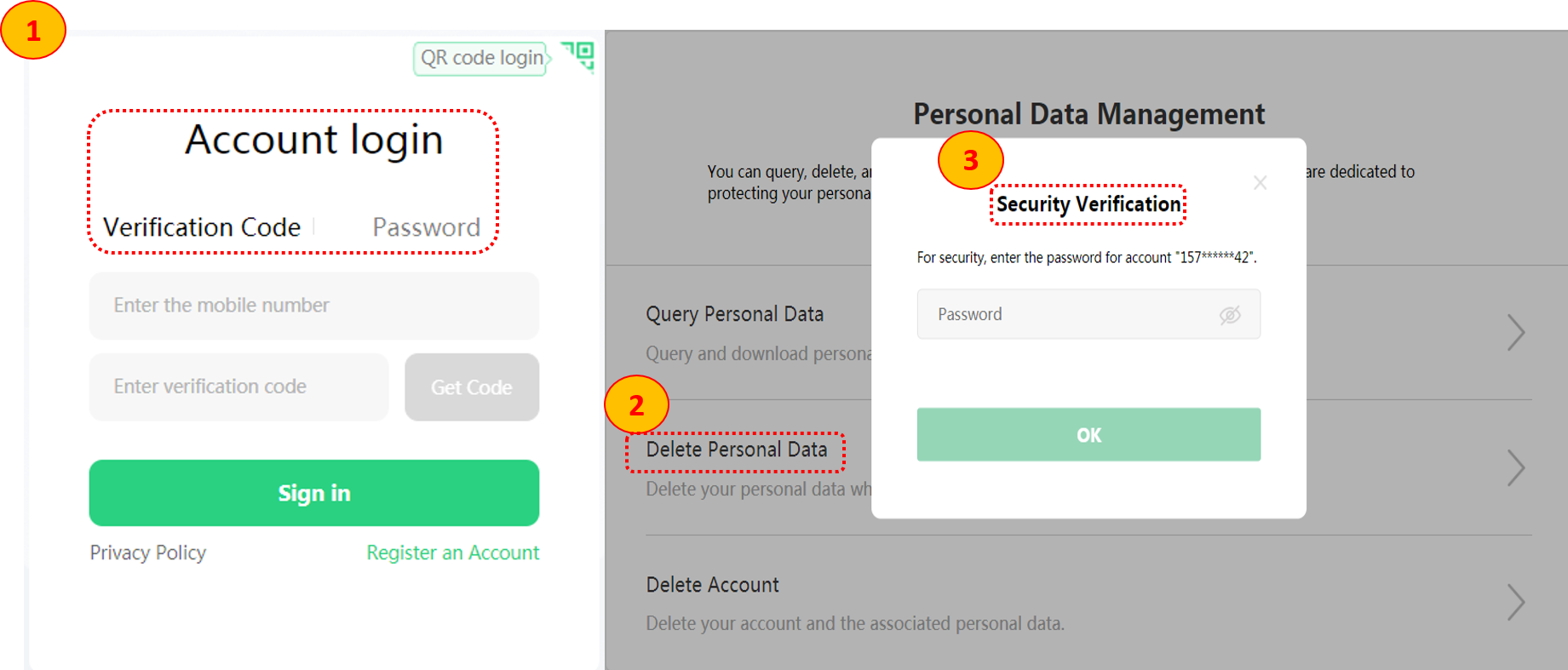
4. Choose the reason for account deletion. To ensure your account security, you need to input a verification code sent through your number, click "Get Code".
Related article: How to Delete HeyTap/OPPO Account?
A deleted account cannot be recovered.
The link can be operated on your computer or your default phone browser.
Using your OPPO phone
1. Go to [Settings] > tap your [Avatar] > [Sign-in & Security] > [More Help] >[Choose a browser] > [Delete Personal Account] the choose the data you want to delete.
2. To ensure your account security, you need to input a verification code sent through your number then choose the reason for account deletion.
Related article: How to Delete HeyTap/OPPO Account?
A deleted account cannot be recovered.
The link can be operated on your computer or your default phone browser.
Sponsored Deals
Advertisement · Hand-picked offers, refreshed regularly
These are paid/affiliate advertisements from our partner store and are not related to OPPO or OPPO spare parts.
Related Articles
Sponsored Deals
Advertisement · Hand-picked offers, refreshed regularly
These are paid/affiliate advertisements from our partner store and are not related to OPPO or OPPO spare parts.