Guidance for Handling Mainboard Test Failure with DC Power Supply _V1
Views: 0 • Likes: 0
| Version | Date | Drafted | Verified | Approved | Modified content |
| V1.0 | 2020-04-09 | Chen JinLing | Li BinBin | Huang GuoXin | 1st Version |
1. Background
DC power supply (code: 5380180033) limits the maximum voltage to 4.5V,SuperVOOC models require higher power, so it is necessary to ensure a steady starting power by increasing the current. But when the current rises inside DC power supply, the channel switching is instability, which cause the output instability, and the output voltage is probabilistically lowered below the startup voltage, ultimately resulting in startup failure.
2. Applicable Scope
The test of the mainboard of SuperVOOC model with regulated power supply(50W/65W)
3. Applicable Staff
Engineers in Customer Service Center
4. Content
Refer to 5.5 8V boost fixture in the OPPO Customer Service Center Repair Tool Instruction Manual _V1.0, and connect DC power supply, 8V booster fixture, 8V battery connect cable, the interface board, and the mainboard performs in sequence and conduct motherboard leakage test. After we performed the above steps, the OPPO interface directly drops power during the boot and boot failure. If the above low-probability event occurs in our Customer Service Center, please handle the issue and refer to the following steps:
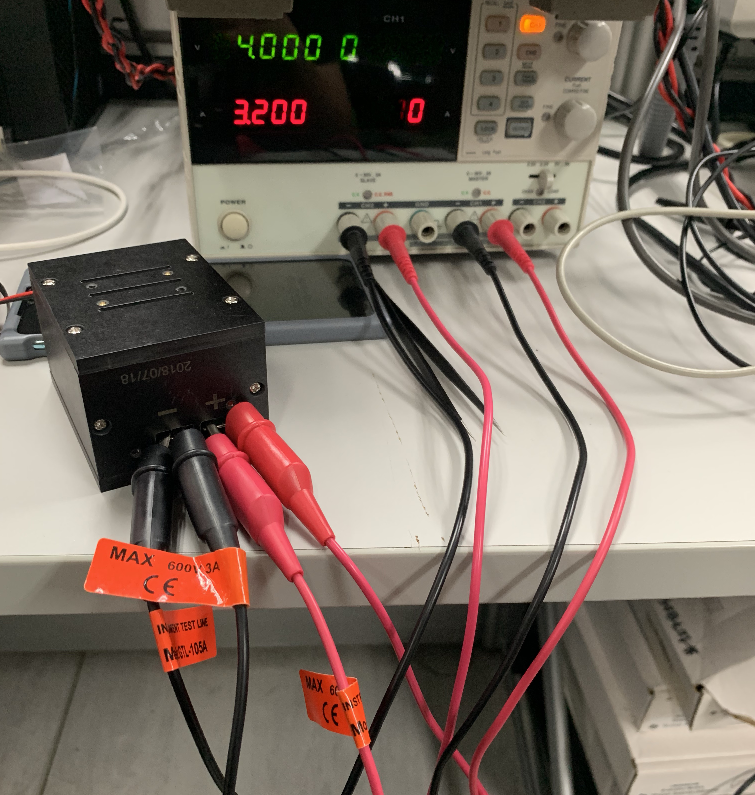
1) Turn on the 2 channels of DC Power Supply simultaneously, and keep the input setting constant.
2) Corresponding to 2 positive and 2 negative terminals, and clamp on the positive and negative terminals of 8V booster fixture, achieve the effect of parallel connection of channel 1 (CH1) , channel 2 (CH2) and the input side of booster fixture ( As shown in figure 4.1) .
3) Keep the connection mode of other ports of the phone constant and test.
Ad
Sponsored Deals
Advertisement · Hand-picked offers, refreshed regularly
These are paid/affiliate advertisements from our partner store and are not related to OPPO or OPPO spare parts.
Related Articles
Unified Processing Guidance on the Start-up Failure of the A71L and A57 Under Download Mode V1
Views: 1 • Likes: 0
Read ArticleAd
Sponsored Deals
Advertisement · Hand-picked offers, refreshed regularly
These are paid/affiliate advertisements from our partner store and are not related to OPPO or OPPO spare parts.