New Features For ColorOS 7.2(Overseas)_V1
1.Super Power Saving Mode
The background of requirement :
In the case of extremely low power, the power of the mobile phone will not last long, affecting the user experience.
Function description :
Super Power Saving Mode can fulfill the user's emergency needs and relieve electricity anxiety under extremely low power. Under Super power saving mode, a series of power saving strategies such as CPU frequency scaling and screen brightness adjustment are used, and at the same time adopts targeted power saving strategies for specific apps is used to save the battery. Such as WeChat under super power saving will be matched with dark mode to appropriately extend the time of receiving information.
In super power saving mode, six APPs can be opened, among which phone, SMS, and browser are fixed, and the remaining three can be selected by the user. At 10% power, a window will pop up to remind the user to turn on the super power saving mode. The user can also actively turn on the super power saving mode in the settings by himself. After entering the super power saving mode, you can click the ‘:’ icon in the upper right corner of the screen to edit the application you want to use, or choose to exit the super power saving mode.
Operation path :
Settings > Battery > Super Power Saving Mode
Models-covered :
ColorOS 7.2 and above devices
Regions-covered :
Global
2.Gravity Wallpapers
The background of requirement :
Not limited to static wallpapers and live wallpapers, increasing the competitiveness of desktop interaction.
Function description :
Gravity wallpaper can change dynamically depending on how user holds their device.
Note:
There is only one gravity wallpaper so far.
Operation path :
Settings > Home Screen & Lock Screen Magazine > Set wallpaper > Live wallpapers(Currently only the last one )
Models-covered :
ColorOS 7.2 and above devices
Regions-covered :
Global
3.Icon Pull-Down Gesture
The background of requirement :
As the screen of the mobile phone increases, one-handed operation becomes more and more difficult.
Function description :
On the desktop, swipe upward on the left or right side of the screen to pull down app icons. Continue swiping to an icon and release to open the app.
Note:
The function is turned off by default.
Operation path :
Settings > Home Screen & Lock Screen Magazine > Icon Pull-Down Gesture
Models-covered :
ColorOS 7.2 and above devices
Regions-covered :
Global
4.Lock Home Screen Layout
The background of requirement :
When using a mobile phone, the layout of the mobile phone may change due to misoperation. For example, children use parents ’phones to disrupt the original desktop layout. Or the elderly use the mobile phone, because they are not familiar with the operation of the mobile phone, the layout is changed, and the original application in a certain location cannot be found. Therefore, a function that forcibly locks the desktop layout that cannot be changed is required.
Function description :
After enabling this function, it is forbidden to add, delete, modify or move the desktop content (icons, folders, plug-ins, desktop shortcuts). When performing related operations, they do not respond, and prompt "Desktop layout is locked".
Operation path :
Settings > Home Screen & Lock Screen Magazine > Lock Home Screen Layout
Models-covered :
ColorOS 7.2 and above devices
Regions-covered :
Global
5.Screen Recording
The background of requirement :
Increase the richness of the screen recording function to cover a wider range of user scenarios and enhance the user's screen recording experience.
Function description :
1.Support simultaneous recording of system sound and microphone sound.
2.Floating window Add a quick setting switch for sound, you can choose to record system sound, record microphone sound, or click more settings to enter the screen recording setting interface.
3.Increase the function of custom resolution and bit rate.
4.The recording resolution of the 2K screen model supports 2k recording.(Depends on models)
Operation path :
Slide the floating bar of Smart Sidebar,
click the screen recording function icon.
Models-covered :
ColorOS 7.2 and above devices
Regions-covered :
Global
6.Boot Wizard(Accessibility)
The background of requirement :
Improve the Accessibility function of the boot wizard.
Function description :
Boot wizard adds Color Accessibility Mode. After turning on, the system switches to Color Accessibility Mode. If you turn on this function in the boot wizard, the function will always be turned on, you can turn off in settings>other settings>accessibility>Color Accessibility Mode.
Operation path :
The entrance is in the upper right corner of the language selection interface in the boot wizard
Models-covered :
ColorOS 7.2 and above devices
Regions-covered :
Global
7.You might be looking for
The background of requirement :
1.Convenient for users to find relevant content not found on this page.
2.Convenient for users to find the setting items whose position changed.
Function description :
Add recommendations for similar functions under the Do Not Disturb, Security, Battery, SIM Card & Mobile Data features and other functions list of of the settings app.
Note: Not all settings pages are available.
Operation path :
Some system settings pages >"You might be looking for" is displayed at the bottom.
Models-covered :
ColorOS 7.2 and above devices
Regions-covered :
Global
8.Air Gestures-Air answer
The background of requirement :
When your hands are occupyied(e.g. cooking, eating) or dirty, you can still answer your calls without touching it.
Function description :
When a call comes in, you can answer the call with a gesture.
Operation path :
Settings>Gesture & Motions>Air Gestures>Air Answer
Models-covered :
Depend on the hardware.
Currently only Reno4 support this feature.
Regions-covered :
Overseas
9.Air Gestures-Air scroll
The background of requirement :
When your hands are occupyied(e.g. cooking, eating) or dirty, you can still glance through Apps without touching it.
Function description :
When your hands are occupyied(e.g. cooking, eating) or dirty, you can still glance through Apps without touching it.
Currently only available for Youtube, Facebook, Instagram and Tiktok.
Operation path :
Settings>Gesture & Motions>Air Gestures>Air scroll
Models-covered :
Depend on the hardware.
Currently only Reno4 support this feature.
Regions-covered :
Overseas
10.Adaptive Sleep
The background of requirement :
When the human face is looking at the screen, the screen will not automatically go off because of the system setting the auto screen off time.
Function description :
When the auto screen off timer is triggered to the threshold of auto screen off, the proactive detection of the face is enabled, and when the front camera detects a face, the auto screen off does not take effect.
Operation path :
Settings>Display & Brightness>Adaptive Sleep
Models-covered :
Depend on the hardware.
Currently only Reno4 support this feature.
Regions-covered :
Overseas
11.Anti-Peeping
The background of requirement :
Prevent private information from being leaked due to peeping.
Function description :
Combining hardware and software, ensures a high level of privacy protection.
Automatically recognize whether only the owner is looking at the screen. If it is, the message content will be displayed when the message is received (pull-down notification bar, banner notification, etc.). Otherwise, the message content will be folded to protect user privacy.
Operation path :
Settings>Manage Notifications>Anti-Peeping
Models-covered :
Depend on the hardware.
Currently only Reno4 support this feature.
Regions-covered :
Overseas
12.Smart Rotation
The background of requirement :
/
Function description :
With the AI Sensor and the smart algorithm, The phone can intelligently rotate based on your face orientation.
With Smart Rotation,your browsing experience will not be interrupted by the auto-rotate screen.
Operation path :
Settings>Display & Brightness>Auto Rotate>Smart rotation
Models-covered :
Depend on the hardware.
Currently only Reno4 support this feature.
Regions-covered :
Overseas
13.Super Nighttime Standby
The background of requirement :
Previously, the night standby did not learn the user's sleeping habits, and it may consume too much power during the night standby.
Function description :
The ColorOS system optimizes power saving at night by learning the user's sleeping habits, so that the night's power consumption is only 2%, effectively reducing the user's anxiety of power consumption at night.
Operation path :
Low-level function, no setting path
Models-covered :
ColorOS 7.2 and above devices
Regions-covered :
Global
14.AI App Preloading
The background of requirement :
/
Function description :
Through AI algorithm, ColorOS intelligently predict what app you would use next and preload it for you, so that it opens much faster. With AI APP Preload, the longer you use your phone, the smoother it gets.
Operation path :
Low-level function, no setting path
Models-covered :
ColorOS 7.2 and above devices
Regions-covered :
Global
15.3-fingers screenshot
The background of requirement :
Scrolling screenshots in landscape mode is relatively rare in the industry, but there is still demand.
Function description :
3-fingers screenshot optimizes the scrolling screenshot experience.
1. The page will autoscroll when you take a scrolling screenshot. You don't need to scroll down the page by yourself anymore.
2.Scrolling screenshots in landscape mode are now supported, and the page will also autoscroll.
Operation path :
Scrolling screenshots in landscape mode
Models-covered :
ColorOS 7.2 and above devices
Regions-covered :
Global
16.Live HDR
The background of requirement :
Previously, when recording a video, it failed to achieve a wider, more beautiful, and clearer details.
Function description :
1. Equipped with an exclusive self-developed and first-release HDR video algorithm to achieve HDR video shooting;
2. In the video HDR mode, realize richer and brighter colors, the picture colors transition naturally, and the layers are continuous;
3. Keep the background and the subject clear under the high light ratio scene, and the exposure is accurate, solving the problem of too bright or too dark in the high contrast shooting scene;
4.Improve the video portrait effect under backlight shooting, make the portrait details more prominent, the lighting more balanced, and highlight the background details at the same time;
5. Only supports 1080P@30fps. Video HDR is done on the main camera, and currently video HDR cannot overlay other video related functions.
Operation path :
Turn on camera>select video mode>Click the icon in the upper right corner>Tap Live HDR
Models-covered :
Depend on the hardware
Regions-covered :
Global
17.App lock
The background of requirement :
Previous cloned app did not support app lock.
Function description :
Cloned app support app lock now.
Operation path :
Settings>Security>App Lock
Models-covered :
ColorOS 7.2 and above devices
Regions-covered :
Global
18.Recent tasks manager
The background of requirement :
Enter the recent tasks manager interface more quickly.
Function description :
After entering the recent task interface, long press the clear button at the bottom to jump to the recent tasks manager interface.
Operation path :
After entering the recent task interface, long press the clear button at the bottom to jump to the recent tasks manager interface.
Models-covered :
ColorOS 7.2 and above devices
Regions-covered :
Global
19.Quik Launch Gestures
The background of requirement :
It allows users to quickly activate the camera and quickly capture beautiful moments by using the physical buttons to quickly activate the camera while screen is off.
Function description :
Double press either volume button to launch the camera when the screen is off.(Not available during audio playback)
Operation path :
Enter the camera app>Settings>Quik Launch Gestures
Models-covered :
ColorOS 7.2 and above devices
Regions-covered :
Global
20.Video editing
The background of requirement :
In the album interface, you can directly edit the video to meet the basic editing needs of a single vieo.
Function description :
The video supports Crop & Rotate editing, the video frame supports a variety of fixed-scale cropping, and new basic video editing functions are added.
Remarks:
Support to enlarge pictures when using Picture Mosaic and Eraser function.(Pinch or stretch with two fingers to change views)
Operation path :
Open the Photos app>Select and open a video>Edit
Models-covered :
The photos app version supports this function in 7.2.4 and above.
Regions-covered :
Global
21.Video snapshot
The background of requirement :
When the user plays the video in the album, there will be scenes that want to capture the picture and save it, retaining the beautiful moment.
Function description :
1.Tap the snapshot button will intercept the current video frame.
2.The pictures are saved in the screenshot file.
3.Click on the thumbnail, it will jump to the big picture interface; If you don't click on the thumbnail, it will disappear after 3 seconds.
4.It does not affect video playback.
Operation path :
Open the Photos app>Select and open a video>Tap the button in the upper right corner
Models-covered :
ColorOS 7.2 and above devices
Regions-covered :
Global
22.LAB RINGTONE
The background of requirement :
Help users create their own personalized, recognizable ringtones or notification tones.
Function description :
You can customize the richness of the sound level of the ringtone through four dimensions (excitement, simplicity, ease, and richness), and you can also adjust the speed of the ringtone.
Operation path :
OPPO LAB App
Models-covered :
ColorOS 7.2 and above devices
Regions-covered :
There are regional differences
23.Decision Spinner
The background of requirement :
Solve the pain points of people who are afraid to make choices.
Function description :
Built-in different topics, such as "what to eat today" and "where to play on the weekend", you can decide the options through the turntable. Users can create their own topics or edit alternative topics.
Operation path :
OPPO LAB App
Models-covered :
ColorOS 7.2 and above devices
Regions-covered :
There are regional differences
24.OPPO LAB
The background of requirement :
1.A treasure box with all the new and innovative features. You can experience all the new features
2.User could score their satisfaction for different feature inside OPPO LAB and these opinion would reach product managers directly.
3.OPPO LAB will regularly incubate fun and innovative new features and users could experience it immediately(don't need to wait for upgrade).
Function description :
OPPO LAB is like a treasure box with all the new and innovative features in it. You can experience all the new features inside OPPO LAB and score your satisfaction to let product manager know your thoughts to make the feature better together.
1.A treasure box with all the new and innovative features. You can experience all the new features
2.User could score their satisfaction for different feature inside OPPO LAB and these opinion would reach product managers directly.
3.OPPO LAB will regularly incubate fun and innovative new features and users could experience it immediately(don't need to wait for upgrade).
Operation path :
OPPO LAB App
Models-covered :
ColorOS 7.2 and above devices
Regions-covered :
There are regional differences
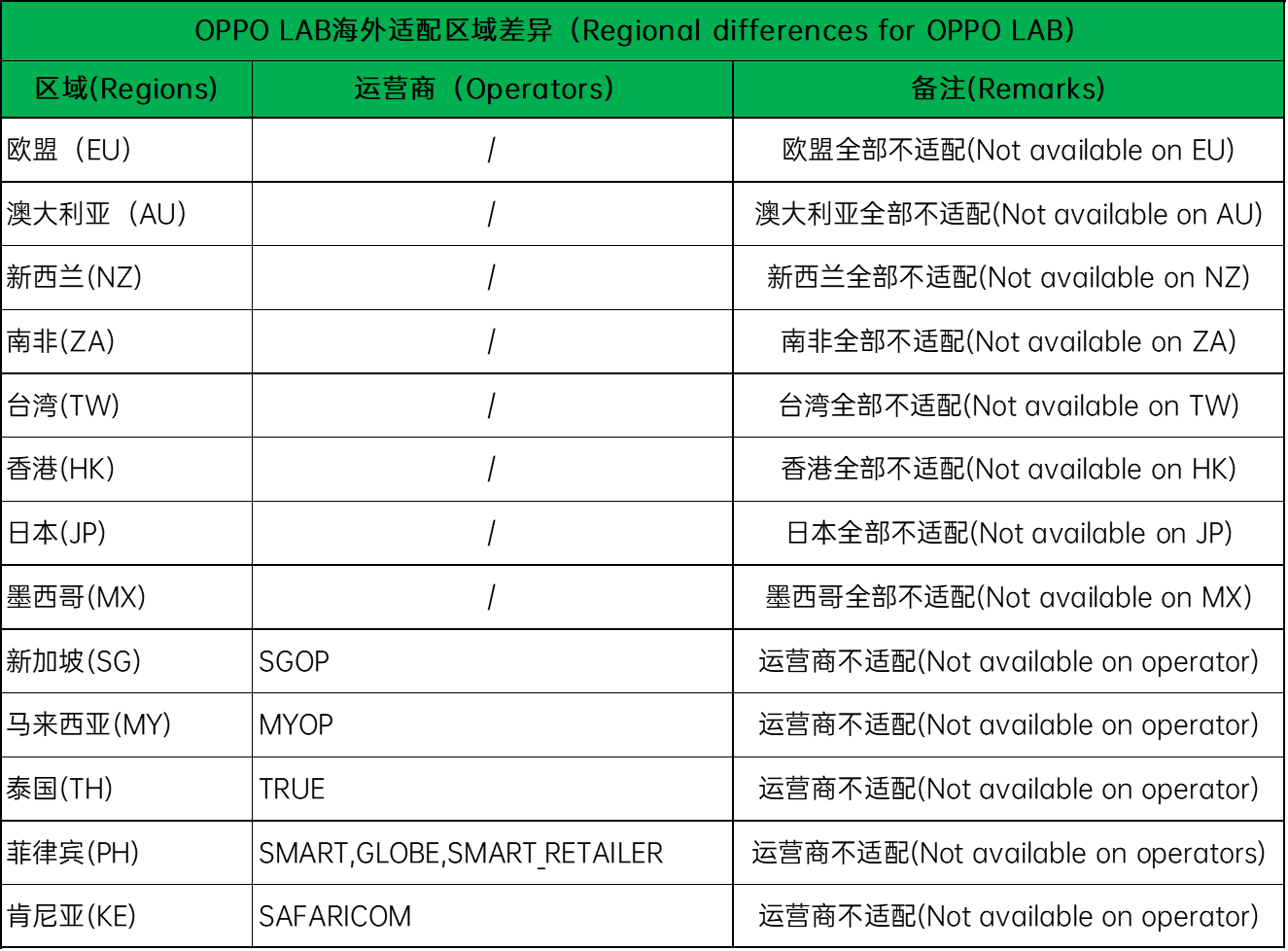
PS: Regional differences for OPPO LAB
25.App Baterry management
The background of requirement :
Power consumption management strategies are now scattered everywhere, making adjustments inconvenient.
Function description :
Allow foregroud activity
After closing, it will effectively reduce the power consumption of the application, but it may cause the application to not work properly, and the corresponding notification may be delayed.
Allow backgroud activity
After opening, without any restrictions and optimization of the application background behavior, it may result in increased power consumption.
Operation path :
Settings>Battery>App battery management>
Select and click an application>Allow foregroud activity/Allow backgroud activity
Models-covered :
ColorOS 7.2 and above devices
Regions-covered :
Global
26.Quick Return Bubble
The background of requirement :
/
Function description :
When you switch to other APPs while gaming, the Quick Return Bubble displays key information (e.g. respwan count down or in cabin time) from the background gaming apps as a floating bubble. And it allows you to switch back with one easy tap on the bubble.
1. Multitasking is achievable even while gaming. Provide you the true seamless switching experience.
When important texts incoming while gaming, you can switch out to reply without worrying about missing any important moment in gaming. Because the Quick Return Bubble will show the progress and the information of the game and you can switch back to the game with one simple tap on the bubble.
2. The bubble would only display the key information of the game (e.g. respwan count-down or in cabin time). Just enough information to let you know when to switch back without distracting you from the current task.
3. The Quick Return Bubble is now available for the Top 2 popular game: PUBG and Mobile legends
4. Will be available for more third-party apps in the future ( ride-hailing Apps and food-ordering Apps)
Operation path :
Settings > Convenience Tools> Quick Return Bubble
Models-covered :
Currently only Reno4 & Reno4 Pro support this feature.More models will be adapted in the future.
Regions-covered :
There are regional differences.
1.Available Apps:
PUBG、PUBG lite、Mobile Legends、Arena of Valor(This game is not available in India)
2.Available Countries:
India, Indonesia, Vietnam, Thailand.
Sponsored Deals
Advertisement · Hand-picked offers, refreshed regularly
These are paid/affiliate advertisements from our partner store and are not related to OPPO or OPPO spare parts.
Related Articles
Sponsored Deals
Advertisement · Hand-picked offers, refreshed regularly
These are paid/affiliate advertisements from our partner store and are not related to OPPO or OPPO spare parts.