User Guide for DC-DC Boost Converter
1、Background
Due to the change in the charging mode of Find X (Super-Fast Charge), the supply voltage needs 8V. In order to ensure the versatility of the DC-DC Boost Converter, it is necessary to use a DC-DC Boost Converter to raise the 4.2V DC voltage to about 8V when repairing the model with super VOOC charging function.
Models involved:Find X (Super VOOC charge),Find X Lamborghini Edition(CPH1875),Find X(CPH1871), R17Pro and subsequent models with super VOOC
2、Equipment Introduction
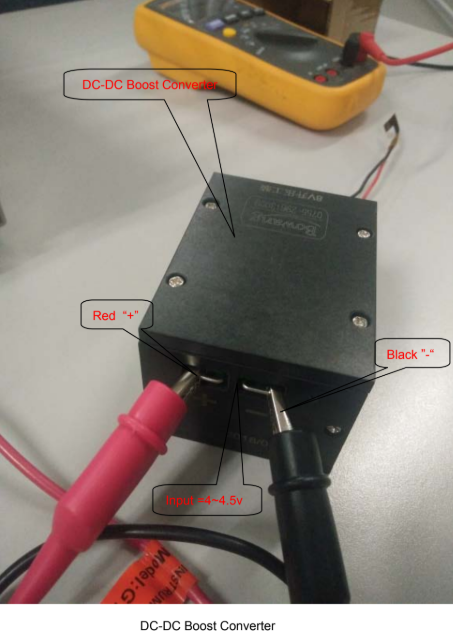
3、Introduction
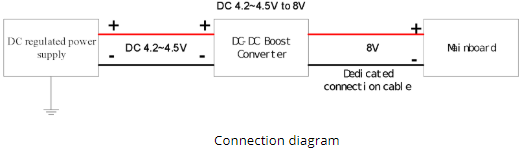
3.1 Voltage input
Connect the 4.2V voltage of the DC power supply to the input end of the boost converter. The positive end should be connected to the positive end and the negative end should be connected to the negative end.
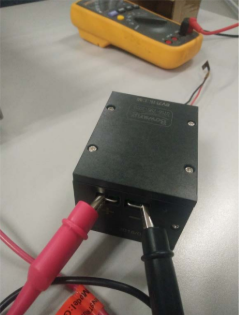
3.2 Voltage output
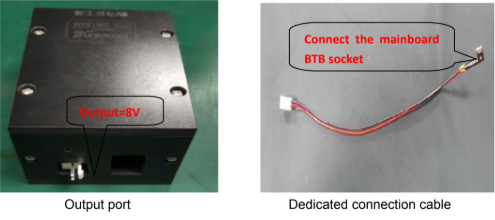
Use a dedicated connection cable to connect the output of 8V DC-DC boost converter. The BTB connector of the motherboard can be connected to 8V voltage output end; the input voltage ranging from 3V to 7V can be outputted at voltage of 8V through the boost converter.
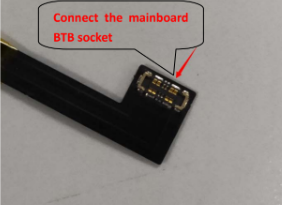
Connect the motherboard BTB connector
4、Precautions
4.1 The voltage input and output of the boost converter can identify the electrode of positive or negative automatically. If the input electrode is connected in reverse, the output electrode will have no voltage output.
4.2 Use the clip as much as possible to connect the voltage input electrode. If the hook is used, it is easy to loosen to leak the power.
4.3 After boosting, the power of the input to the phone plus the power loss on the circuit is equal to the power output of the boost converter power supply. Since the power of start-up for the mobile phone is large, it is recommended to use the standard cable of the DC power supply to avoid interrupting the power during the start-up process. Therefore, the circuit loss should be reduced (the cable connecting the input end should not be loose, and the internal resistance of the cable should be as small as possible)
Sponsored Deals
Advertisement · Hand-picked offers, refreshed regularly
These are paid/affiliate advertisements from our partner store and are not related to OPPO or OPPO spare parts.
Related Articles
Troubleshooting Guide សំរាប់បង្កើតឡើងនៅក្នុង APK Malfunctions វិធីសាស្រ្ត
Notice about F3&A77 Unable to be Operated after Connecting to Wi-Fi in Start-up Guide
Sponsored Deals
Advertisement · Hand-picked offers, refreshed regularly
These are paid/affiliate advertisements from our partner store and are not related to OPPO or OPPO spare parts.