OPPO Phone's Personal Hotspot Turns Off Automatically
A Personal Hotspot enables you to share your phone's internet connection with other devices using mobile data while still allowing you to browse the internet on your device. However, there are instances when it may turn off automatically due to reaching the data restriction limit. Read on!
Note: Available for ColorOS 5.0 and above only. Check your phone's ColorOS version in [Settings] > [About Phone] / [About Device].
Troubleshooting steps for OPPO Hotspot
The Personal Hotspot will turn off automatically due to the following reasons:
No device is connected for 10 minutes
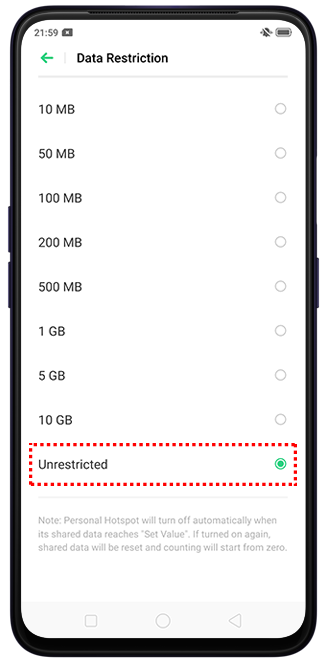
Shared data reaches the value set for data restriction
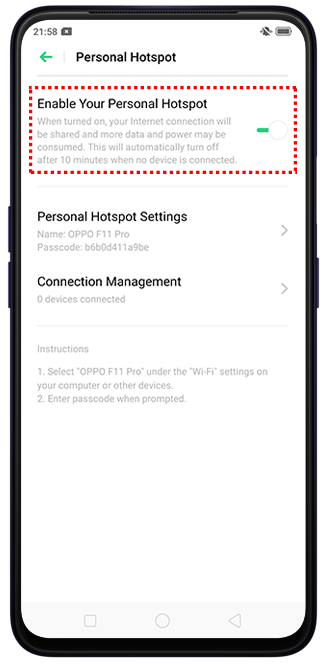
Enable Personal Hotspot and connect a device to your hotspot
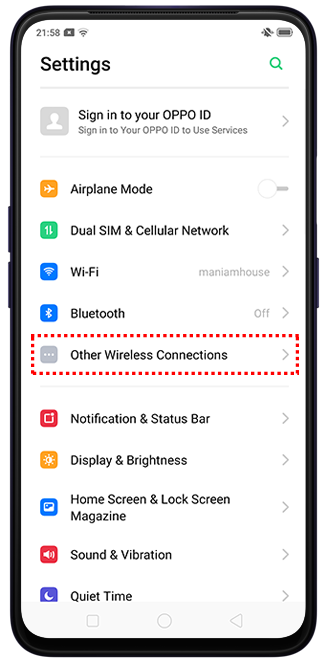
Go to [Settings] > [Other Wireless Connections] / [Connection & Sharing] > [Personal Hotspot] and toggle on [Personal Hotspot] / [Enable Your Personal Hotspot].

Select larger value or Unrestricted for Data Restriction
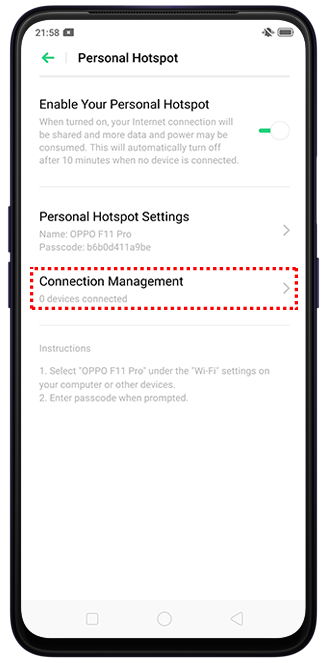
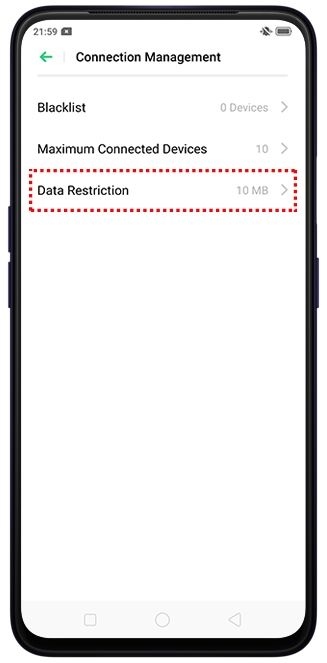
For ColorOS 13 to ColorOS 14 and above: Go to [Settings] > [Connection & sharing] > [Personal hotspot] > [Connection management] > [Data usage limit] > choose a larger value or [Unrestricted].
For ColorOS 11 to ColorOS 12: Go to [Settings] > [Connection & sharing] > [Personal hotspot] > toggle on the [Personal hotspot] > [Connection management] > [Data restriction] > choose a larger value or [Unrestricted].
For ColorOS 5 to ColorOS 7: Go to [Settings] > [Other Wireless Connections] > [Personal Hotspot] > [Connection management] > [Data restriction] and choose a larger value or [Unrestricted].
If the abovementioned steps do not fix your concern, prepare your warranty card and contact your nearest OPPO Customer Service. You can also contact OPPO Support so we can help and assist you further with your concern. Depending on your region, you may check if you need to book an appointment before visiting your local Service Center.
Related articles:
* Pictures, settings, and paths might differ from those of your phone, but that does not affect the description in this article.
Sponsored Deals
Advertisement · Hand-picked offers, refreshed regularly
These are paid/affiliate advertisements from our partner store and are not related to OPPO or OPPO spare parts.
Related Articles
Why Can't My Friends Access the Internet with My Personal Hotspot On when Using ORoaming?
Sponsored Deals
Advertisement · Hand-picked offers, refreshed regularly
These are paid/affiliate advertisements from our partner store and are not related to OPPO or OPPO spare parts.