How to Clear Bluetooth Cache in Your OPPO Phone?
How to Clear Bluetooth Cache in Your OPPO Phone?
Some Bluetooth problems can be solved by simply clearing the Bluetooth cache. Learn how to clear the cache for your OPPO phone here!
Situation: Some of the Bluetooth issues such as unable to find or pair a device can be solved by clearing the cache.
Applicable to: All OPPO Smartphones.
Clear the Data & Cache of Bluetooth
● For ColorOS 7.0 and above: [Settings] > [App Management] > [App List] > Tap Icon > [Show System] > [Bluetooth/ Bluetooth Share] > [Storage usage] > [Clear Data].
● For ColorOS 5.0- 6.1: Go to [Settings] > [App Management] > [Show System Process] > [Bluetooth/ Bluetooth Share] > [Storage usage] > [Clear Data].
● For ColorOS 3.2: Go to [Settings] > [App Management] > [All] > [Bluetooth Share] > [Clear Data].
● For ColorOS 3.0: Go to [Settings] > [Additional Settings] > [Application Management] > [All] > [Bluetooth Share] > [Clear Data].
● For ColorOS 2.1: Go to [Settings] > [App Management] > [Bluetooth Share] > [Clear Data].
After clearing the data and cache, restart your phone.
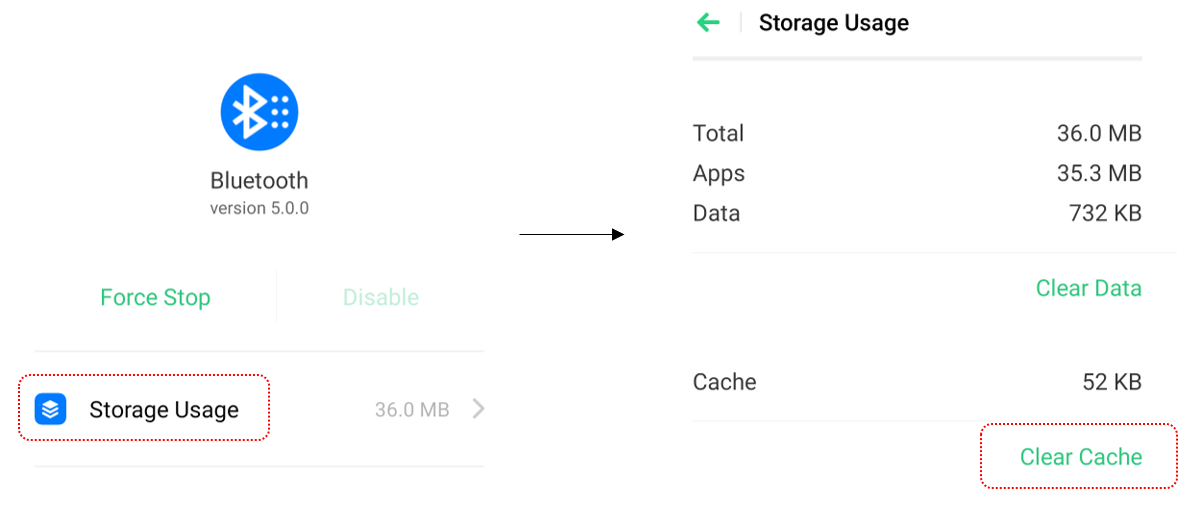
* Pictures, settings, and paths might differ from those of your phone, but these won't affect the description in this article.
Sponsored Deals
Advertisement · Hand-picked offers, refreshed regularly
These are paid/affiliate advertisements from our partner store and are not related to OPPO or OPPO spare parts.
Related Articles
Sponsored Deals
Advertisement · Hand-picked offers, refreshed regularly
These are paid/affiliate advertisements from our partner store and are not related to OPPO or OPPO spare parts.