DC Power Supply ႏွင့္အတူ Mainboard Test Failure ကိုင္တြယ္ျခင္းအတြက္ လမ္းညႊန္ _V1
Views: 0 • Likes: 0
| ဗားရွင္း | ေန႕ရက္ | မူၾကမ္း | အတည္ျပဳသူ | ေထာက္ခံသူ | ျပဳျပင္သည့္အေၾကာင္းအရာ |
| V1.0 | 2020-04-09 | Chen JinLing | Li BinBin | Huang GuoXin | 1st Version |
1. ေနာက္ခံ
DC power supply (code: 5380180033) သည္ 4.5V ကိုကန္႕သတ္သည္။ SuperVOOC models သည္ higher power ကို လိုအပ္ပါသည္။ ထို႕ေၾကာင့္ current တိုးလာျခင္းအားျဖင့္ တည္ၿငိမ္ေသာ starting power ကိုေသခ်ာေစရန္ လိုအပ္ပါသည္။သို႕ေသာ္ current သည္ DC power supply ထဲသို႕ ျမင့္တက္ေသာအခါ channel switching သည္ တည္ၿငိမ္မႈ မရွိပါ။ ၎သည္ output တည္ၿငိမ္မႈမရွိျခင္းကို ျဖစ္ပြားေစၿပီး output voltage သည္ ျဖစ္ႏိုင္ေခ်ရွိေသာ startup voltage ေအာက္တြင္ နိမ့္သည္။ startup failure တြင္ ေနာက္ဆုံး ရလဒ္ရရွိသည္။
2. သက္ဆိုင္ေသာ Scope
power supply ထိန္းညွိျခင္းႏွင့္အတူ SuperVOOC model ၏ mainboard စမ္းသပ္ျခင္း(50W/65W)။
3. သက္ဆိုင္ေသာ ဝန္ထမ္း
Customer Service Centerရွိ Engineers မ်ား
4. အေၾကာင္းအရာ
OPPO Customer Service Center Repair Tool Instruction Manual _V1.0 တြင္ 5.5 8V boost fixture ကိုဖတ္ၿပီး DC power supply သုိ႕ခ်ိတ္ဆက္ပါ။ 8V booster fixture, 8V battery connect cable, the interface board ႏွင့္ အစဥ္လိုက္ mainboard လုပ္ေဆာင္ခ်က္ ႏွင့္ motherboard ယုိစိမ့္မႈ စမ္းသပ္ခ်က္ကို လုပ္ေဆာင္ျခင္း။ အထက္ေဖာ္ျပပါအဆင့္မ်ားကို ကၽြန္ေတာ္တို႕ လုပ္ေဆာင္ၿပီးေနာက္တြင္ boot ႏွင့္ boot failure ျဖစ္ေနစဥ္အတြင္း OPPO interface သည္ power ကို တိုက္ရုိက္ က်သည္။ အထက္ေဖာ္ျပပါ low-probability ျဖစ္စဥ္သည္ ကၽြႏု္ပ္တို႕ Customer Service Center တြင္ျဖစ္ပြားလွ်င္ ေက်းဇူးျပဳ၍ ျပႆနာကို ကိုင္တြယ္ၿပီး ေဖာ္ျပပါအဆင့္မ်ားကို ဖတ္ရႈပါ။
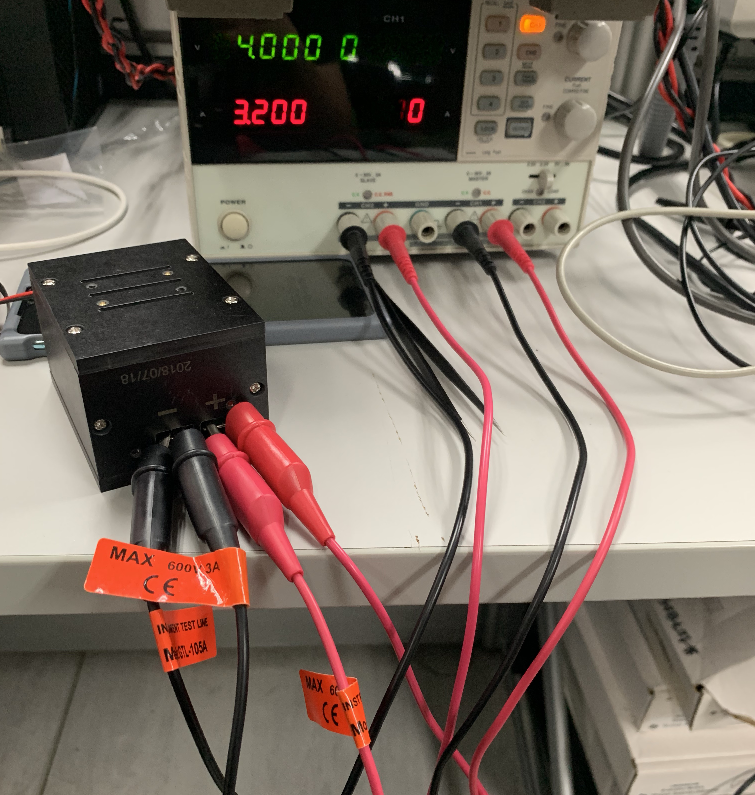
1) DC Power Supply ၏ channels ၂ ခုကို တစ္ၿပိဳင္နက္ဖြင့္ပါ။ ထို႕ေနာက္ input setting constant ဆက္လုပ္ပါ။
2) positive2 ႏွင့္ negative 2 terminals သို႕ အလားတူ လိုက္ေလ်ာ္ညီေထြၿပီး 8V booster fixture ၏ positive and negative terminals ေပၚတြင္ ညွပ္ထားပါ။ channel 1 (CH1) , channel 2 (CH2) ႏွင့္ input side of booster fixture ( As shown in figure 4.1) ၏ parallel connection ၏ အက်ိဳးသက္ေရာက္မႈကို ရရွိပါသည္။
3) phone constant ၏ အျခား ports မ်ား၏ connection mode ကို ဆက္လက္ထိန္းထားၿပီး စမ္းသပ္ပါ။
Ad
Sponsored Deals
Advertisement · Hand-picked offers, refreshed regularly
These are paid/affiliate advertisements from our partner store and are not related to OPPO or OPPO spare parts.
Related Articles
Ad
Sponsored Deals
Advertisement · Hand-picked offers, refreshed regularly
These are paid/affiliate advertisements from our partner store and are not related to OPPO or OPPO spare parts.