What is the Lucky Draw Online in the OPPO App Market?
What is the Lucky Draw Online in the OPPO App Market?
Lucky Draw is an exciting online activity in which you can participate using your points, and try your luck to win coupons. Every lucky draw has a different point price, and the point price is much lower than the price it takes to redeem in the Points Mall. You can participate in a lucky draw as many times as you want in a day. Read on to know how to play the Lucky Draw!
Situation: You to know more about the Lucky Draw feature in App Market.
Applicable to: ColorOS 3.0 and above devices. Check your ColorOS version in [Settings] > [About Phone].
To play Lucky Draw, follow the below steps:
1. Open [App Market] > [General] > [Lucky Draw]. Optionally you can go to [App Market] > [General] > [Points Mall] > [Lucky Draw].
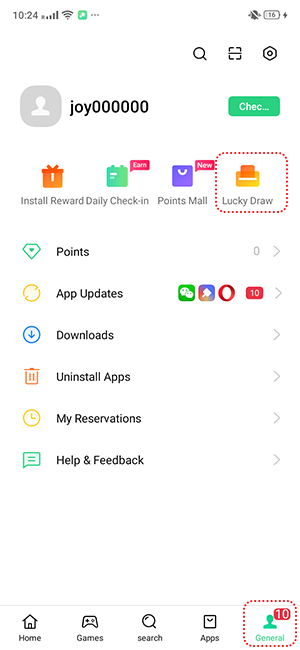
2. Select a coupon of your choice.
3. Tap [Draw Now] to try your luck.
* App Market features may vary across phone models, region and device compatibility. Some options may not be available in your device.
* Pictures, settings, and paths might differ from those of your phone, but these won't affect the description in this article.
Sponsored Deals
Advertisement · Hand-picked offers, refreshed regularly
These are paid/affiliate advertisements from our partner store and are not related to OPPO or OPPO spare parts.
Related Articles
Sponsored Deals
Advertisement · Hand-picked offers, refreshed regularly
These are paid/affiliate advertisements from our partner store and are not related to OPPO or OPPO spare parts.