Tap to Search on Google Chrome
Tap to Search on Google Chrome
Learn about the Tap to Search feature on Google Chrome.
Applicable to all devices.
Google Chrome offers the Tap to Search feature, which lets you to quickly search a specific word or phrase in the website or browsing history without navigating to Google's homepage.

Enable Tap to Search
On your phone, open the [Chrome] app. Tap [More]  > [Settings] > [Privacy] > [Tap to Search] and toggle on.
.png)

Tap to Search
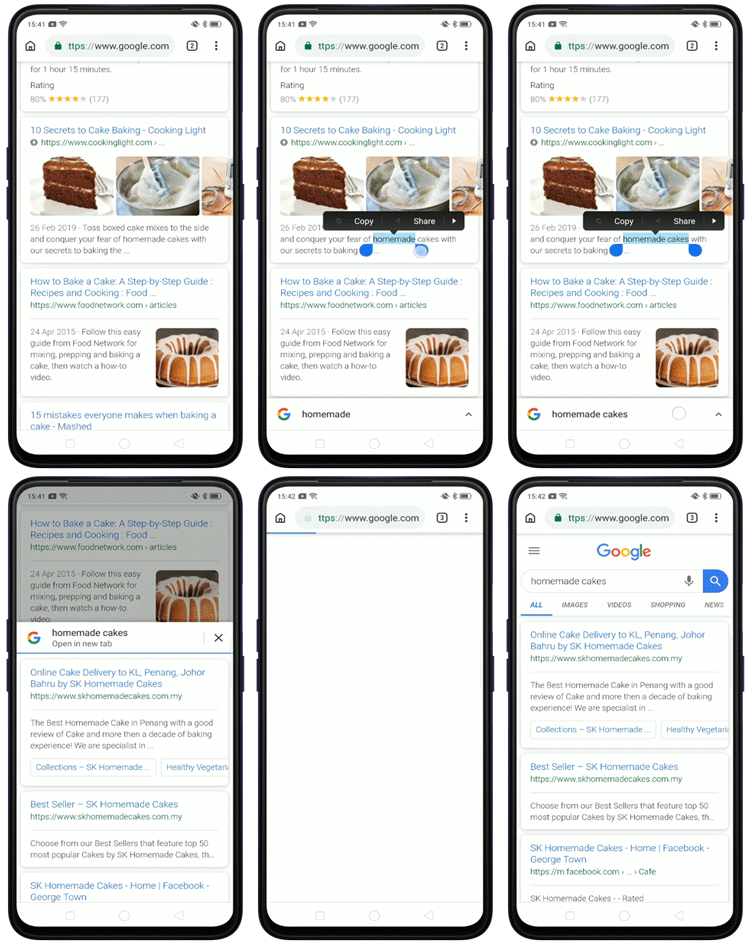
Tap and hold on a word or phrase until a pop-up panel appears at the bottom of the screen. Then, tap on to return a page of search results.
The search results may include the following:
-
Definitions
-
Pictures
-
Websites
-
Videos
-
Other details
To adjust the search term, long press to select the word or phrase and move the text selection menu to add or remove words.

Edit search
To refine your search, slide the panel all the way up and tap the search box.
Sponsored Deals
Advertisement · Hand-picked offers, refreshed regularly
These are paid/affiliate advertisements from our partner store and are not related to OPPO or OPPO spare parts.
Related Articles
Sponsored Deals
Advertisement · Hand-picked offers, refreshed regularly
These are paid/affiliate advertisements from our partner store and are not related to OPPO or OPPO spare parts.