How to Delete Google Search and Browsing History?
How to Delete Google Search and Browsing History?
Clearing your browsing history helps in maintaining the performance of your phone. We recommend our users to use Google History Delete All option where you can swiftly erase browsing history and Google Searches that can overtime accumulate and affects phone capabilities.
Check out our simple guide below on how to delete your Google search history!
Situation: You can clear all your Google search history on your phone.
Applicable to: All OPPO Smartphones.
Delete Google Search and Browsing History
1. On your phone, open [Chrome].
2. Tap the menu icon  on the top left corner and tap [Search activity].

3. Tap the menu icon again and tap [Delete activity by] > [Always].


4. At the bottom of the screen, tap [Delete]
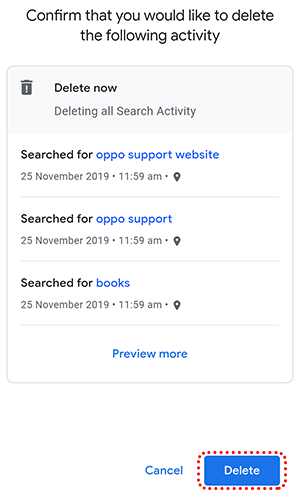
5. Tap [OK] on the 'Deleting complete' screen.
Learn more:
* Pictures, settings, and paths might differ from those of your phone, but these won't affect the description in this article.
Sponsored Deals
Advertisement · Hand-picked offers, refreshed regularly
These are paid/affiliate advertisements from our partner store and are not related to OPPO or OPPO spare parts.
Related Articles
Notice about Google Search, Google Photos crash and the Google Search not show in the home page
Sponsored Deals
Advertisement · Hand-picked offers, refreshed regularly
These are paid/affiliate advertisements from our partner store and are not related to OPPO or OPPO spare parts.