Take Classic Black and White Photos with OPPO Reno
Take Classic Black and White Photos with OPPO Reno
While color photography is attractive, classic black and white photos have delicate details and minimize distraction.
OPPO Reno's black and white filter captures the image in black and white instead of converting it after the shot, offering stunningly crisp black and white photos.
Applicable to: OPPO Reno.
How to Take Black And White Photos?
Go to [Camera] and tap [Filter  ] at the top of the screen. You will see a series of filter options. You can also show a preview of the filter applied to your photo. Slide left to select R6.
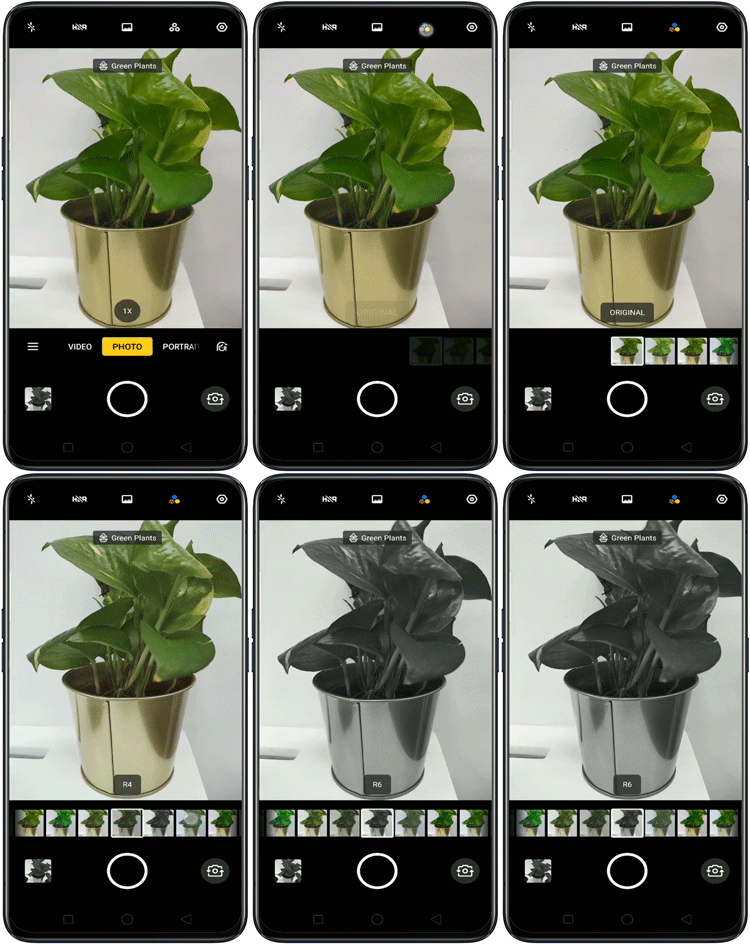
Note: To remove the black and white filter, switch to ORIGINAL.
Tips of the day
Here are some of the tips on taking great black and white photos you might want to know.
Use natural light and shadow to create clear contrast in the tones.
Focus on shape, pattern, and texture to attract viewers.
Pick subjects with less distracting backgrounds.
Use sun rays as background.
That's all to it, have fun trying it out!
* Pictures, settings, and paths might differ from those of your phone, but these won't affect the description in this article.
Sponsored Deals
Advertisement · Hand-picked offers, refreshed regularly
These are paid/affiliate advertisements from our partner store and are not related to OPPO or OPPO spare parts.
Related Articles
Sponsored Deals
Advertisement · Hand-picked offers, refreshed regularly
These are paid/affiliate advertisements from our partner store and are not related to OPPO or OPPO spare parts.