Secrecy Auto Unlocker Tool အသုံးျပဳပုံ ညႊန္ၾကားခ်က္
1. ညႊန္ၾကားခ်က္
user အမွားျဖင့္ ျဖစ္ပြားေသာ ျပႆနာမ်ားကို ကာကြယ္ရန္ handset မ်ား စက္ရုံမွ ထြက္သြားပီးေနာက္တြင္တခ်ိဳ႕ engineer modes မ်ား (*#808#ကဲ့သို႕ေသာ)သည္ default အားျဖင့္ locked ျဖစ္သြားမည္ျဖစ္သည္။
user ၏ device ၌တစ္ခုခု မွားယြင္းေနလွ်င္ SC သို႕repair လုပ္ရန္ သြားပါ။ service staff သည္ ေရွးဦးစြာ engineer mode မ်ားကို unlock လုပ္ရန္ လိုအပ္ပီး device ကိုရွာေဖြပီး ခြဲျခမ္း စိတ္ျဖာပါ။
2. Tool information
2.1 tool ကိုအသုံးျပဳပါ
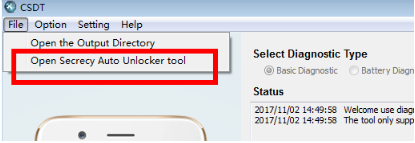
2.2 Interface မိတ္ဆက္ျခင္း
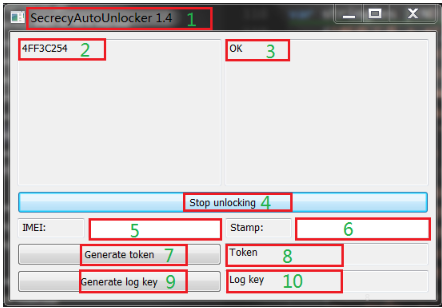
အဓိက interface။
(1) Version information;
(2) Device ID;
(3) Unlock result;
(4) Start/stop unlocking
(5) IMEI input box
(6) Stamp input box
(7) Token generate
(8) Token
(9) Log key generate
(10) Log key
2.3 အသုံးျပဳပုံ မိတ္ဆက္ျခင္း
2.3.1 Online unlock
User သည္ SC သုိ႕ handset ကိုယူလာပီး service staff သည္ phone adb ကိုဖြင့္ၾကည့္သင့္ပါသည္။ထို႕ေနာက္ computer သို႕ connect လုပ္ရပါမည္။
(4) start unlocking ကို Click လုပ္ပါ။ tool သည္ unlock status သို႕ဝင္ေနမည္ျဖစ္ပီး adb သို႕connected လုပ္ေသာ မည္သည့္စက္မဆို အလိုအေလ်ာက္ unlock ျဖစ္ပီး unlock ျဖစ္သည့္ မည္သည့္ handset ၏ရလဒ္မဆို (2) Device ID and (3) Unlock Result တြင္ displayed ျဖစ္မည္။
(4) stop unlockin ကို ျပန္၍ click လုပ္ပါ။ adb connected ျဖစ္ေသာ unlock handset မ်ားသည္ ရပ္တန္႕လိမ့္မည္ျဖစ္သည္။
2.3.2 Offline unlock
အကယ္၍ user သည္ SC တြင္ မရွိလွ်င္ offline unlock mode သည္ unlocking ေအာင္ျမင္ျခင္းအားျဖင့္ ၎ handset သည္ ရွာေဖြေဖာ္ထုတ္ႏိုင္သည္ ကို ေသခ်ာေစရန္ သက္ဆိုင္လိမ့္မည္ျဖစ္သည္။
user handset ၏ dial pad တြင္ *#9434# ကို ရိုက္ထည့္ပါ။ AuthTokeDecrypt ကိုႏွိပ္ပီးေနာက္ box သည္က်လာမည္ျဖစ္သည္။
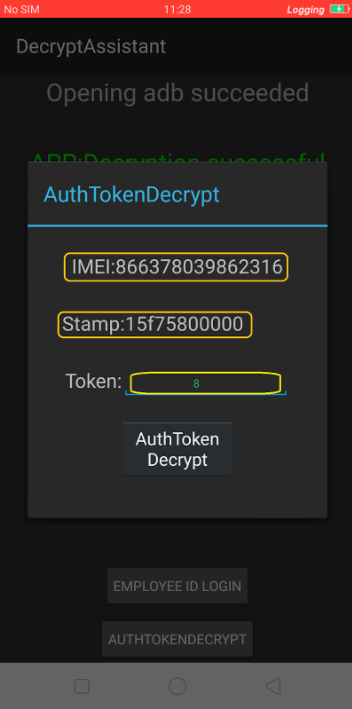
box မွ user IMEI ႏွင့္ stamp information ကိုေတြ႕ျမင္ႏိုင္ပါသည္။ (5) IMEI ရိုက္ထည့္ရာ box တြင္ ေလးစားစြာျဖည့္ပီး (6) stamp input box ထို႕ေနာက္ (7) Token generate ကို ႏွိပ္ပါ။ token generated ကို tool into the handset မွ ထည့္ပါ။ AuthTokeDecrypt ကိုႏွိပ္ပါ။ ထို႕ေနာက္ handset သည္ unlocked ျဖစ္မည္။
2.3.3 log save function ကို Unlock လုပ္ပါ
handset သည္ locked ျဖစ္လွ်င္ *#800# ကိုႏွိပ္ျခင္းျဖင့္ log toolkit ကိုဖမ္းပီး settings option တစ္ခုကို ႏွိပ္ပါ။ “Please input authentication code” box သည္ ဤအခ်ိန္တြင္ ေပၚလာမည္ျဖစ္သည္။ ဥပမာအားျဖင့္ အကယ္၍ Audio log ကိုဖမ္းရန္ လိုအပ္လွ်င္ ေဖာ္ျပပါ box မ်ားသည္ ေပၚလာမည္ျဖစ္သည္။ authentication code တစ္ခုသာ ႏွိ္ပ္ပါ။ ၎သည္ unlocked ျဖစ္ႏိုင္သည္။ ထို႕ေနာက္ ဤ code သည္လည္း tool ျဖင့္ ေတာင္းဆိုရန္လိုအပ္ပါသည္။
handset သည္ unlocked ျဖစ္လွ်င္ following prompt box သည္ ေပၚလာမည္မဟုတ္ပါ။
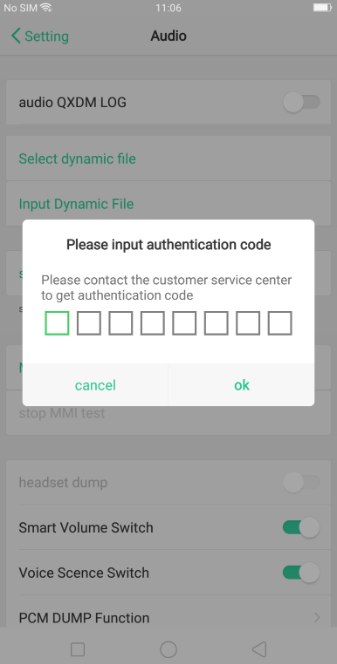
user handset IMEI number ကို tool ၏ IMEI input box တြင္ ျဖည့္ပါ။ (9) log key generate အား click လုပ္ပါ။ ထို႕ေနာက္ log key သည္ (10) တြင္ displayed လုပ္သည္။ Log save function သည္ activated ျဖစ္သည္ ။ အထက္ေဖာ္ျပပါ ဓတ္ပုံအတိုင္း log key ထည့္ပီးေနာက္တြင္ tool မွ handset ၏ code box ထဲသုိ႕ ျဖစ္ေပၚလာသည္
ဂရုစိုက္ရန္
3.1 Handset သည္ အလုိအေလ်ာက္ ခ်က္ခ်င္း unlocked ျဖစ္မည္ျဖစ္ပီး adb တြင္ handset connect လုပ္မလုပ္ကို CSDT tool သည္ ရွာေဖြသည္။ ထို႕ေနာက္ ၎အား unlock လုပ္ရန္ unlock interface ကိုဝင္ရန္ service staff အတြက္ မလိုအပ္ေပ။
3.2 token function stamp သည္ handset တြင္ အခ်ိန္ႏွင့္ ေျပာင္းလဲေနမည္ျဖစ္သည္။ ၎ တံဆိပ္သည္ ေျပာင္းသြားလွ်င္ token အား ျပန္လည္တိုးပြားလာေစရန္ လိုအပ္သည္။
3.3 Engineer mode unlock function သည္ model R11s ႏွင့္ စတင္ပီး Locked device သည္ အကယ္၍ engineer mode သည္ ဝင္ေနရန္ လိုအပ္လွ်င္ဤ tool ကိုသုံးျခင္းအားျဖင့္ unlocked ျဖစ္ရန္လုိအပ္သည္။ 24h SCREEN-ON time (screen-off time သည္ ေရတြက္ေနမည္မဟုတ္ပါ)handset သည္ unlocked ျဖစ္ပီးေနာက္ ၎သည္ auto locked ျဖစ္သည္။
Sponsored Deals
Advertisement · Hand-picked offers, refreshed regularly
These are paid/affiliate advertisements from our partner store and are not related to OPPO or OPPO spare parts.
Related Articles
Sponsored Deals
Advertisement · Hand-picked offers, refreshed regularly
These are paid/affiliate advertisements from our partner store and are not related to OPPO or OPPO spare parts.