Save Power, Stop Unused Apps
Save Power, Stop Unused Apps
Learn how to automatically stop unused apps on your phone.
Applicable to OPPO F11 Pro.
The System Smart Management monitors processes and intelligently close the background apps that are barely used to preserve the battery life.
To enable it, go to [Settings] > [Battery] and toggle to enable [Super High Power Efficiency]. Optionally, swipe down from the top of the screen to open the [Control Center] and turn on [Power Saver].

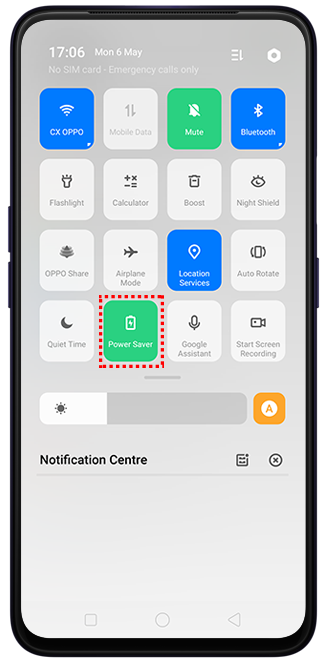
Note: This will not delete the apps and app data.
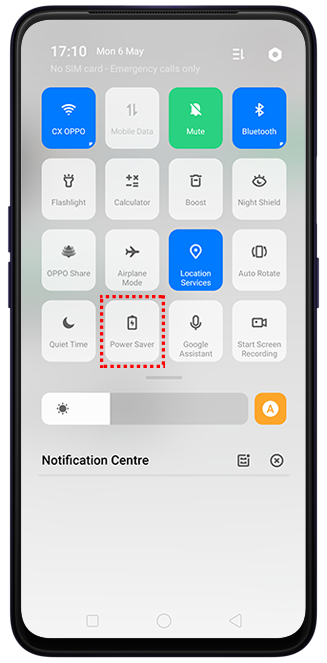
To turn off the Super High Power Efficiency mode, swipe down from the top of the screen to open the [Control Center] and turn off [Power Saver].
Sponsored Deals
Advertisement · Hand-picked offers, refreshed regularly
These are paid/affiliate advertisements from our partner store and are not related to OPPO or OPPO spare parts.
Related Articles
How to Stop WhatsApp Auto-Save Photos and Videos to the Photos Apps On Your Phone?
How to Detect/Calibrate Hard Keys (Volume Up, Volume Down, Power) on OPPO Phone?
Sponsored Deals
Advertisement · Hand-picked offers, refreshed regularly
These are paid/affiliate advertisements from our partner store and are not related to OPPO or OPPO spare parts.