Liquid Damage Handset Instruction V1
1. Background
Through customer complaint data analysis,satisfaction degree of service center dealing with liquid damage device is too low,such as questioned judgment,not informed the risk of liquid damage,and without overall cleaning and test.
2. Purpose
Instruct technician to correctly judge and deal with liquid damage device,thus improve users satisfaction.
3. Suggested scripts
Service center and call center should guide users and give temporary solutions based on the following methods.
3.1 Shut the phone down immediately if it’s power-on; do not power on if it’s off ( for removable battery models, battery needs to be taken out)
3.2 Remove SIM card and SD card,no charging
3.3 use tissue or soft cloth to wipe liquid on the phone, place screen face up in a dry and ventilated environment
3.4 If not cleaned,it will accelerate oxidation damage,send it to service center for professional detection and free cleaning as soon as possible.
Note:no microwave oven drying.
4. Service center instruction
4.1 Judgement methods
The waterproof paper on motherboard turns red
camera lens have water drops
oxidation, mold or liquid mark inside the phone (including all accessories)
user inform liquid inside phone
Confirmed just meet above any point.
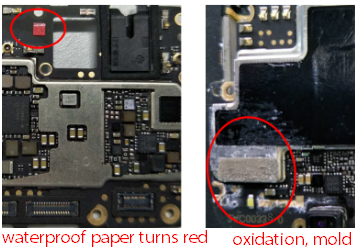
4.2 Cleaning methods:
After it’s confirmed Liquid damage, take and save photo ,then overall clean phone.
Overall cleaning refers to use above 95% concentration alcohol to clean oxidation, mold and liquid in motherboard/antenna plate/camera/speaker/BTB/ both sides of FPC.
Tools:anti-static soft brush(535155023),syringe(535191149).
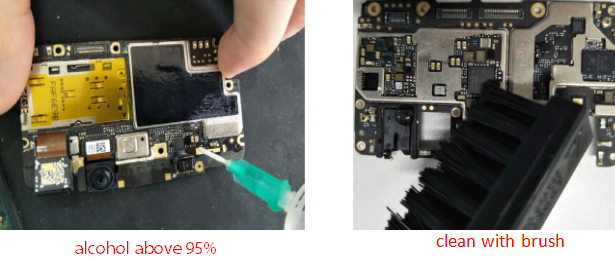
Note: phone can boot and be used-- communicate with the user of overall cleaning to verify ,and remind them of liquid damage risks and it’s possibly unable to boot,only after user’s agreement can overall cleaning be started.
4.3 After confirming liquid damage handset, ways to confirm whether liquid damage battery
BTB surface has corrosion traces
white sediment and water lines on the surface of battery
Communicate with user to pay to replace battery if meeting above any point.
After confirming battery appearance is fine, make overall cleaning and re-assemble the phone. Check whether battery is working fine or not by following the below steps:
watch video for 10 minutes , if the power lost more than 5%, which means the battery performance has decreased, suggest users to pay to replace battery.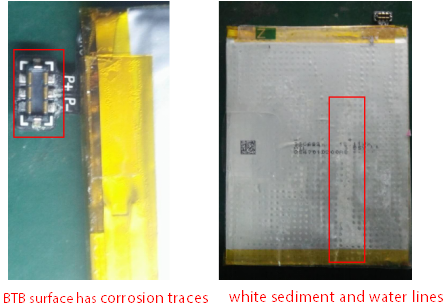
4.4 After overall cleaning and being normal to use ,take function tests
Must use *#899# to take a whole function test;
make a phone call to test phone function.
4.5 System recording instruction
"Fault phenomenon” records according to user description;
“Fault cause” records according to test result:
JY1 Liquid inside motherboard;JY2 Liquid inside antenna plate;JY3 Liquid inside screen;
JY4 Liquid inside button (only for button,if other parts not influenced, order recording needs to remark that it won’t influence the following warranty service) ;
JY5 other liquid inside parts.
5. Scripts:
Liquid damage risk explanation:There will be risk of parts short/oxidation/corrosion damage, although temporarily it has not appeared yet, later it may occur that phone can’t be used in normal situation,you should note liquid protection in later use.
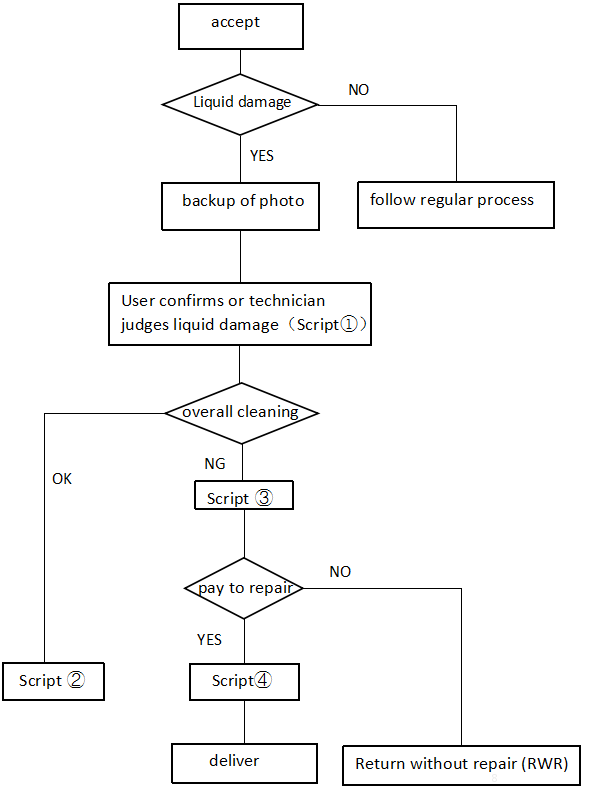
User confirms or mechanic judges liquid damage
We are sorry to tell you that liquid damage is out of warranty; however, we will make a overall and free cleaning on your phone, and detect it to confirm whether it’s workable or not. There will be risk of parts short/oxidation/corrosion damage, although temporarily it has not appeared yet, later it may occur that phone can’t be used in normal situation,you should note liquid protection in later use.Recover after overall cleaning
After overall cleaning, it has been basically restored . All functions have been tested OK, and there is no problem for the time being.There will be risk of parts short/oxidation/corrosion damage, although temporarily it has not appeared yet, later it may occur that phone can’t be used in normal situation,you should note liquid protection in later use.Not recovered after overall cleaning
After overall cleaning,xx parts/components have been damaged due to short /oxidation /corrosion. Because liquid damage has exceeded warranty scope,do you need to pay to replace xx accessories?Pay-to-repair device
We have replaced XX accessories/components for you.There will be risk of parts short/oxidation/corrosion damage, although temporarily it has not appeared yet, later it may occur that phone can’t be used in normal situation,you should note liquid protection in later use.
6. Implementation audit
6.1 The headquarters will decide time to return visit all liquid damage jobsheet , in order to check the handling and implementation condition of liquid damage :
Whether confirm with the user about liquid phenomenon, whether to inform the risk of liquid damage, and evaluate customer satisfaction;
6.2 The headquarters will decide to regular on-site inspection service centers to determine whether service centers following【Liquid Damage Handset Instruction】including liquid damage phenomenon judgement, backup of photo before cleaning, overall cleaning, battery judgment, jobsheet standard.
Sponsored Deals
Advertisement · Hand-picked offers, refreshed regularly
These are paid/affiliate advertisements from our partner store and are not related to OPPO or OPPO spare parts.
Related Articles
What to Do if Your Phone Accidentally has Water or Other Liquid Damage?
Uniform requirements for the quotation of parts damage on the smallboard and mainboard V2
Sponsored Deals
Advertisement · Hand-picked offers, refreshed regularly
These are paid/affiliate advertisements from our partner store and are not related to OPPO or OPPO spare parts.