How to Set/Change Ringtone for a Contact on OPPO Phone
Whenever there's an incoming call, you wonder who among your contacts is calling you. This situation can happen when your ringtone is set for everyone. However, by assigning unique ringtones to individual contacts, you can instantly identify who is calling. You can continue reading below to learn how to customize ringtones for a contact.
Note: Check your phone's ColorOS version in [Settings] > [About Phone] / [About Device].
For OPPO Dialer
For ColorOS 7.0 and above:
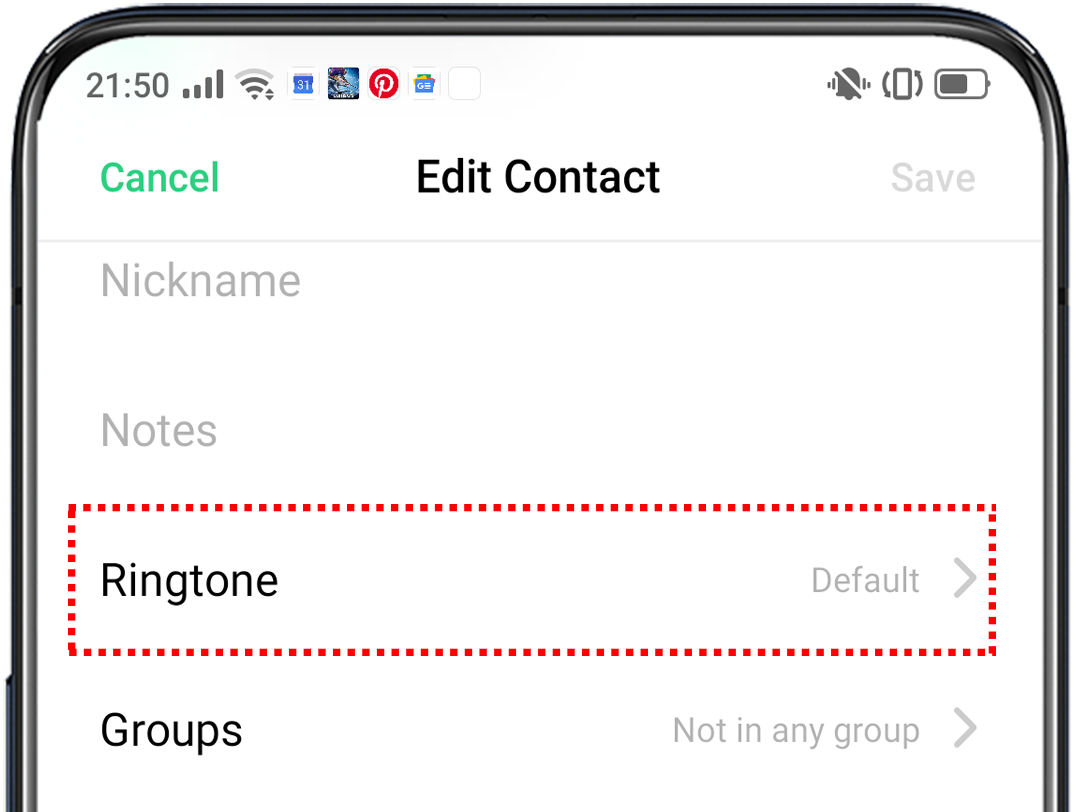
Open the [Phone] app and tap the [Contacts] tab, then tap the contact you wish to assign a ringtone to. Tap the [2-dot] icon on the upper-right > [Edit] > [Ringtone]. Under [CUSTOM], tap [Select From Files] to select the ringtone of your choice from your phone storage.
For ColorOS 3.0 to 6.1:
Open the [Phone] app and tap the [Contacts] tab, then tap the contact you wish to assign a ringtone to. Tap [Edit] > [Ringtone]. Under [CUSTOM], tap [From Files] / [Select From Files] to select the ringtone of your choice from your phone storage.

For Google Phone dialer
Open the *[Contacts] app > tap the contact you wish to assign a ringtone to > tap [3-dotted line] icon at the upper right corner, then tap [Set ringtone].
If you want to choose a different ringtone from the available options, choose [Select from files] / [On this device] and choose your preferred ringtone.
Or you can choose from the set of ringtones provided.
Note: *The Google Contacts in some OPPO devices are located on the Google folder on the home screen of your OPPO phone.
Set a ringtone to a contact group
When you assign a ringtone to a contact group, all the contacts in that group will have the ringtone you've assigned.
Go to [Contacts] > [My Groups]. Tap the group you wish to set the new ringtone for. Tap [Ringtone ] at the bottom and select the desired ringtone for the group.
)
Related articles:
* Pictures, settings, and paths might differ from those of your phone, but these won't affect the description in this article.
Sponsored Deals
Advertisement · Hand-picked offers, refreshed regularly
These are paid/affiliate advertisements from our partner store and are not related to OPPO or OPPO spare parts.
Related Articles
Sponsored Deals
Advertisement · Hand-picked offers, refreshed regularly
These are paid/affiliate advertisements from our partner store and are not related to OPPO or OPPO spare parts.