How to Post Your Story Instantly on Social Media
People love stories because stories connect us all. But with your busy schedule, you might not have time to post your stories. Thanks to OPPO's seamless app integration, users can capture moments and upload them to their preferred social media platforms right away! Learn how it works below!
Note: Applicable for ColorOS 3.0 and above. Check your phone's ColorOS version in [Settings] > [About Phone] / [About Device].
Capture and Share
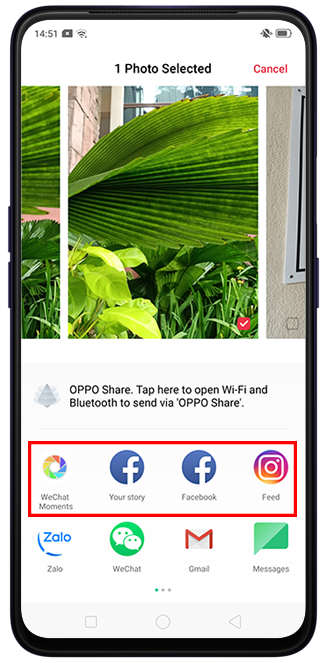
OPPO allows you to quickly post your Instagram Feed, Facebook Story, or WeChat Moments without having to open the apps individually.
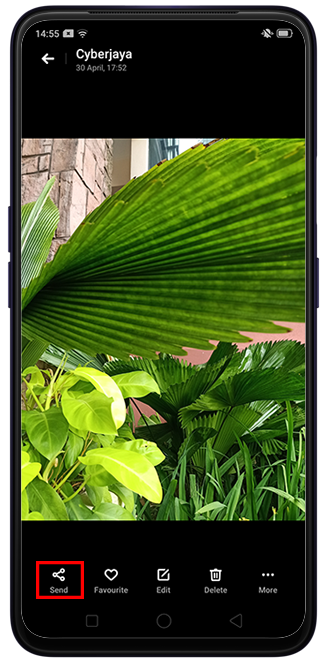
Take a photo or video with the Camera app. Alternatively, you can also select the photo from your [Photos] app. Tap [Send] and choose your desired social media app.
Other articles you might be interested in:
* Pictures, settings, and paths might differ from those of your phone, but these won't affect the description in this article.
Sponsored Deals
Advertisement · Hand-picked offers, refreshed regularly
These are paid/affiliate advertisements from our partner store and are not related to OPPO or OPPO spare parts.
Related Articles
Notice about Instagram cannot save the photo after taking photos in Story
Sponsored Deals
Advertisement · Hand-picked offers, refreshed regularly
These are paid/affiliate advertisements from our partner store and are not related to OPPO or OPPO spare parts.