How to Enable Raise to Wake Feature on OPPO Phone
Automatically wake up your OPPO device once you lift it with the Raise to Wake feature in the OPPO phone. This feature allows you to view the lock screen without having to press the Home or the Power button. Learn how to enable this feature with a few easy steps below. Read on!
Note: Available for ColorOS 5.0 and above devices. Check your phone's ColorOS version in [Settings] > [About Phone] / [About Device].
How to turn on Raise to Wake feature
To enable the Raise to Wake/Raise to Turn On Screen feature of your OPPO smartphone, follow the presented steps below:
For ColorOS 12 and above:
Go to [Settings] > [System settings] / [Additional settings] > [Gesture & motions] > enable [Raise to wake].
For ColorOS 7 to 11.1:
Go to [Settings] > [Convenience tools] > [Gesture & motions] > toggle [Raise to wake] to enable.
For ColorOS 6.0:
Go to [Settings] > [Convenience Aid] > [Gesture & Motion] and toggle on [Raise to Turn On Screen].

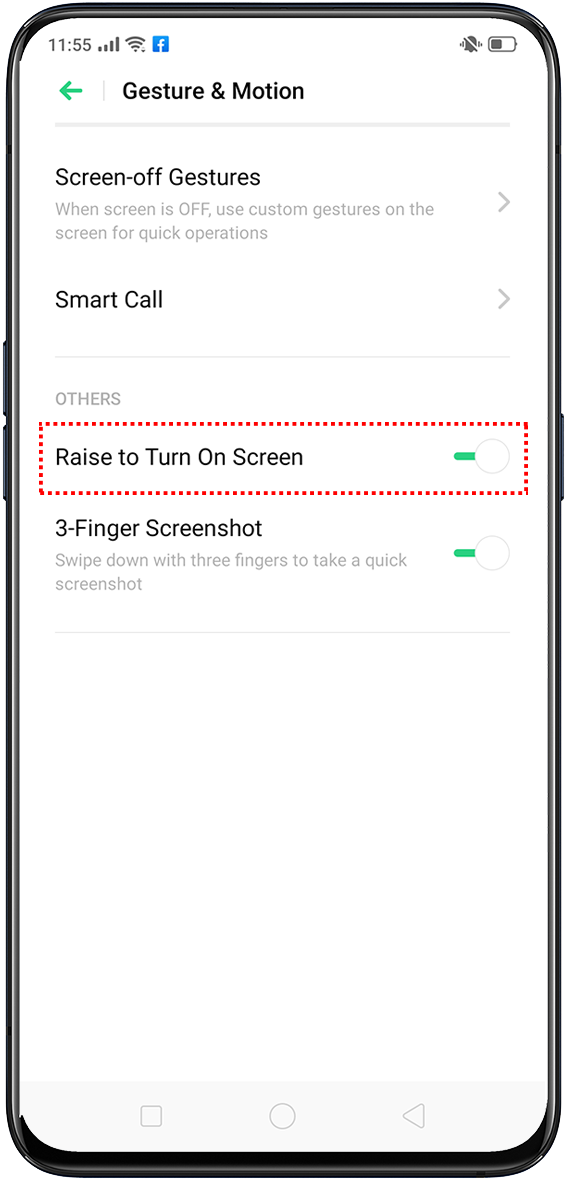
For ColorOS 5.0 to 5.2:
Go to [Settings] > [Smart & Convenient] > [Gesture & Motion] and toggle on [Raise to Turn On Screen].

How to turn off the Raise to Wake/ Raise to Turn On Screen feature
Enabling this feature can sometimes cause the screen to wake up at unintended times. So, if you change your mind, you can easily disable this setting by tapping the toggle switch again in the Settings presented above.
Related articles:
* Pictures, settings, and paths might differ from those of your phone, but these won't affect the description in this article.
Sponsored Deals
Advertisement · Hand-picked offers, refreshed regularly
These are paid/affiliate advertisements from our partner store and are not related to OPPO or OPPO spare parts.
Related Articles
Sponsored Deals
Advertisement · Hand-picked offers, refreshed regularly
These are paid/affiliate advertisements from our partner store and are not related to OPPO or OPPO spare parts.