How to Adjust OPPO Watch's Heart Rate Alert Threshold?
OPPO Watch can monitor your heart rate, it can also send you an alert when it detects an abnormal heart rhythm. However, not everyone has the same heart rate. You can adjust your OPPO watch's heart rate alert threshold on your OPPO Watch's settings. Know how you can do this on a step-by-step guide we created below.
Applicable to: OPPO Watch Series.
Adjust your OPPO Watch's heart rate alert threshold
You can adjust your watch's heart rate alert threshold by following these instructions:
Open the [HeyTap Health application] on your smartphone.
Tap on [Manage].
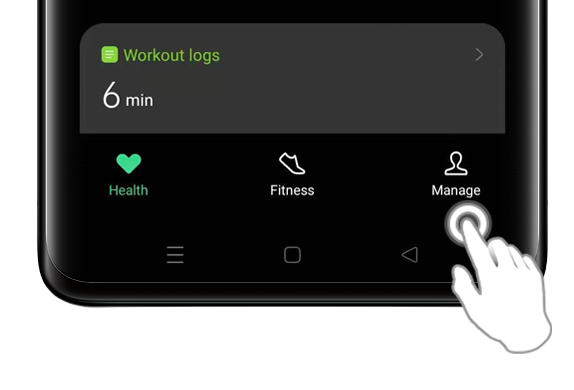
Tap on [More].
Select [Workout and Health Settings].
Adjust the [Resting Heart Rate Alert] and [Workout Heart Rate Alert], based on your desired heart rate.
To go to your OPPO Watch's Heart Rate application, follow the instructions:
Access your [App List] by pressing the [Home Button] on the right side of your OPPO Watch.
Tap on the heart icon to go to the [Heart Rate application].
Learn more about OPPO Watch.
* Pictures, settings, and paths might differ from those of your smartphone, but these won't affect the description in this article.
Sponsored Deals
Advertisement · Hand-picked offers, refreshed regularly
These are paid/affiliate advertisements from our partner store and are not related to OPPO or OPPO spare parts.
Related Articles
Sponsored Deals
Advertisement · Hand-picked offers, refreshed regularly
These are paid/affiliate advertisements from our partner store and are not related to OPPO or OPPO spare parts.