Enable Battery Percentage in Notification Bar
Are you not able to suggest the battery of your device from the battery bar? Are you charging your device and not able to read properly how much battery is now available in your device? You can enable the show battery percentage level in your device so you can get an accurate reading of the battery percentage. Nowadays there are multiple necessary apps on our devices and many of them consume a lot of battery in our device so it will be easy to notice which app consumed how much amount of battery. Follow the article below to learn how to enable battery percentage.
Applicable to: ColorOS 3 and above. Check your ColorOS version in [Settings] > [About phone]/[About Device].
Steps to Enable Battery Percentage in Notification Bar:
For ColorOS 15 and above:
Go to [Settings] > [Notifications and Quick Settings] > [Status Bar] > [Battery Percentage] > Select your preferred battery Percentage icon.
For ColorOS 12 to ColorOS 14:
Go to [Settings] > [Notification and Status Bar] > [Status Bar] > [Battery Percentage] > Select your preferred battery Percentage icon.
For ColorOS 3 to 11:
Go to [Settings] > [Notification and Status Bar] > [Battery Percentage].
)
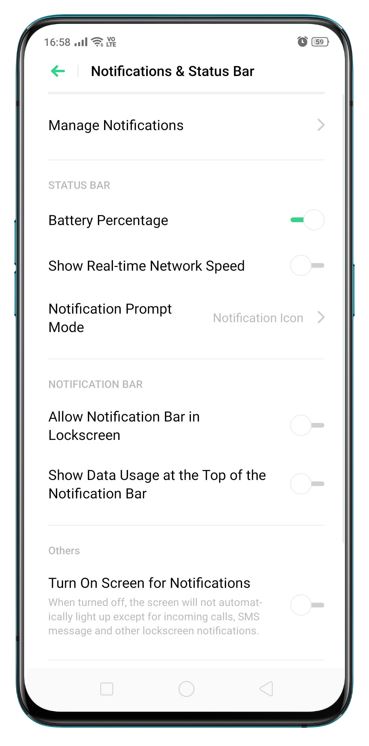
* Pictures, settings, and paths might differ from those of your phone, but these won't affect the description in this article.
Sponsored Deals
Advertisement · Hand-picked offers, refreshed regularly
These are paid/affiliate advertisements from our partner store and are not related to OPPO or OPPO spare parts.
Related Articles
Sponsored Deals
Advertisement · Hand-picked offers, refreshed regularly
These are paid/affiliate advertisements from our partner store and are not related to OPPO or OPPO spare parts.