3.27 Theme Store- Check In And Get Coupons Campaign Online VOC Synchronization
Views: 3 • Likes: 0
【Basis Info】
1.Online duration: 27th,March—2nd,April
2.Online region: India
3.Online Channel: Theme Store
4.Online brands: OPPO & Realme
【Campaign details】
1. user journey: Click resource positions or push——jump into Campaign page——Click"Check in "button ——Claim the discount coupons
2.campaign rules:
> Users need login in their account first before participate the campaign.
>Do Daily Check-in to win discount coupons.
>Participants can use those coupons in the resources showed on the campaign page or Theme Store.
>Participants can view their prizes in my prize section or in Theme Store> Me> My coupons.
>If you have any questions, please contact customer service in "Me - Help & Feedback - Write Feedback" in the latest version of Theme Store.
>Theme Store reserves the right of final interpretation for the rules of this activity.
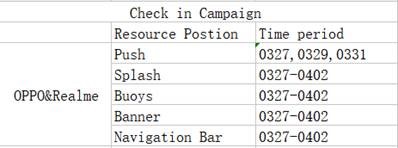
3.resource schedules:
【Prizes details】
1.Vadility time : 30 days
2.How to use:
1) Only users with ≥6.5 theme store version and ≥203 Payment version can use discount coupons in theme store ( we already exposure this event to the users with ≥6,5 theme store version) But when users whose payment version <203 feedbacks that they can not use coupons, please guide them to download the latest payment package ( Steps: Go to OPPO App Market——Search "Secure Payment"——Download )
2) Click "Buy"button ——jump into the payment center——select the coupons you want to use in "My coupon"—— Paid Successfully
1.Online duration: 27th,March—2nd,April
2.Online region: India
3.Online Channel: Theme Store
4.Online brands: OPPO & Realme
【Campaign details】
1. user journey: Click resource positions or push——jump into Campaign page——Click"Check in "button ——Claim the discount coupons
2.campaign rules:
> Users need login in their account first before participate the campaign.
>Do Daily Check-in to win discount coupons.
>Participants can use those coupons in the resources showed on the campaign page or Theme Store.
>Participants can view their prizes in my prize section or in Theme Store> Me> My coupons.
>If you have any questions, please contact customer service in "Me - Help & Feedback - Write Feedback" in the latest version of Theme Store.
>Theme Store reserves the right of final interpretation for the rules of this activity.
3.resource schedules:
【Prizes details】
1.Vadility time : 30 days
2.How to use:
1) Only users with ≥6.5 theme store version and ≥203 Payment version can use discount coupons in theme store ( we already exposure this event to the users with ≥6,5 theme store version) But when users whose payment version <203 feedbacks that they can not use coupons, please guide them to download the latest payment package ( Steps: Go to OPPO App Market——Search "Secure Payment"——Download )
2) Click "Buy"button ——jump into the payment center——select the coupons you want to use in "My coupon"—— Paid Successfully
Ad
Sponsored Deals
Advertisement · Hand-picked offers, refreshed regularly
These are paid/affiliate advertisements from our partner store and are not related to OPPO or OPPO spare parts.
Related Articles
Purchased themes and fonts in Theme Store were lost, how to get them back?
Views: 381 • Likes: 4
Read ArticleAd
Sponsored Deals
Advertisement · Hand-picked offers, refreshed regularly
These are paid/affiliate advertisements from our partner store and are not related to OPPO or OPPO spare parts.