What's New in Recent Tasks
What's New in Recent Tasks
Learn about the new feature added for Recent Tasks.
Applicable for ColorOS 6.0. Check your ColorOS version in [Settings] > [About Phone].
The Recent Tasks screen lists recently accessed activities and tasks. You can navigate through the list by swiping left or right and select a task to resume, or remove a task from the list by swiping it up.
ColorOS 6.0 brings you an optimized Recent Tasks for greater accessibility.
Task Menu button
With ColorOS 6.0, you no longer need to press and hold a task to display the Lock, Split-screen and Fixed functions. You can simply tap  above a task to view the three options.
Note: The Fixed function is only available if Screen Pinning is turned on. To learn more, check Screen Pinning.
.png)

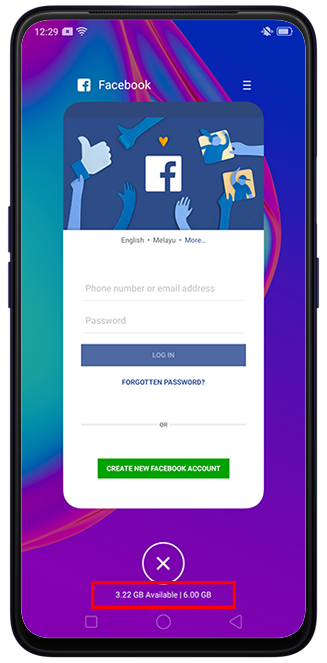
View memory information
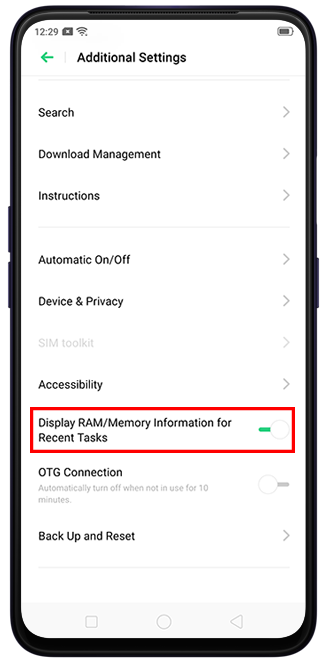
You can view memory information below  in Recent Tasks. To enable memory information, go to [Settings] > [Additional Settings] and toggle on [Display RAM/ Memory Information for Recent Tasks].
Sponsored Deals
Advertisement · Hand-picked offers, refreshed regularly
These are paid/affiliate advertisements from our partner store and are not related to OPPO or OPPO spare parts.
Related Articles
Sponsored Deals
Advertisement · Hand-picked offers, refreshed regularly
These are paid/affiliate advertisements from our partner store and are not related to OPPO or OPPO spare parts.