Save Last Exit Camera Mode within a Minute
Save Last Exit Camera Mode within a Minute
Learn about the Save Last Exit Camera Mode feature on your phone.
Applicable for ColorOS 6.0 device. Check your ColorOS version in [Settings] > [About Phone].
Previously, each time you turn off the camera on your phone, the camera mode will be restored to the default Photo mode.
A new feature in your F11 Pro lets you keep the last camera mode for one minute for your convenience. If you turn off the camera and turn on within one minute, you can continue to shoot without having to select the mode again. The modes that can be saved within one minute are:
-
Timer
-
Flashlight
-
All modes on VIDEO, PHOTO, PORTRAIT and Selfie
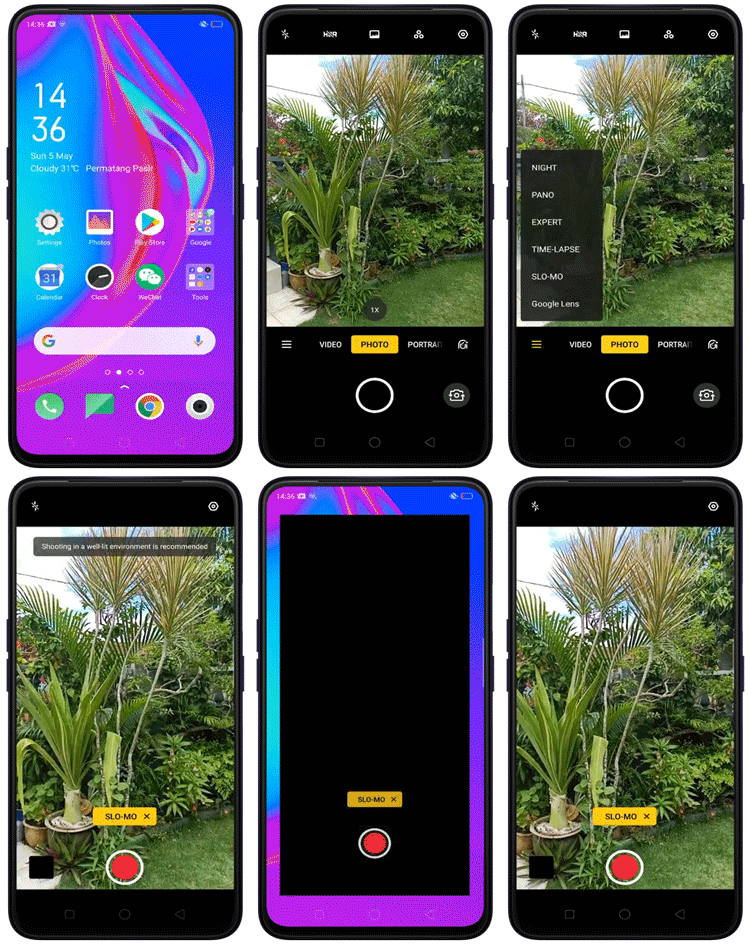
Note: This feature is available for both the front and rear cameras.
Sponsored Deals
Advertisement · Hand-picked offers, refreshed regularly
These are paid/affiliate advertisements from our partner store and are not related to OPPO or OPPO spare parts.
Related Articles
Why Does the A9/ A5 2020 Camera Flashes When Exit to Home Screen?
Why Does the Camera Closes Automatically if Not Used for a while?
Why Can't I Open the Clone Switch for the First Time after Restoring the Exit Settings?
Why Do I Receive Access Requests from the Fitbit App on My OPPO Phone?
Sponsored Deals
Advertisement · Hand-picked offers, refreshed regularly
These are paid/affiliate advertisements from our partner store and are not related to OPPO or OPPO spare parts.