R15 Pro: How Does the Sensor HDR Technology Works
R15 Pro: How Does the Sensor HDR Technology Works
Learn more about the Sensor HDR Technology in your phone.
Applicable for OPPO R15 Pro,
The Sensor HDR (High Dynamic Range) Technology in R15 Pro brings you perfect selfies even in back-light conditions.
When HDR mode is enabled, the camera combines multiple shots into one detailed image. It softens the harsh effects of light, leaving natural skin tones.
To turn on HDR, go to [Camera] and at the top of the screen, tap [HDR] > [On].
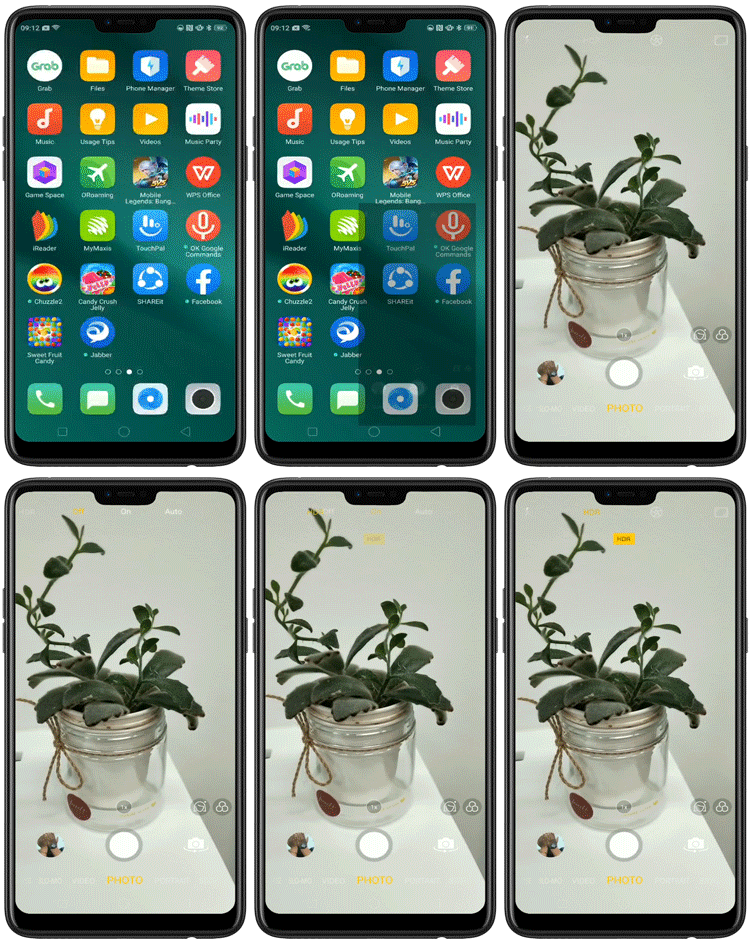
Shoot what you see now with HDR!
* Pictures, settings, and paths might differ from those of your phone, but these won't affect the description in this article.
Sponsored Deals
Advertisement · Hand-picked offers, refreshed regularly
These are paid/affiliate advertisements from our partner store and are not related to OPPO or OPPO spare parts.
Related Articles
Proximity and Light Sensors: Where to Find Them in Your Panoramic Phone?
Sponsored Deals
Advertisement · Hand-picked offers, refreshed regularly
These are paid/affiliate advertisements from our partner store and are not related to OPPO or OPPO spare parts.