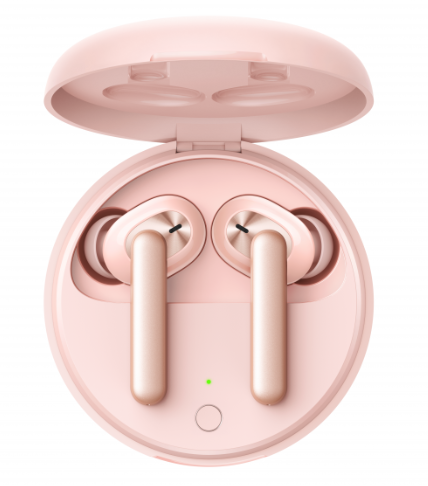
OPPO Enco W31 True Wireless Headphones Service Manual
Contents
1. Purpose and Requirements
2.Product Introduction
3. After-sales Guide
4.Instruction
5.Function Test
1. Purpose and Requirements
1.1 Purpose
This article introduces the product parameters, instructions for use, and after-sales policies of the OPPO Enco Free true wireless headphones to guide the customer service center to properly handle the after-sales work of the product.
1.2 Requirements
The customer service center must operate in strict accordance with after-sales policies and order specifications.
2. Product Introduction
2.1 Product Parameters
| Name | OPPO Enco W31 True Wireless Headphones |
| Model | ETI11/ETI13 |
| Driver | 7mm dynamic driver |
| Frequency response range | 20Hz-20kHz |
| Microphone sensitivity | -38dBV/Pa |
| Supported audio formats | AAC/SBC |
| Bluetooth version | 5.0 |
| Wireless range | 10m |
| Battery type | Rechargeable Lithium-ion battery |
| Weight | 4g(Single earphone) 42g(Charging Case) |
| Battery capacity | 25mAh(Headphones) 350mAh(Charging Case) |
| Music play time(50% volume) | 3.5h(Single charge) 15h(With Charging Case) |
| Charging time | 80min(Headphones) 150min(Charging Case) |
| Charging Case model | ETI12/ETI14 |
| Input(Charging Case) | 5V⎓1A |
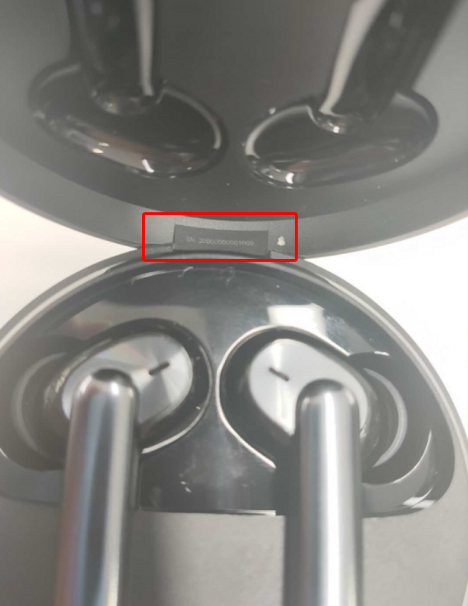
2.2 SN Code Identification
The SN code information of OPPO Enco Free true wireless headphones products is printed on the charging case.
Charging case
3. After-sales Guide
3.1 After-sales policy
The After-sales policy is implemented in accordance with local regulations.
3.2 Warranty Instruction
① In warranty period, if the left earphone, or the right earphone, or the charging case has non-artificial damage and the quality of the product itself, the whole earphones should be replaced.(We must collect the old whole earphones.)
② In warranty period, if the USB charging cable is not artificially damaged and the quality of the product itself, the USB charging cable accessories can be replaced separately.
③ In warranty period, if the ear tip has non-artificial damage and the quality of the product itself, the ear tip can be replaced separately.
3.3 Maintenance Instruction
① If the left earphone, or the right earphone, or the charging case is faulty or missing, the customer can pay for left earphone, or the right earphone, or the charging case accessory , and the whole earphones should be replaced. (We must collect the old whole earphones.)
② If the USB charging cable is faulty or missing, the customer can pay for the replacement of the USB charging cable accessory separately.
③ If the ear tip is faulty or missing, the customer can pay for the replacement of the ear tip accessories separately.
3.4 Warranty Time Specification
1. Having proof of purchase: calculate the warranty time with the purchase invoice and warranty card;
2. No proof of purchase: provide the box and identify the SN code, and use the SN code information to query and calculate the warranty date.
3. In the case where the invoice, warranty card, packing box, online purchase record, SN code information query and calculation of the warranty date cannot be provided, No warranty is provided.
4.Instruction
4.1 Bluetooth Pairing
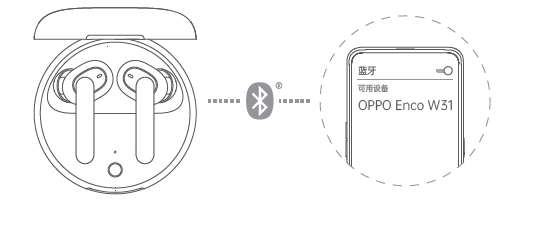
When using for the first time, open the Charging Case and the headphones will start pairing automatically.
Turn on Bluetooth on your device:
• Normal Pairing: On the Bluetooth interface, search and select "OPPO Enco Free".
• Quick Pairing: Hold near unlocked OPPO phone, then follow the onscreen instructions.
※ Not all models support quick pairing. For details, please visit www.oppo.com.
4.2 Automatic Connection
After the pairing record has been recorded, open the Charging Case, then the headphones will connect to your device automatically.
4.3 Pairing with Other Devices
With the headphones in the Charging Case and lid open, press and hold the Function Button untill the Indicator blinks. The headphones then are available for pairing with a new device.
4.4 Touch Control
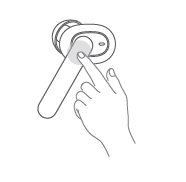
During media playback, double tap on the right
headphone to play the next track, double tap on
the left headphone to switch the audio effects.
During a call, double tap to answer / end the call.
Switching audio effects: double tap on the left headphone.
• Balance mode: excellent audio balanced for every frequency.
• Bass mode: enhanced, rich and smooth bass.
4.5 Wearing Detection
When you listen to music while wearing both units of the headphones, the music playback will be paused if either of them is removed. When the removed unit is worn again, the music playback will be resumed.
4.6 Charging
Check charge status
• The Indicator shows charge status of the headphones when they are in Charging Case. Otherwise, the Indicator shows charge status of the Charging Case.
• The indicator color indicates the battery level, red indicates low battery, yellow indicates medium power, and green indicates high battery.
• When the remaining battery charge of the Charging Case is low (the indicator lights red), the Charge Case can only complete one full charge of the headphones at most. Please charge the Charging Case in time.
Charge the headphones
The headphones charge while in the Charging Case.
※ If the device is left to lie idle for long periods, charge it every two months; otherwise, the headphones may not work properly.
Charge the Charging Case
Use the USB-C Cable to charge the Charging Case. The Indicator will light up when charging.
4.7 Resetting
With the headphones in the Charging Case and lid open.
Press and hold the Function Button untill the Indicator flashes red three times. Then the headphones have been restored to factory settings.
5.Function Test
5.1 Bluetooth Connection Test
1. With connected mobile phones, you can quickly connect after opening the charging case (most connect within 5s, and a few connect within 10s)
2. Put the headphones back on the charging case. After closing the lid of the charging case, the Bluetooth connection will be disconnected within 5s. If you turn it on again, it will automatically reconnect.
3. An earphone can be connected separately. At this time, the mobile phone only displays the power of the worn earphone.
4. Bluetooth signal test: The mobile phone is placed on the desktop, the headphones is worn, music is played or a call is made, and the distance between the headphones and the mobile phone (no obstruction in the middle) ≤ 10m indicates that the signal is abnormal.
Note: There is an obstruction between the mobile phone and the headphones (when the object or the human body is stuck, the phenomenon of jamming may occur during the distance)
5.2 Headphones Listening Function Test
1. Play the music, wear the headphones well, and listen to whether the volume of the left and right ears is the same (it is important to measure this after replacing the single earphone separately for the user, it is best to confirm with the user when the user picks up the machine)
2. Play music, slide the right ear up to switch to the previous song, slide down to switch to the next song, double-click to pause and play music (note: the tapping function is located on the head of the headphones, so tapping as far as possible can improve sensitivity)
3. Play the music, wear the left and right ears, the left and right ears are normal at this time, then remove the left ear, the music is paused, then wear the left ear music to continue playing; remove the right ear, the music is paused, and then wear the right ear to continue to play the music.
5.3 Headphones Call Function Test
1. Wear the headphones, make a call, pay attention to whether the sound is low in the first 10s, and then normal.
2. Make a call, test whether the other party hears noise, electric current, or broken sound.
3. Wear the headphones, double-click to access the phone, listen to the other party's voice and whether the other party's listening is normal, double-click to hang up the phone
5.4 Charging Function Test
Use the Type-C charging cable to charge the charging case. The indicator light will turn on when charging, indicating that the charging case has entered the charging state.
Sponsored Deals
Advertisement · Hand-picked offers, refreshed regularly
These are paid/affiliate advertisements from our partner store and are not related to OPPO or OPPO spare parts.
Related Articles
Sponsored Deals
Advertisement · Hand-picked offers, refreshed regularly
These are paid/affiliate advertisements from our partner store and are not related to OPPO or OPPO spare parts.