Notification Prompt on the Status Bar on F11 Pro
Notification Prompt on the Status Bar on F11 Pro
Learn how to set the notification prompt for the status bar.
Applicable to F11 Pro.
Are you seeing too many notification icons on the status bar?
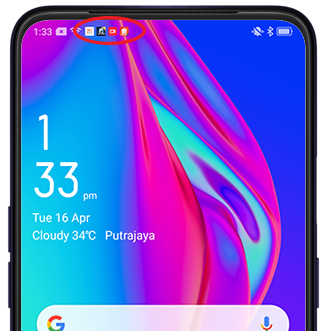
With F11 Pro, you can now customize the Notification Prompt on the status bar to only show the number of notifications. Notification Prompt alerts you when messages, reminders, or timely updates are sent from your apps.
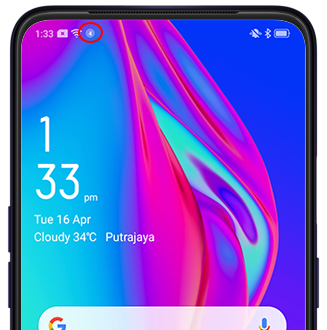
To change the notification prompt mode, go to [Settings] > [Notification & Status Bar] > [Notification Prompt Mode] and choose [Number of Notifications]. You can also choose No Prompt if you do not want the notification prompt on the status bar.
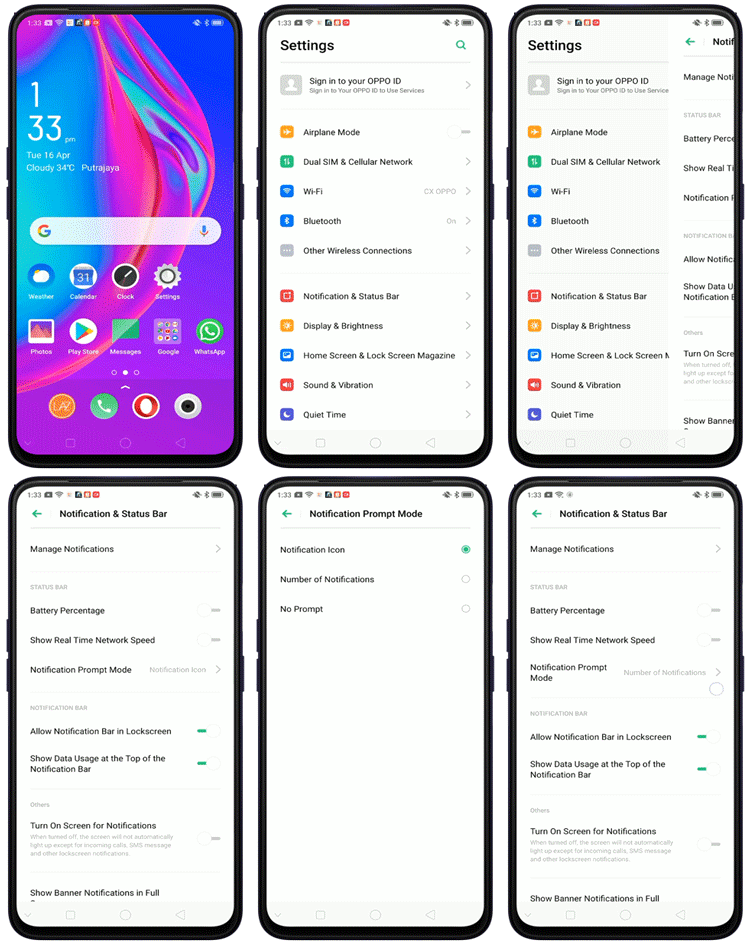
* Pictures, settings, and paths might differ from those of your phone, but these won't affect the description in this article.
Sponsored Deals
Advertisement · Hand-picked offers, refreshed regularly
These are paid/affiliate advertisements from our partner store and are not related to OPPO or OPPO spare parts.
Related Articles
Sponsored Deals
Advertisement · Hand-picked offers, refreshed regularly
These are paid/affiliate advertisements from our partner store and are not related to OPPO or OPPO spare parts.