Notice That Yellow-Highlight Pops Up On The Status Bar
Model Involved
A83, F5, and Models that are based on ColorOS 5.0Background
Recently we get feedback from customer that there is yellow-highlight appearing on the status bar in some situations.
Situation 1:After downloading some third-party apps related to “One-Tap Lockscreen”in the Play store, there is a yellow-highlight appearing on the status bar.
Situation 2:After enabling some functions in Settings – Additional Settings –Accessibility –Services, there is a yellow-highlight appearing on the status bar.
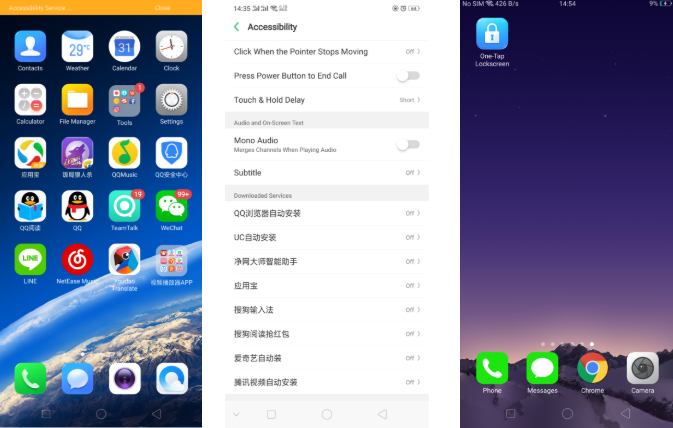
Solution
CauseBecause the new software version has integrated the latest Google Security demand, and this kind of operation (Device administrator, Accessibility) have asked for high authority of security risk. For the safety of data and device, we use highlight bar to emphasize the risk of enabling this functions to remind customers that to turn it off.
Solution
Issue1:guide users to install One-Tap Lockscreen which we recommend, download address as below:
Aftersales official website:http://downloads.oppo.com.s3.amazonaws.com/firmware/LockScreen/OneKeyLockScreen_signed.apk
Aftersales FTP:/外销手机客服/oppofuwu/Tools and Drivers/Apk/One-Tap Lockscreen.
Issue2:disable the specific functions under settings for Accessibility.
Script
Q1: Why there is yellow-highlight appearing on the status bar?
A1: Hi can you check if you had just downloaded the “One-Tap Lockscreen” app and enabled some functions under Settings – Additional Settings –Accessibility –Services or under Settings – Additional Settings—Safety and Privacy—Device Administrator. If yes, this is normal because the latest software version has intergraded the Google security demand. The apk you are using or the functions you has enabled have asked for high authority of security risk. For the safety of data and device, we use highlight bar to emphasize the risk of enabling this functions to remind you to turn it off. We advise you to uninstall the One-Tap Lockscreen or disable the specific functions under settings.
Sponsored Deals
Advertisement · Hand-picked offers, refreshed regularly
These are paid/affiliate advertisements from our partner store and are not related to OPPO or OPPO spare parts.
Related Articles
Sponsored Deals
Advertisement · Hand-picked offers, refreshed regularly
These are paid/affiliate advertisements from our partner store and are not related to OPPO or OPPO spare parts.