Notice on Hanging in the OTA Interface after Updating for R9s and A57
Model Involved
A57、R9s、Huawei Nexus 6P.Background
There is feedback that Models like R9s, A57 will hang in the OTA interface after updating.Solution
Cause:Original defects of Google: When Google Voice Assistant is updated to version 8.55.6.16.arm version, hanging will appear.
Solution:
a. Flash the phone to the latest version, then update the Google Voice Assistant to the latest version.
b. If some users strongly demand for data retention:
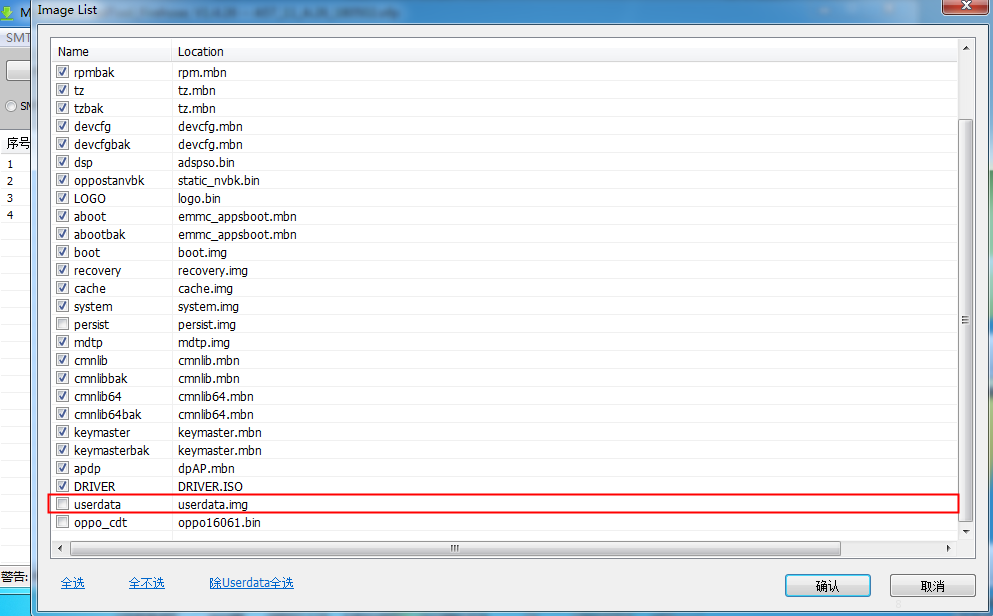
Flash the phone with the temporary software provided by the HQ (press “F5”button of your computer then don’t choose userdata ); after the phone can be started normally and all the data has been backup, then flash the phone with the official software.
A57 temporary software:https://drive.google.com/open?id=1V7IyjAuikYOsntblNQ_irq0UZ9xZO6KX
R9S temporary software:https://drive.google.com/open?id=1zemWcNFJY547bzjFwrFboiBCuZBat5Pp
Note: After all the steps have been finished, update the Google Voice Assistant the latest version 8.55.6.21.arm64 by searching “Google” at the “Google Play Store”.
Script
Q: Why did the OTA updating interface keep hanging after the phone was OTA updated?
A.We are truly sorry for the accident happened and all the inconveniences caused. It’s been confirmed the issue is triggered by Google Assistant Update, Version 8.55.6.16, released on the 28th November. To solve this issue, please visit our Service Center to have the Software re-flashed and then update Google Assistant to Version 8.55.6.21.
Sponsored Deals
Advertisement · Hand-picked offers, refreshed regularly
These are paid/affiliate advertisements from our partner store and are not related to OPPO or OPPO spare parts.
Related Articles
Important Notice about The Flashing Screen on Side Border in Call of Duty
Sponsored Deals
Advertisement · Hand-picked offers, refreshed regularly
These are paid/affiliate advertisements from our partner store and are not related to OPPO or OPPO spare parts.