How Do I Insert Dual SIM?
How Do I Insert Dual SIM?
Situation: You want to insert dual SIM cards into your phone.
Applicable to: All OPPO Smartphones.
Inserting dual SIM in OPPO phones is no different from inserting one SIM. Before inserting SIM cards, turn off the phone and make sure both SIMs are already activated.
1. Depending on the phone model, locate the SIM card slot. Usually, the SIM card slot is on the side of the phone.
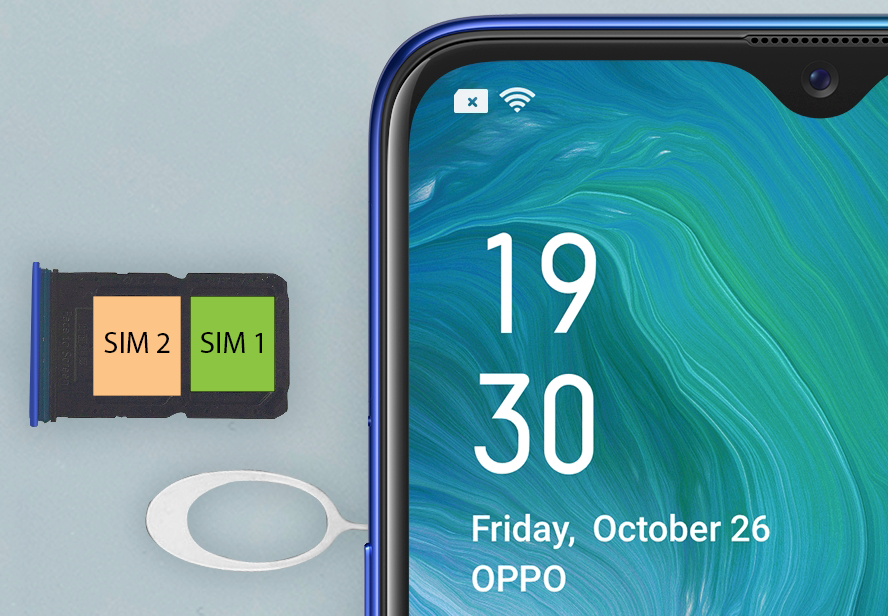
2. Insert the card needle into the hole next to the SIM card slot and the card tray will pop open.

3. Pull out the card tray.
4. Place your main SIM card (SIM1) in the first (innermost) slot and your second SIM (SIM2) in the second (outer) slot. Make sure the gold (metal) side of the card facing down.
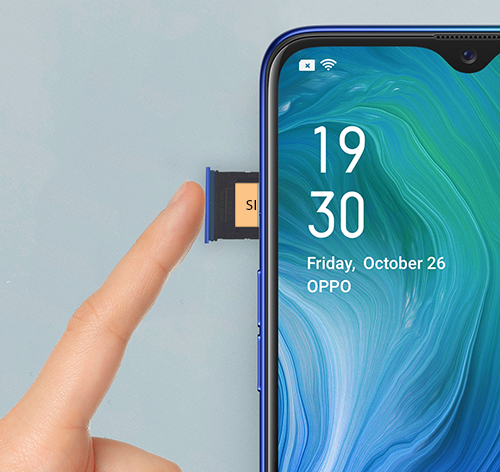
5. Reinsert the card tray in the phone.
6. Turn on the phone. If this is your first time using a SIM, the E-Warranty Card registration page will appear.
Related article:
*All photos shown are for illustration purpose ONLY. Actual products may vary due to product enhancement.
Sponsored Deals
Advertisement · Hand-picked offers, refreshed regularly
These are paid/affiliate advertisements from our partner store and are not related to OPPO or OPPO spare parts.
Related Articles
Can Both the SIM Cards Be Used at the Same Time in a Dual SIM Phone?
Sponsored Deals
Advertisement · Hand-picked offers, refreshed regularly
These are paid/affiliate advertisements from our partner store and are not related to OPPO or OPPO spare parts.