F11 Service Manual_V1
Views: 0 • Likes: 0
Content
1. Guidance
2. General Repair Information
3. Product Overview
4. Disassembly steps
5. Assembly Step
6. Calibration
7. Function test
8. Cautions
1. Guidance
The purpose of this document is used to guide OPPO maintenance engineers to carry out service to OPPO products, and the content shall be keep in confidential. This Service Manual is to be used only by authorized OPPO maintenance service centers, not be provided to third parties for use without authorization. Please follow the regulations and follow the guidance for maintenance service, please contact HQ if any questions.
1.1 warnings and Cautions
1.1.1 Warnings
1. Service centers may be required to install the handset's vehicle-mounted system in vehicles. Under certain fault conditions, the handset's RF signals may affect the operation of the vehicles' electric power management systems and anti–skid braking systems (ABSs). If necessary, consult the vehicle dealer/manufacturer to determine the immunity of vehicle electronic systems to RF energy.
2. The handset must not be operated in areas likely to contain potentially explosive atmospheres, such as petrol stations, gas stations and blasting areas.
3. Operation of any radio transmitting equipment, including handsets, may interfere with the functionality of the medical devices protected by industrial mechanisms. Consult the manufacturer of the medical device if necessary. Other electronic equipment may also be subject to interference.
1.1.2 Cautions
1. Maintenance and calibration must be undertaken by qualified technicians only.
2. Use only the materials listed in the BOM for maintenance services.
3. All parts are assembled correctly as required.
4. Electrostatic discharge can easily damage the sensitive components of electronic products. Service centers must follow with OPPO's requirements for electrostatic protection. All the operations must be on an ESD maintenance table and worn with an ESD ring.
2. General Repair Information
1.Before starting the maintenance, please enter the ESD area and wear the ESD ring.
2. ESD gloves are recommended to avoid oil stains and fingerprints.
3. Use protective film to protect the display screen, camera, and camera lenses from dust and scratches.
4. It is necessary to use dust-free cloth, ESD brush and alcohol (concentration above 95%) for appearance cleaning. Do not use other items for cleaning (like eraser) to prevent the protective layer on the scratched surface from oxidizing and corroding.
5. It can only be replaced instead of repair if the welded mechanical parts (except the shield cover and shield frame parts) fail.
6. Repairs must be made using the accessories supplied by OPPO.
7. Check the contacts or solder joints of devices that may cause simple faults (e.g. soldered connectors or switches) and re-solder them if necessary (only repair centers that can conduct lead-free soldering) and clean the residual flux after welding.
8. You must use the equipment provided by OPPO to test whether the mobile phone is normal. For example, if the customer feedback charging malfunction, please use the original adapter of OPPO to test to ensure the accuracy of test results.
9. When recording the fault code in the after-sales system, fill in the fault phenomenon code and fault reason code according to the actual situation, and accurately record the replacement accessory code (refer to " Smart Phone Fault Reason Code List " if necessary).
10. If you want to know more information about this product, please visit the FTP service: ftp://ftpex.oppo.com:919/
3. Product Overview
3.1 Product Appearance
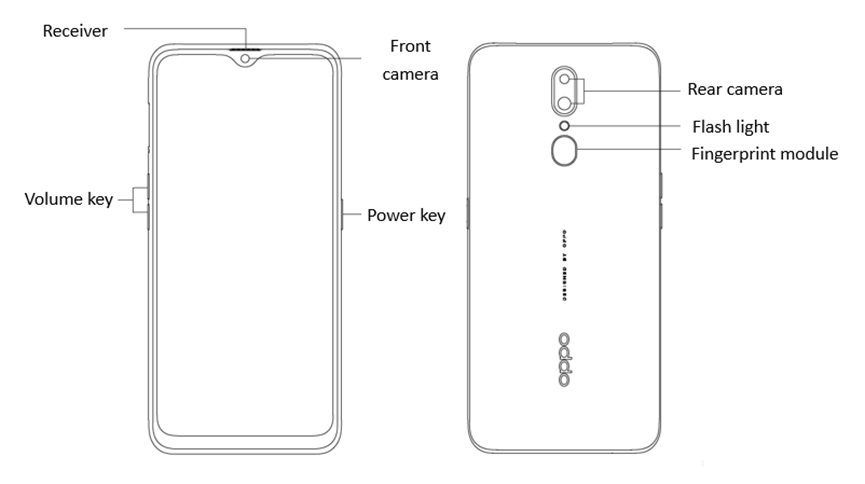
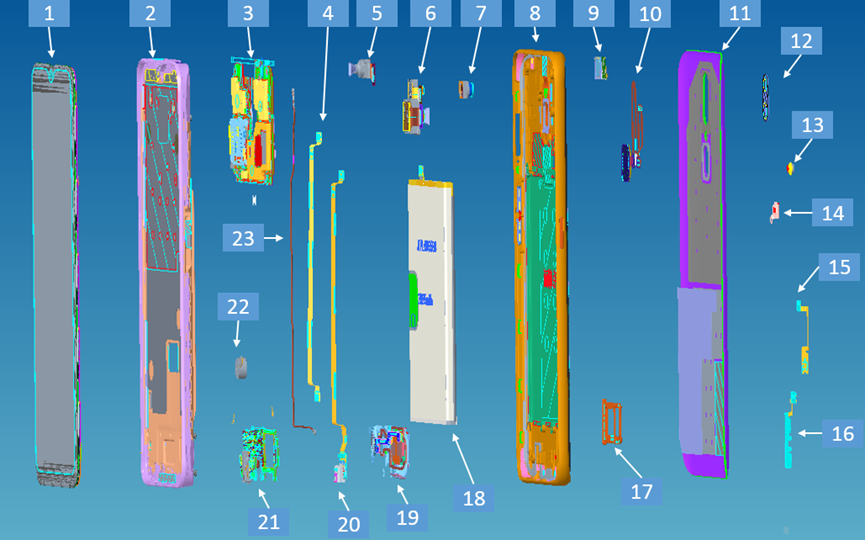
3.3 Exploded map corresponding material table
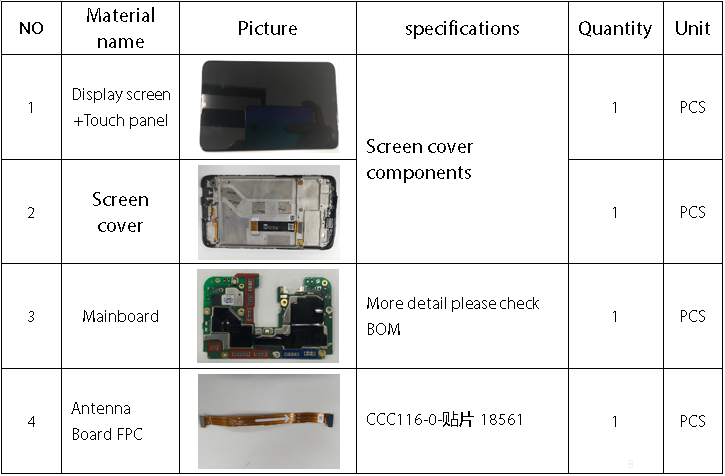
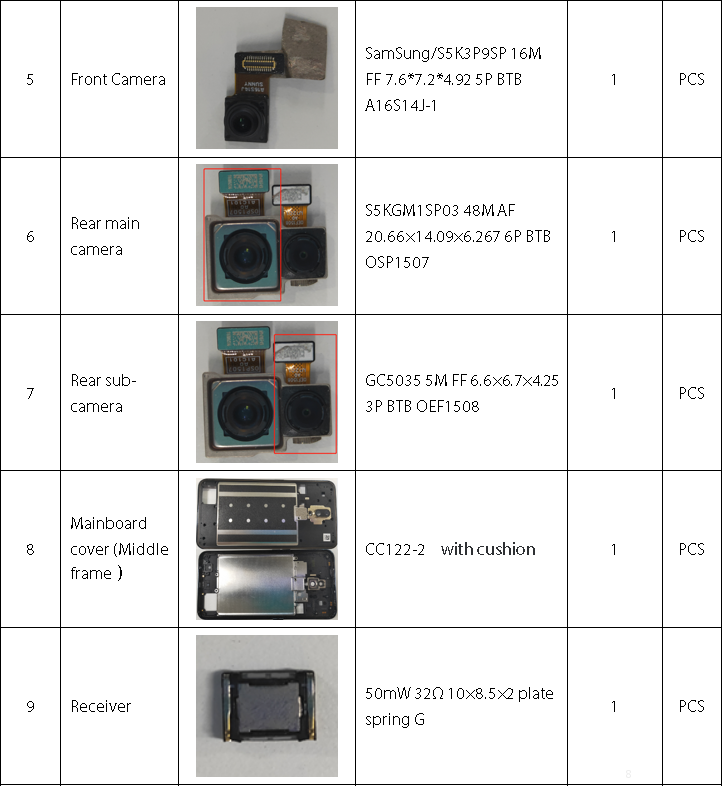
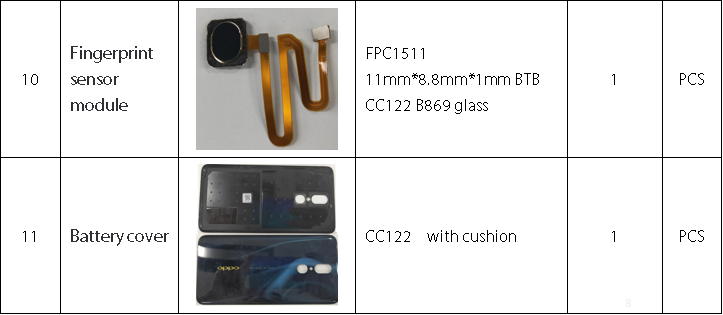
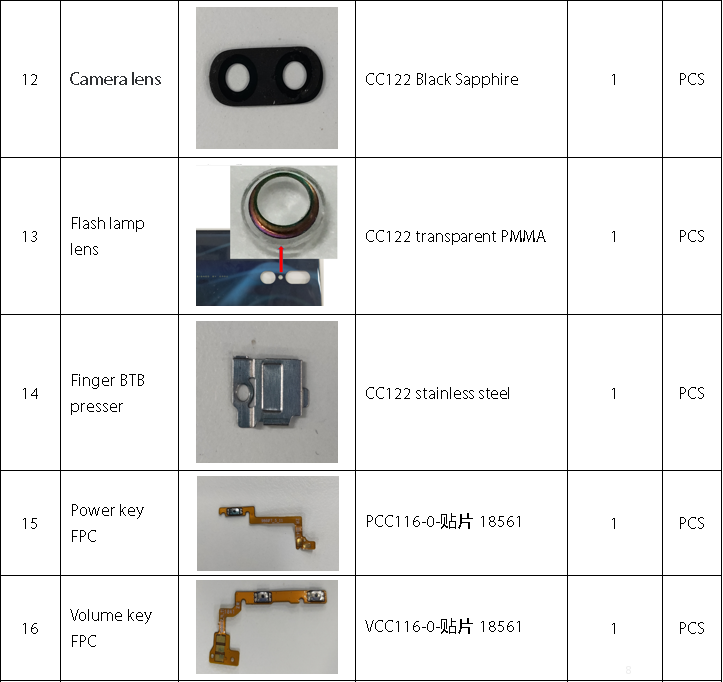
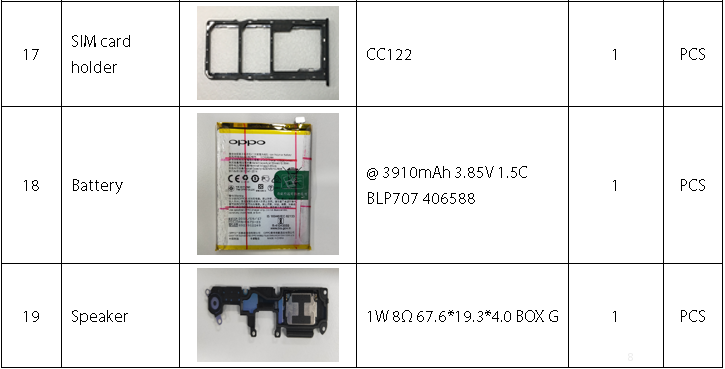
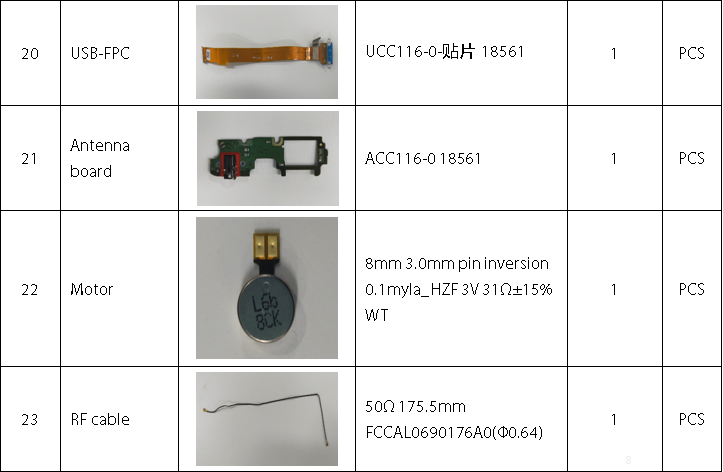
Note: This table is used only for the name of the annotation. It is not suitable for the preparation of materials. Please refer to the “Price list of Commonly-used Materials and Accessories” for the preparation.
4. Disassembly steps
4.1 Disassembly tools required as shown below
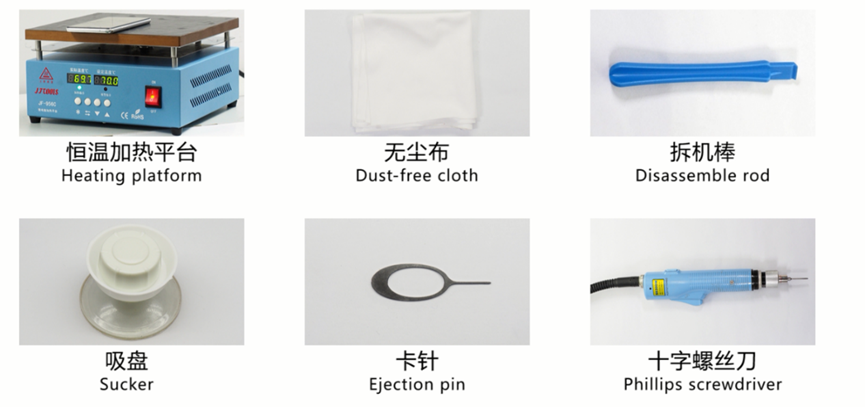
4.2 Preparation
1. The phone must be shut down with the power option before disassembling.
2. Way to Shut Down: Press the power button then slide to power off.( The forced shutdown method is long press the volume + button and power button for about 8 seconds until the display is off)
4.3 Disassembly Steps
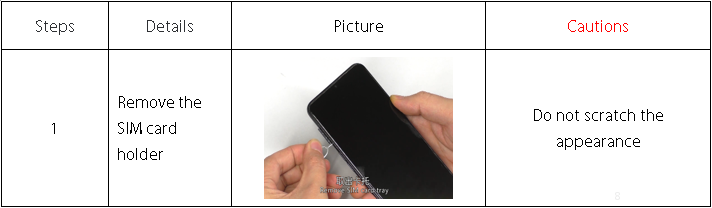
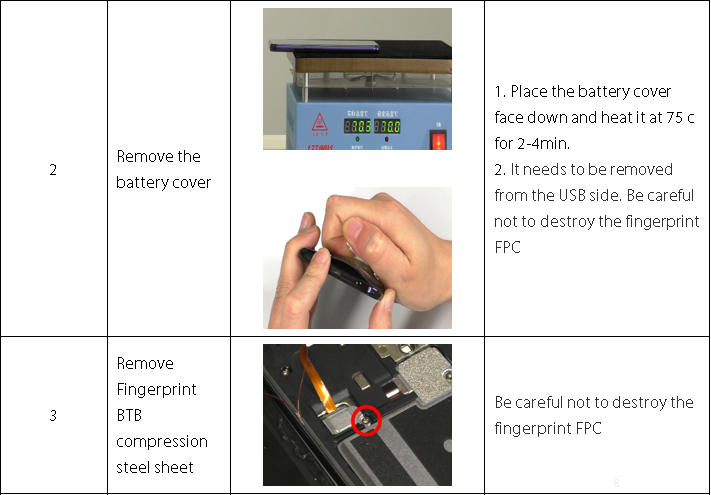
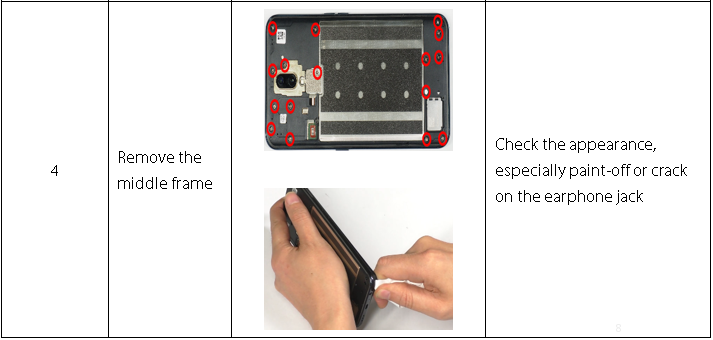
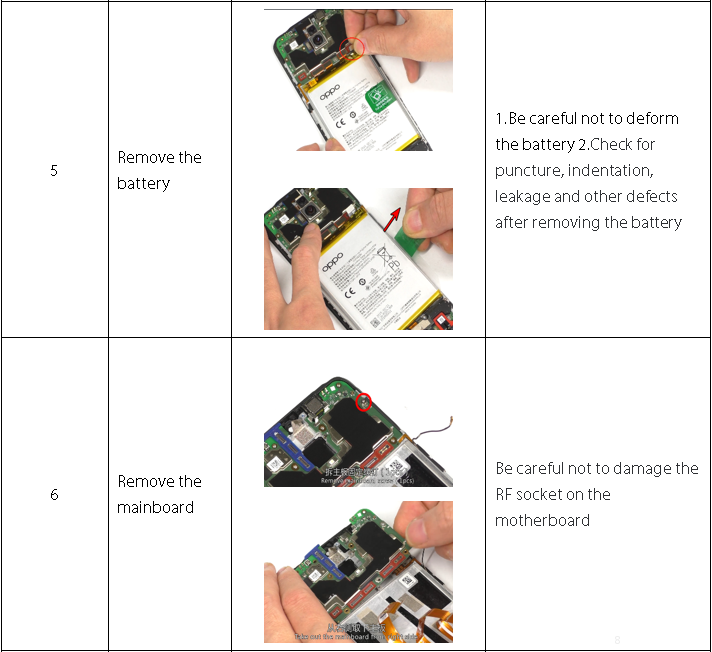
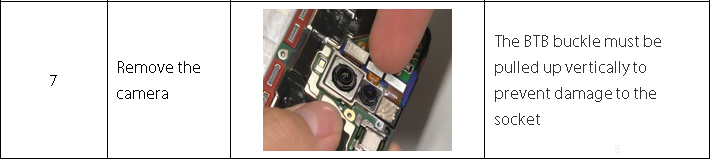
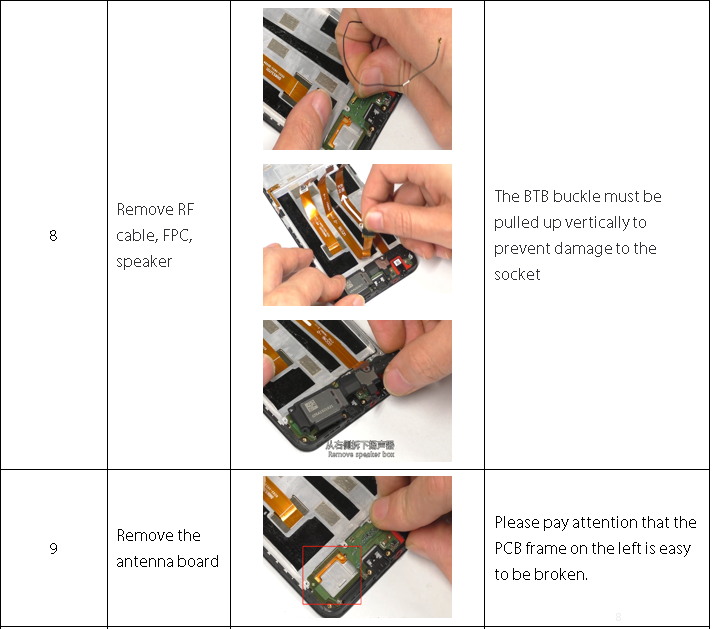
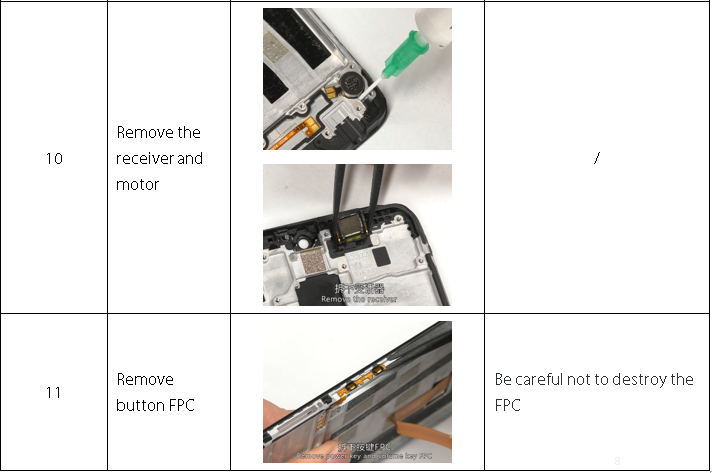
5. Assembly Step
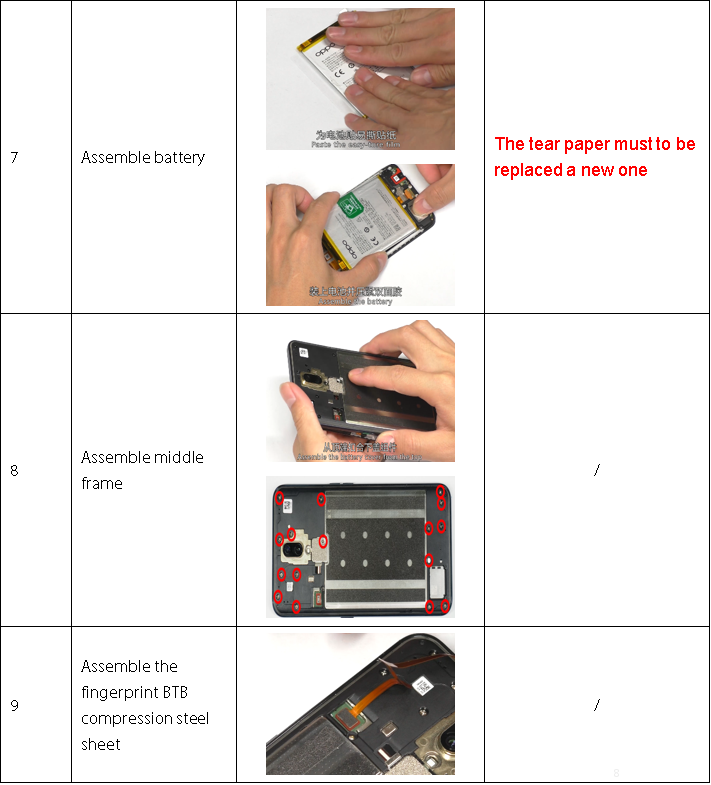
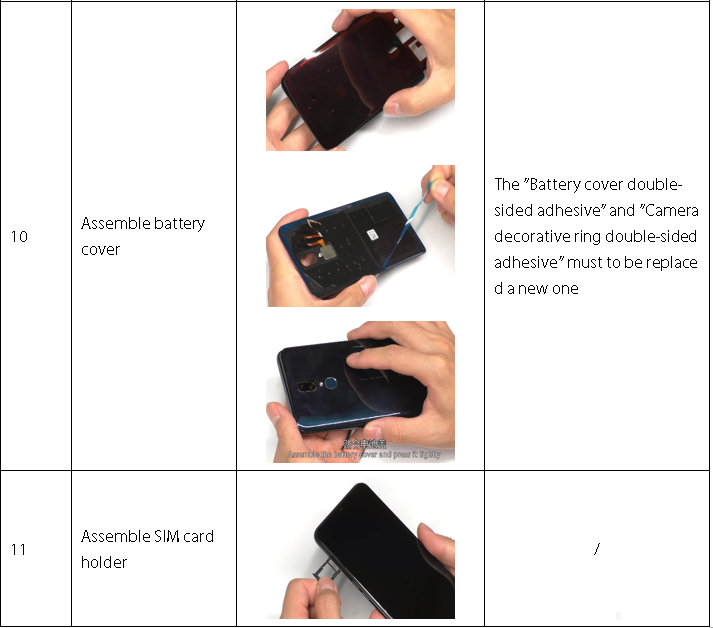
5.1 Materials are required to be replaced after disassembly
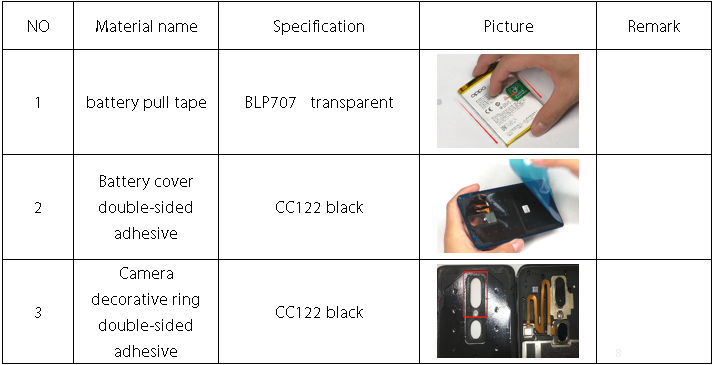
5.2 Assembly Step
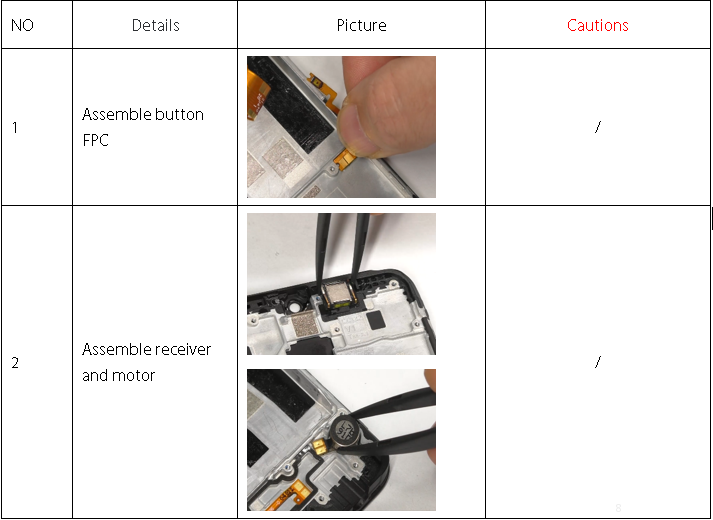
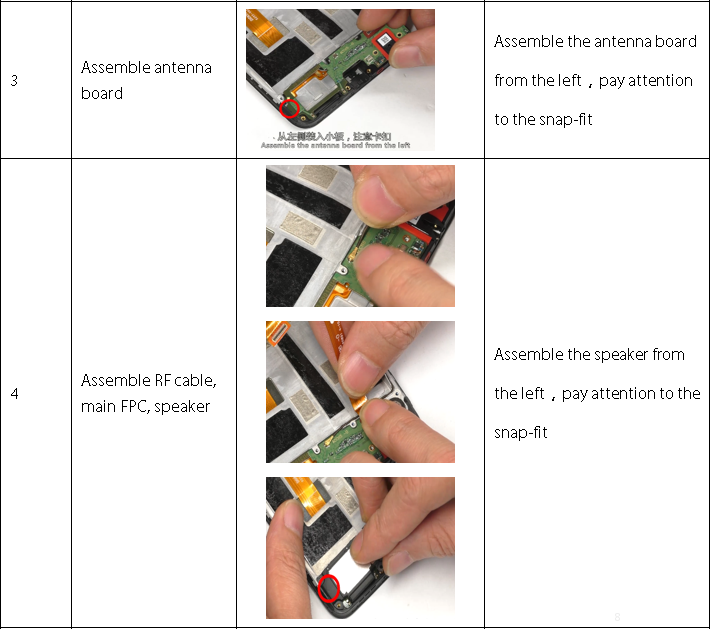
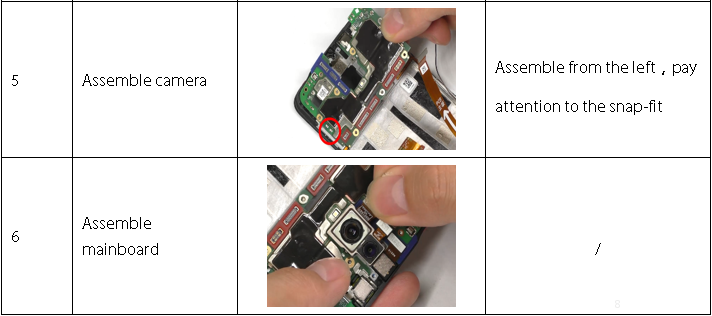
6. Calibration
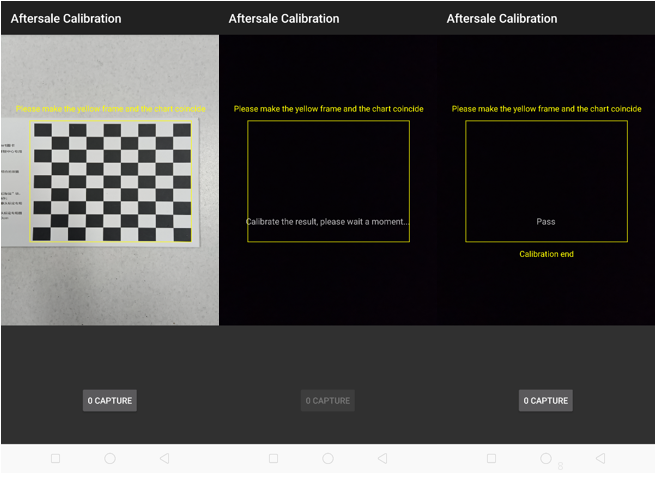
Calibration path: input *#899# in the dialing interface > Aftersale calibration/ last test in the automatic test; When the following interface pops up, take a photo with the chart.
Note: Please align the yellow box with the edge of the chart, and then take a Photo. Then, do not operate the phone when the phone enters the computing interface until it display “Pass” with the calibration completed.
Precautions:
1. If the phone sent to the SC is with Poor blurred effect issues in the Portrait Mode, re-calibrate the camera for the user.
2. Re-calibrate the phone for the user once the phone has been disassembled, Otherwise the phone will be with Poor blurred effect issues;
3. If it shows “Fail 69” during calibration, the lens is too far from the chart;
4. If it shows “Fail 70” during calibration, the lens is not parallel to the chart;
5. If it shows “Fail 68” during calibration, the lens is too close from the chart.
7. Function test
7.1 Test Path
Dialing Interface>Enter*#899#>Enter automatic test; The "Confirm" dialog box will pop up after the test complete, if there is no problem choose “Pass”, otherwise choose “Fail”.
7.2 Test Requirements
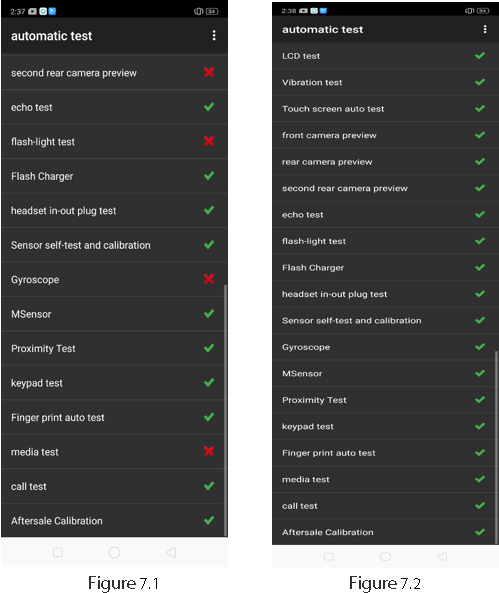
After the above 19 items are tested, they will prompt to the test result interface. If the test PASS, project will show “√”; If the test FAIL, project will show “×” as shown below.
8. Cautions
1. Recalibration is required after maintenance.
2. After assembly, calibration must be performed before functional testing to ensure proper function after maintenance;
3. Sensory test items require staff to judge the results. For example, LCD test, vibration test, pre-test, post-test, flash test, echo test, audio test, and call test are all human judgment results. Therefore, the judgment result must be followed. Test requirements judgment;
4. It is forbidden to use the return key to judge the result in advance if the test item is not tested.
1. Guidance
2. General Repair Information
3. Product Overview
4. Disassembly steps
5. Assembly Step
6. Calibration
7. Function test
8. Cautions
1. Guidance
The purpose of this document is used to guide OPPO maintenance engineers to carry out service to OPPO products, and the content shall be keep in confidential. This Service Manual is to be used only by authorized OPPO maintenance service centers, not be provided to third parties for use without authorization. Please follow the regulations and follow the guidance for maintenance service, please contact HQ if any questions.
1.1 warnings and Cautions
1.1.1 Warnings
1. Service centers may be required to install the handset's vehicle-mounted system in vehicles. Under certain fault conditions, the handset's RF signals may affect the operation of the vehicles' electric power management systems and anti–skid braking systems (ABSs). If necessary, consult the vehicle dealer/manufacturer to determine the immunity of vehicle electronic systems to RF energy.
2. The handset must not be operated in areas likely to contain potentially explosive atmospheres, such as petrol stations, gas stations and blasting areas.
3. Operation of any radio transmitting equipment, including handsets, may interfere with the functionality of the medical devices protected by industrial mechanisms. Consult the manufacturer of the medical device if necessary. Other electronic equipment may also be subject to interference.
1.1.2 Cautions
1. Maintenance and calibration must be undertaken by qualified technicians only.
2. Use only the materials listed in the BOM for maintenance services.
3. All parts are assembled correctly as required.
4. Electrostatic discharge can easily damage the sensitive components of electronic products. Service centers must follow with OPPO's requirements for electrostatic protection. All the operations must be on an ESD maintenance table and worn with an ESD ring.
2. General Repair Information
1.Before starting the maintenance, please enter the ESD area and wear the ESD ring.
2. ESD gloves are recommended to avoid oil stains and fingerprints.
3. Use protective film to protect the display screen, camera, and camera lenses from dust and scratches.
4. It is necessary to use dust-free cloth, ESD brush and alcohol (concentration above 95%) for appearance cleaning. Do not use other items for cleaning (like eraser) to prevent the protective layer on the scratched surface from oxidizing and corroding.
5. It can only be replaced instead of repair if the welded mechanical parts (except the shield cover and shield frame parts) fail.
6. Repairs must be made using the accessories supplied by OPPO.
7. Check the contacts or solder joints of devices that may cause simple faults (e.g. soldered connectors or switches) and re-solder them if necessary (only repair centers that can conduct lead-free soldering) and clean the residual flux after welding.
8. You must use the equipment provided by OPPO to test whether the mobile phone is normal. For example, if the customer feedback charging malfunction, please use the original adapter of OPPO to test to ensure the accuracy of test results.
9. When recording the fault code in the after-sales system, fill in the fault phenomenon code and fault reason code according to the actual situation, and accurately record the replacement accessory code (refer to " Smart Phone Fault Reason Code List " if necessary).
10. If you want to know more information about this product, please visit the FTP service: ftp://ftpex.oppo.com:919/
3. Product Overview
3.1 Product Appearance
3.2 Exploded View of Phone’s Structure
3.3 Exploded map corresponding material table
Note: This table is used only for the name of the annotation. It is not suitable for the preparation of materials. Please refer to the “Price list of Commonly-used Materials and Accessories” for the preparation.
4. Disassembly steps
4.1 Disassembly tools required as shown below
4.2 Preparation
1. The phone must be shut down with the power option before disassembling.
2. Way to Shut Down: Press the power button then slide to power off.( The forced shutdown method is long press the volume + button and power button for about 8 seconds until the display is off)
4.3 Disassembly Steps
5. Assembly Step
5.1 Materials are required to be replaced after disassembly
5.2 Assembly Step
6. Calibration
Calibration path: input *#899# in the dialing interface > Aftersale calibration/ last test in the automatic test; When the following interface pops up, take a photo with the chart.
Note: Please align the yellow box with the edge of the chart, and then take a Photo. Then, do not operate the phone when the phone enters the computing interface until it display “Pass” with the calibration completed.
Precautions:
1. If the phone sent to the SC is with Poor blurred effect issues in the Portrait Mode, re-calibrate the camera for the user.
2. Re-calibrate the phone for the user once the phone has been disassembled, Otherwise the phone will be with Poor blurred effect issues;
3. If it shows “Fail 69” during calibration, the lens is too far from the chart;
4. If it shows “Fail 70” during calibration, the lens is not parallel to the chart;
5. If it shows “Fail 68” during calibration, the lens is too close from the chart.
7. Function test
7.1 Test Path
Dialing Interface>Enter*#899#>Enter automatic test; The "Confirm" dialog box will pop up after the test complete, if there is no problem choose “Pass”, otherwise choose “Fail”.
7.2 Test Requirements
| No | Testing item |
Testing requirements
|
|---|---|---|
| 1 | LCD test | Observe the red, green, blue, white, black, gray, grayscale and color interface successively; If there are black spots, bright spots and other anomalies, the function is sound; |
| 2 | Vibration test | Get ear close to check the vibration from the motor for 3 seconds. If the motor vibrates normally(No noises or weak vibration), the function is sound; |
| 3 | Touch screen auto test | If the interface shows “PASS” and jumps to the next test, the function is sound; |
| 4 | Front camera preview | Align the front camera with a white surface and a black surface. If there is no black dot, black line or blurred screen on the screen after aligning the white surface, and there is no bright spot on the screen after aligning the black surface, the camera is sound; |
| 5 | Rear camera preview | Align the rear camera with a white surface, a black surface, and a surface with text. If there is no black dot, black line or blurred screen on the screen after aligning the white surface, there is no bright spot on the screen after aligning the black surface, white point or blurred screen, the camera is sound; |
| 6 | Second rear camera preview | Align the rear camera with a white surface, a black surface, and a surface with text. If there is no black dot, black line or blurred screen on the screen after aligning the white surface, there is no bright spot on the screen after aligning the black surface, white point or blurred screen, the camera is sound; |
| 7 | Echo test | Testing Main MIC: Blow the air to the MIC hole on the bottom of the phone. If the receiver (earphone) sounds, the function of Main MIC is sound; Testing Sub MIC: Blow the air to the sub MIC hole on the top of the phone. If the speaker sounds, the function of Main MIC is sound; |
| 8 | Flash-light test | Open the flashlight. If it can be opened normally with color deviations, the function is sound; |
| 9 | Charger | Use the original OPPO adapter and USB cable to charge. If the interface shows “PASS” and jumps to the next test, the function is sound; |
| 10 | Headset in-out plug test | Plug in and out the earphone with the OPPO earphone. If the interface shows “PASS” and jumps to the next test, the function is sound; |
| 11 | Sensor self-test and calibration | When the phone enters into the Sensor self-calibration interface, the phone must be placed on the desk flatly. Then click the first calibration item. After the test is passed, it will automatically jump to the next test item |
| 12 | Gyroscope | Take the mobile phone to draw the "8" word graphic. If the interface shows “PASS” and jumps to the next test, the function is sound; |
| 13 | M-Sensor | Shake the phone from the left to the right side. If the interface shows “PASS” and jumps to the next test, the function is sound; |
| 14 | Proximity-sensor test | Use the palm to cover the light sensor hole, and the screen will turn green from black. If the interface shows “PASS” and jumps to the next test, the function is sound; |
| 15 | Keypad test | Press the power key and volume key one by one. If keys can be pressed normally and the interface jumps to the next test, the function is sound; |
| 16 | Finger print auto test | If the interface shows “PASS” and jumps to the next test, the function is sound; |
| 17 | Media test | Click the “20-4K(-3db)signal” to test the sound of the media function for 5s. If there is no silence, weak sound, noises, and breaking sound, the interface shows “PASS” and jumps to the next test, the function is sound; |
| 18 | Call test | If the phone has been installed with the operator's SIM card, dial the corresponding operator's phone number. If no card is installed, call the 112 to test (Calling the Operator is recommended). If the call can be performed normally and the receiver is without noises or weak sounds, the function is sound; |
| 19 | After-sale calibration | Refer to calibration Item |
After the above 19 items are tested, they will prompt to the test result interface. If the test PASS, project will show “√”; If the test FAIL, project will show “×” as shown below.
8. Cautions
1. Recalibration is required after maintenance.
2. After assembly, calibration must be performed before functional testing to ensure proper function after maintenance;
3. Sensory test items require staff to judge the results. For example, LCD test, vibration test, pre-test, post-test, flash test, echo test, audio test, and call test are all human judgment results. Therefore, the judgment result must be followed. Test requirements judgment;
4. It is forbidden to use the return key to judge the result in advance if the test item is not tested.
------ Overseas Customer Service Technical Support Group
Ad
Sponsored Deals
Advertisement · Hand-picked offers, refreshed regularly
These are paid/affiliate advertisements from our partner store and are not related to OPPO or OPPO spare parts.
Related Articles
Ad
Sponsored Deals
Advertisement · Hand-picked offers, refreshed regularly
These are paid/affiliate advertisements from our partner store and are not related to OPPO or OPPO spare parts.