Optimize A1k's Home Screen
Optimize A1k's Home Screen
Situation: You would like to know the shortcuts to change and customize the look of your home screen.
Applicable to: A1k.
If you like changing the looks of your Home Screen, we made it fast and simple.
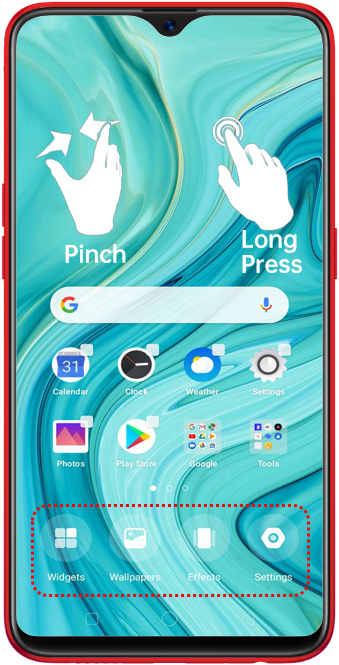
There are two ways to quickly manage your Home Screen:
1. Pinch with two-fingers at any part of the Home Screen.
2. Long press a blank space on the Home Screen.
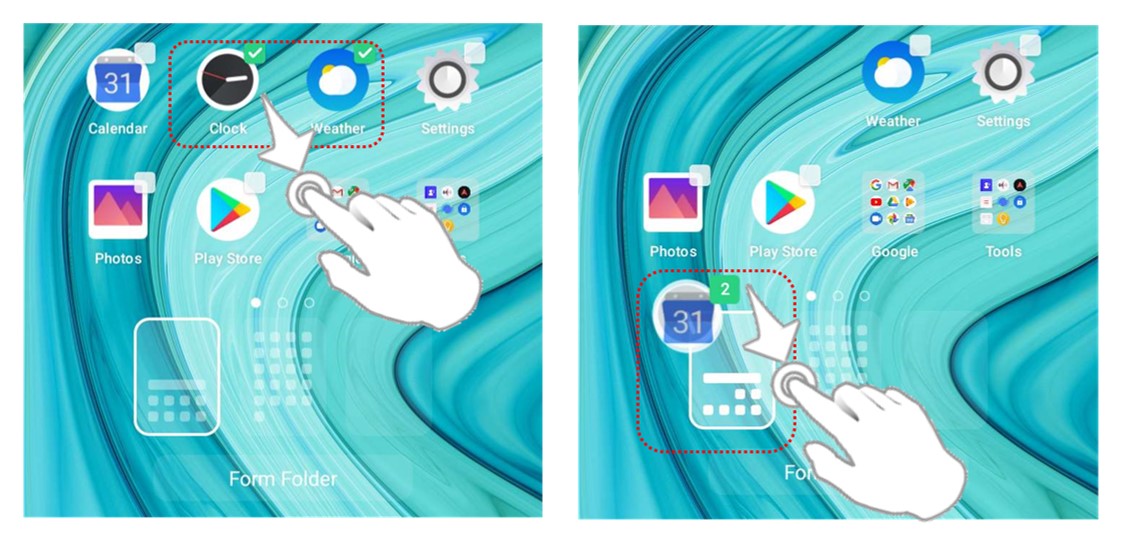
Add multiple selections and group them
Either pinch or long-press Home Screen and choose apps you want to group together. Drag them or drag a single app and combine it with another app to create a new folder or add to an existing one.
* Pictures, settings, and paths might differ from those of your phone, but these won't affect the description in this article.
Sponsored Deals
Advertisement · Hand-picked offers, refreshed regularly
These are paid/affiliate advertisements from our partner store and are not related to OPPO or OPPO spare parts.
Related Articles
Sponsored Deals
Advertisement · Hand-picked offers, refreshed regularly
These are paid/affiliate advertisements from our partner store and are not related to OPPO or OPPO spare parts.