OPPO Wireless Speaker Service Manual
Contents
1. Purpose and Requirements
1.1 Purpose
1.2 Requirements
2.Product Introduction
2.1 Product Parameters
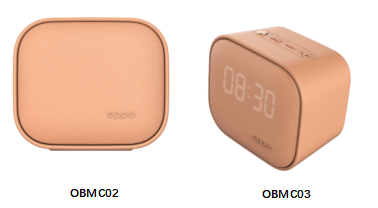
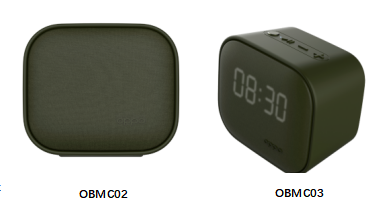
2.2 Model differences
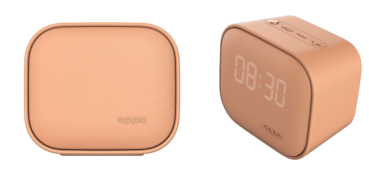
2.3 Product Color and Picture
3. After-sales Guide
3.1 After-sales policy
3.2 Warranty Instruction
3.3 Maintenance Instruction
3.4 Warranty Time Specification
4.Instruction
4.1 Bluetooth Pairing
4.2 Pairing with Other Devices
4.3 Setting Time(OBMC03)
4.4 Charging
5 Functional test
5.1 Bluetooth connection test
5.2 Pairing with Other Devices test
5.3 Time Setting test(OBMC03)
![]() 1. Purpose and Requirements
1. Purpose and Requirements
1.1 Purpose
This document introduces the product parameters, instructions for use, and after-sale policies of the OPPO Wireless Speaker. It is used to guide the customer service center to properly handle the after-sale work of the product.
1.2 Requirements
The customer service center must operate in strict accordance with after-sales policies and order specifications.
![]() 2.Product Introduction
2.Product Introduction
2.1 Product Parameters
| Name | OPPO Wireless Speaker |
| Band | OPPO |
| Model | OBMC02/OBMC03 |
| Color | Green/Pink |
| Button | On/Off button *1 Play/Pause button *1 Volume -/Previous track button *1 Volume +/Next track button *1 |
| Indicator | Power Indicator |
| Interface | Micro-USB(OBMC02)/Type-C(OBMC03) |
| Bluetooth version | 5.0 |
| Music play time(50% volume) | 8h |
| Bluetooth transmitting power | ≦4dBm |
| Input | 5V⎓1A |
| Wireless range | 10m |
| Charging time | 3h |
| Battery type | Rechargeable lithium-ion battery |
| Battery capacity | 750mAh |
* Battery capacity, Music play time, Charging time are measured under OPPO laboratory normal temperature (25 ° C) environment, using OPPO standard charger, the actual measured data may vary due to factors such as the use environment and individual charger differences.
* Specifications are laboratory test data.
2.2 Model differences
| Model | Functions | USB interface |
| OBMC02 | No Clock display | Micro-USB |
| OBMC03 | With Clock display | Type-C |
2.3 Product Color and Picture
(1) Pink
(2)Green
![]() 3. After-sales Guide
3. After-sales Guide
3.1 After-sales policy
The After-sales policy is implemented in accordance with local regulations.
3.2 Warranty Instruction
① In warranty period, if the Wireless Speaker has non-artificial damage and the quality of the product itself, the Wireless Speaker accessories can be replaced separately;
② In warranty period, if the USB Charging cable has non-artificial damage and the quality of the product itself, the USB Charging case accessories can be replaced separately;
3.3 Maintenance Instruction
①If the wireless speaker is faulty or missing, the customer can pay for the replacement of the wireless speaker accessory separately.
②If the USB Charging cable is faulty or missing, the customer can pay for the replacement of the wireless speaker accessory separately.
3.4 Warranty Time Specification
1.With proof of purchase: calculate the warranty time with the purchase invoice and warranty card;
2. No proof of purchase: provide the box and identify the SN code, and use the SN code information to query and calculate the warranty date.
3. In the case where the invoice, warranty card, packing box, online purchase record, SN code information query and calculation of the warranty date cannot be provided, No warranty is provided.
![]() 4.Instruction
4.Instruction
4.1 Bluetooth Pairing
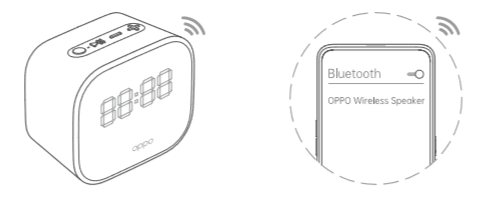
1. When using for the first time, the Bluetooth speaker prompts "Power on, Bluetooth Pairing", and the speaker will automatically enter the pairing state (the green indicator flashes quickly).
2. Turn on the phone's Bluetooth:
3. Bluetooth search for "OPPO Wireless Speaker", select and complete pairing, and the speaker will prompt "Connected". (The green indicator stops flashing)
* Two minutes after the speaker is turned on, if there is no Bluetooth pairing, the speaker will automatically turn off *
4.2 Pairing with Other Devices
Press and hold the Pause/ Play button untill the Indicator flashes green rapidly, and you hear "Bluetooth Pairing" tones. The speaker then is available for pairing with a new device
4.3 Setting Time(OBMC03)
1.Press and hold the Power button and the Pause / Play button for 2 seconds to enter the time setting mode.
2.When the hour setting blinks, press the Volume+ or Volume - button to adjust the hour. Press the Pause / Play button to confirm the hour and switch to the minute setting.
3.When the minute setting blinks, press the Volume + or Volume - button to adjust the minute. Press the Pause / Play button to save the setting.
4.4 Charging
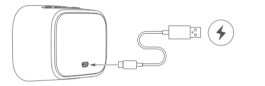
Please use the compatible USB cable and OPPO power adapter to charge the product.
Battery status:
• Low battery: The indicator light flashes red slowly, please charge in time.
• Charging: The indicator light is steady red.
• Charging completed: the indicator light is steady green when turned on; the indicator is off when turned off.
![]() 5 Functional test
5 Functional test
5.1 Bluetooth connection test
1.Pairing test: the mobile phone Bluetooth search for "OPPO Wireless Speaker", you can select and complete the pairing and the test is normal.
5.2 Pairing with Other Devices test
Press and hold the Pause/ Play button untill the Indicator flashes green rapidly, and you hear "Bluetooth Pairing" tones. The speaker then is available for pairing with a new device,then the test is ok
5.3 Time Setting test(OBMC03)
1.Press and hold the Power button and the Pause / Play button for 2 seconds to enter the time setting mode.
2.When the hour setting blinks, press the Volume+ or Volume - button to adjust the hour. Press the Pause / Play button to confirm the hour and switch to the minute setting.
3.When the minute setting blinks, press the Volume + or Volume - button to adjust the minute. Press the Pause / Play button to save the setting.
The above steps can be set and the test is normal.
Sponsored Deals
Advertisement · Hand-picked offers, refreshed regularly
These are paid/affiliate advertisements from our partner store and are not related to OPPO or OPPO spare parts.
Related Articles
Sponsored Deals
Advertisement · Hand-picked offers, refreshed regularly
These are paid/affiliate advertisements from our partner store and are not related to OPPO or OPPO spare parts.