คู่มือการใช้งานบริการการรับประกันระหว่างประเทศสำหรับ OPPO Global Service Center
1. จุดประสงค์
เพื่อเป็นคู่มือในการใช้การบริการการรับประกันระหว่างประเทศ
2. พื้นที่
ทุกศูนย์บริการต่างประเทศ
3. ขั้นตอนการรับประกันระหว่างประเทศ
The operating procedures for IWS
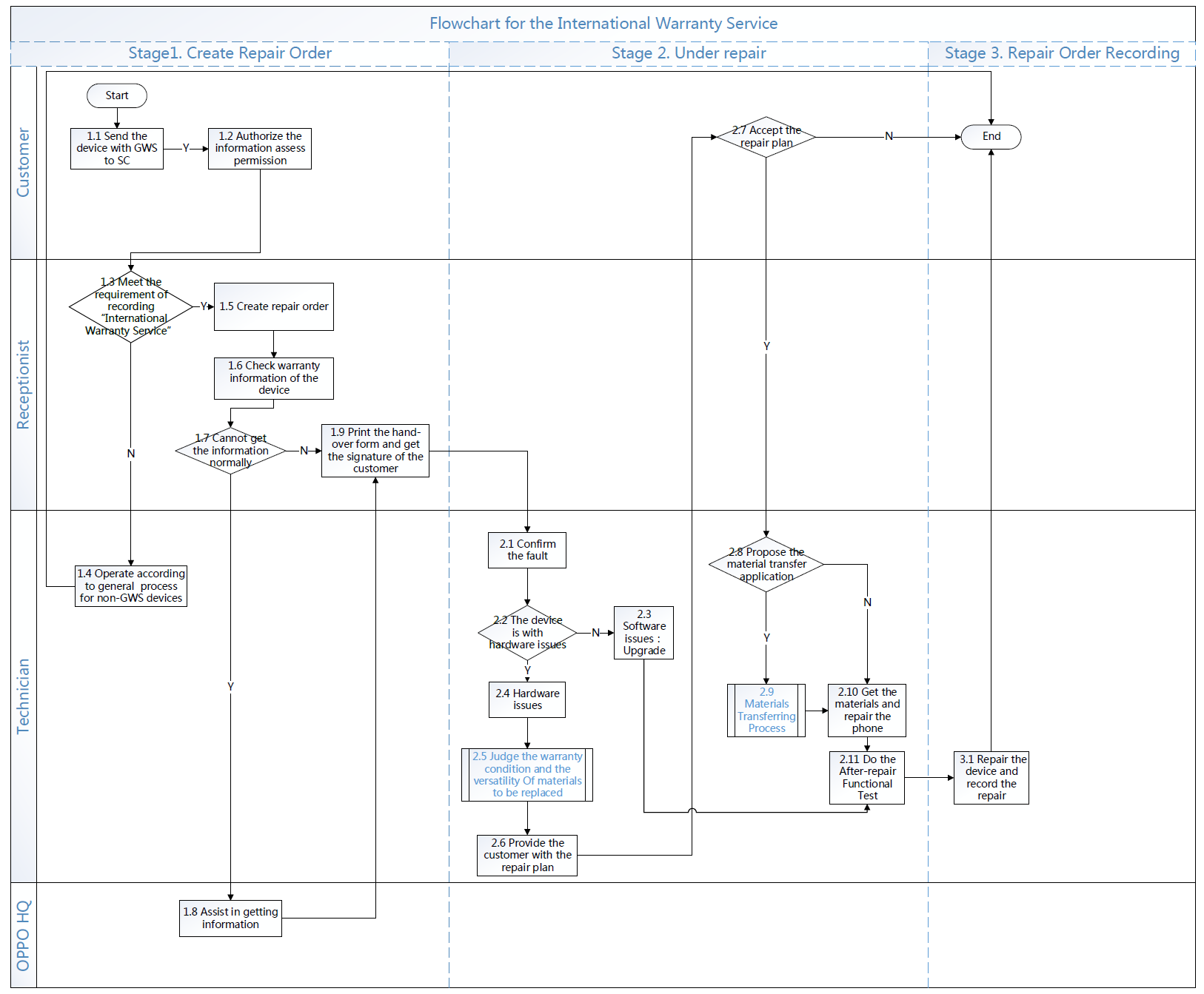
Detailed description for service procedures:
ขั้นตอนที่ 1 : ขั้นตอนระบบใบรับงานแบบใหม่
1.1 การส่งซ่อมเครื่องต่างประเทศ
กระบวนการนี้จะมีผล เมื่อเครื่องที่ส่งรองรับบริการรับประกันระหว่างประเทศ
1.2 ข้อจำกัดการใช้สิทธิ
ลูกค้าจะต้องอนุญาตข้อมูลที่เกี่ยวข้อง มิฉะนั้นศูนย์บริการมีสิทธิ์ปฏิเสธการ
1.3 การบันทึกการรับประกันระหว่างประเทศ
Record “International Warranty Service” in repair orders has to meet two conditions:
① The device belongs to other countries or regions;
② The customer purchases the device from its origin area.
Receptionists should confirm that whether the customers’ information is matched with system, if it is not matched, the purchase certificate, information of purchase area and purchase date should be provided from the customer. Service centers reserve the right to refuse to provide services if the customer’s devices are cross-regional which means the device was purchased from unofficial channels.
1) Overseas WCSM system& Indian ICSM system Guide for Repair Order Recording
① Guide for Repair Order Recording :
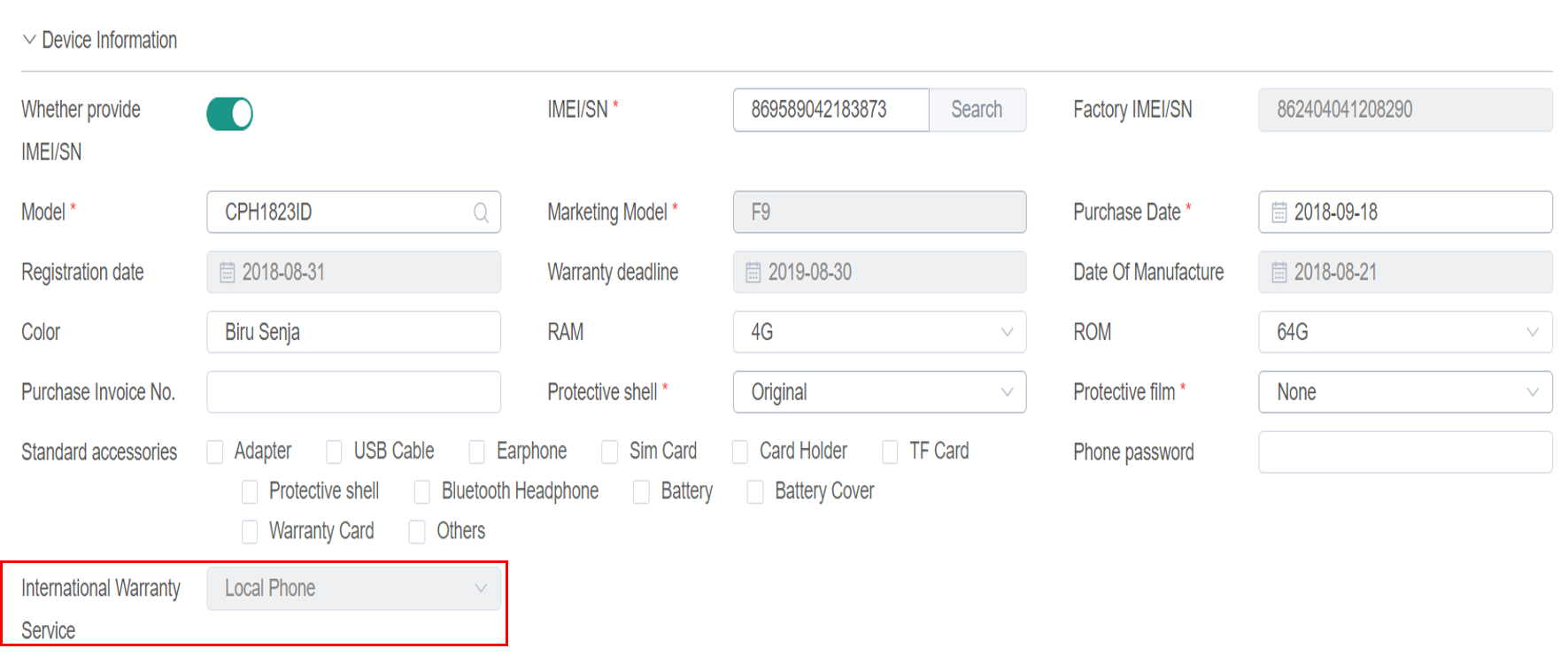
The systems will appear the option “International Warranty Service” When the input device's IMEI query is an IWS model . if the devices belong to other countries and regions, choose Yes /No /unconfirmed according to the actual situations; When it is local device, there “International Warranty”would show the option “local phone”; If the IMEI SN of the mobile phone cannot be obtained, you can select the device model. When the model is choose as an IWS model, the system will appear the option"International warranty service" , you can choose "Yes" / "No" /“unconfirmed”/ "Local phone" according to the actual situation; When it is not IWS model device, there would not show the option “International Warranty Service”.
② Uploading Repair Orders:
Check the information including devices belonging region, E-card registration date and the warranty expiration date via IMEI code in the checking system. If it meets the conditions to record the “International Warranty Service”, record “XX” (belonging region code of the device) International Warranty Service” in the Remark on the repair order.
③ The Record Interface of Overseas WCSM system, Indian System:
When it is not IWS model device, there would not show the option “International Warranty Service”.
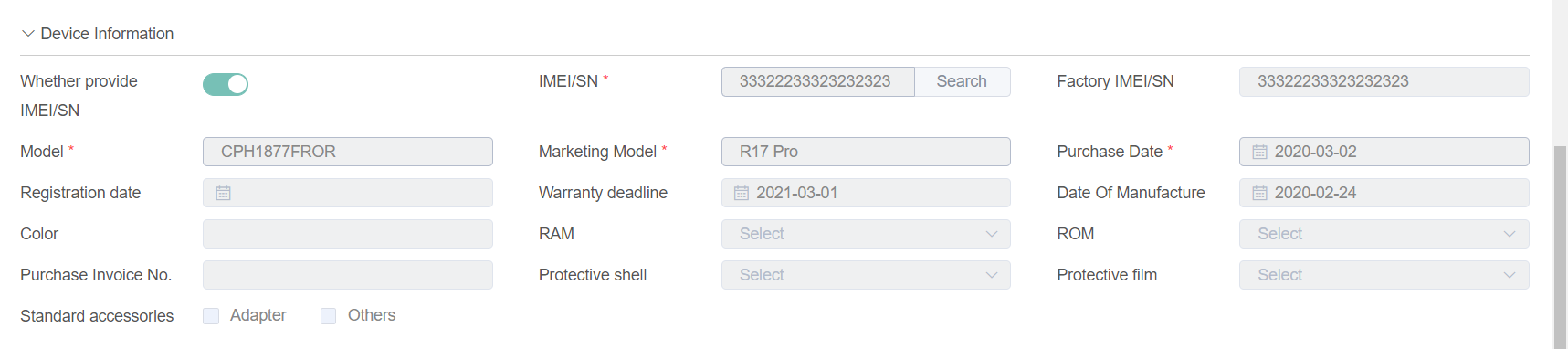
The systems will appear the option “International Warranty Service” When the input device is an IWS model . if the devices belong to other countries and regions, choose Yes /No /unconfirmed according to the actual situations; When it is local device, there “International Warranty”would show the option “local phone”; If the IMEI SN of the mobile phone cannot be obtained, you can choose the device model. When the model is choose as an IWS model, the system will appear the option "International warranty service" , you can choose "Yes" / "No" /“unconfirmed”/ "Local phone" according to the actual situation; When it is not IWS model device, there would not show the option “International Warranty Service”.
2) Salesforce system Guide for Repair Order Recording
① Guide for Repair Order Recording,:
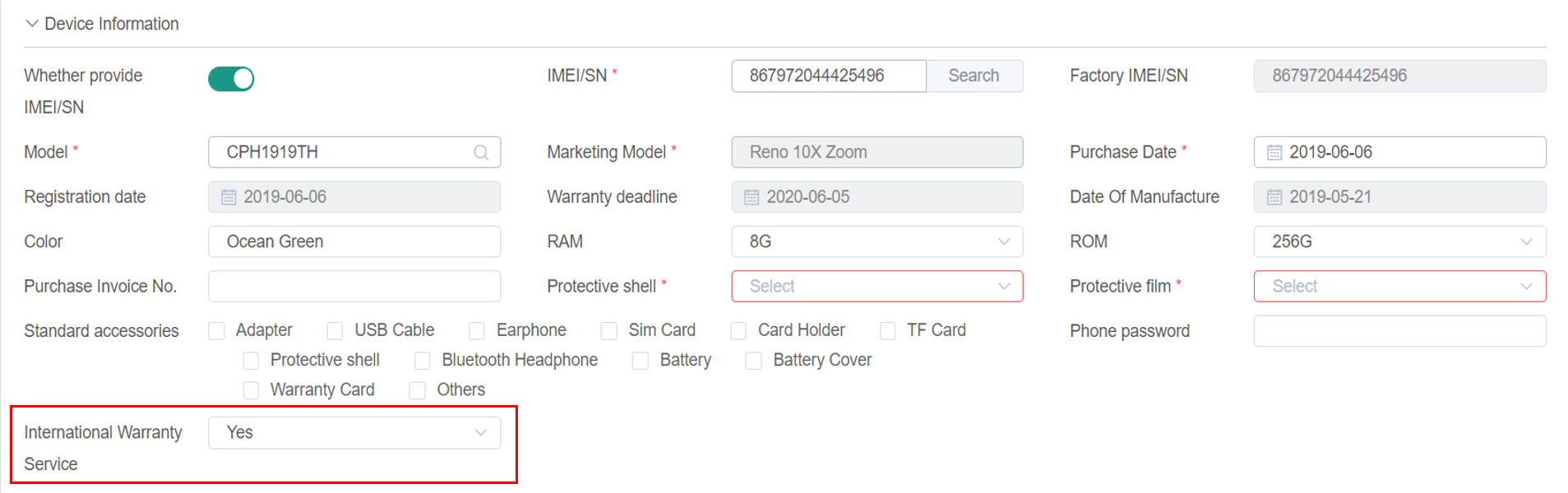
The systems will appear the option “International Warranty Service” if the devices belong to other countries and regions, choose Yes or No according to the actual situations;
② Uploading Repair Orders
Check the information including devices belonging region, E-card registration date and the warranty expiration date via IMEI code in the checking system. If it meets the conditions to record the “International Warranty Service”, record “XX” (belonging region code of the device) International Warranty Service” in the Remark on the repair order.
③ The Record Interface of Salesforce System, Overseas WCSM system, Indian System and OCSS System:
When it is local device, there would not show the option “International Warranty Service”
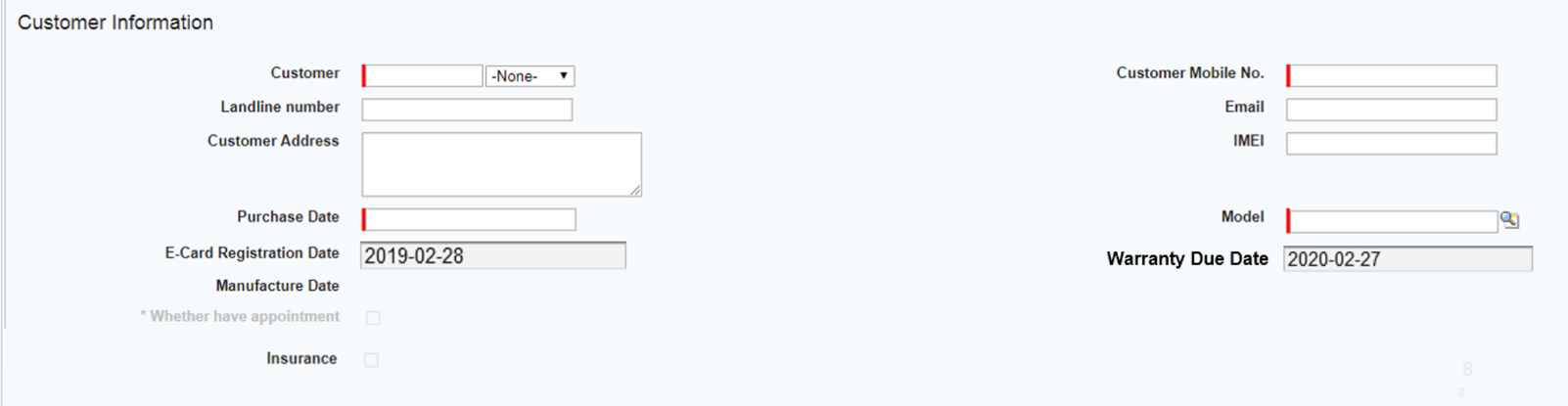
When the device belongs to other countries or regions, the recording interface will appear the option “International Warranty Service”. Choose “Yes” or “No” according to the actual situations
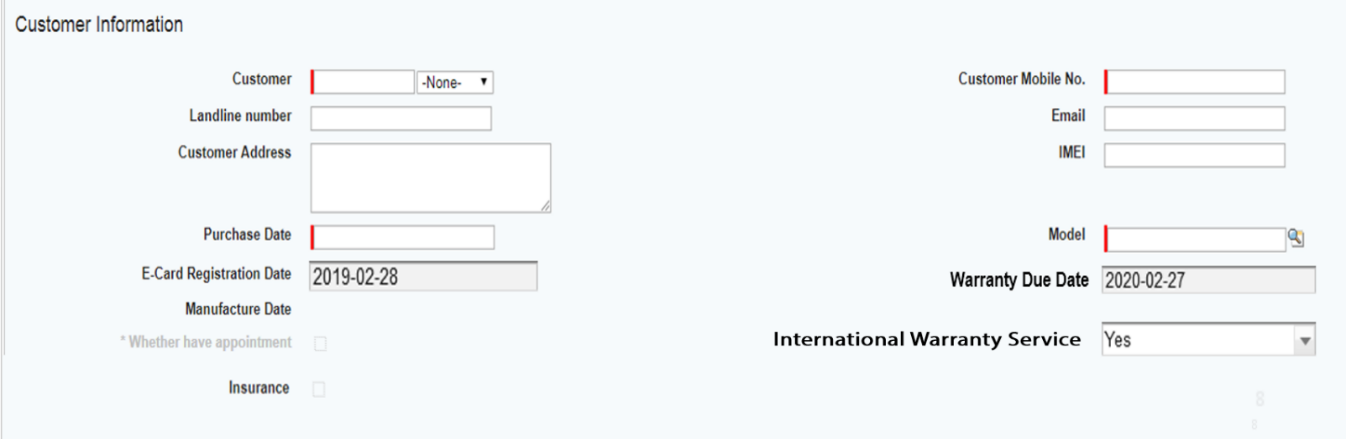
3) Examples:
① Local devices: “International Warranty Service” recording is not needed. Record the faulty device like other devices in the repair order;
② Non-local devices: Record “International Warranty Service” if the customers’ information is matched with system, and the warranty policy is subject to device’s attribution; if customer’s information is not matched with the information showed in the system and the device is a cross-regional device, choose “No” in the option “International Warranty Service” and service centers reserve the right to refuse to provide services.
If it meets conditions to record “International Warranty Service”, go to procedure 1.5; if it doesn't, go to procedure 1.4.
1.4 Operate according to general process for non-IWS devices
When customers’ devices don’t meet the condition to record “International Warranty Service”, take normal maintenance and recording process.
1.5 Create the repair order
Once the customers’ devices meet the conditions to record “International Warranty Service”, record the relevant information such as IMEI, customer’s name, and contact information.
1.6 Check the warranty information of the device
Check the warranty information in checking system including E-card registration date, warranty expiration date. For IWS, the warranty policy is subject to device’s attribution, the maintenance costs are subject to repair areas.
① If the customer can provide valid purchase certificate, the purchase date on the certificate is when the warranty is in effect;
② If the customer cannot provide valid purchase certificate, the registration date for E-card in the system is when the warranty is in effect;
③ If the customer cannot provide valid purchase certificate, nor the E-card has not been registered, the date that 90 days after manufacture date is when the warranty is in effect.
④ If the customer cannot provide valid purchase certificate, and the device is sure to be a cross-regional device, service centers reserve the right to refuse to provide services.
Checking interface in the system:
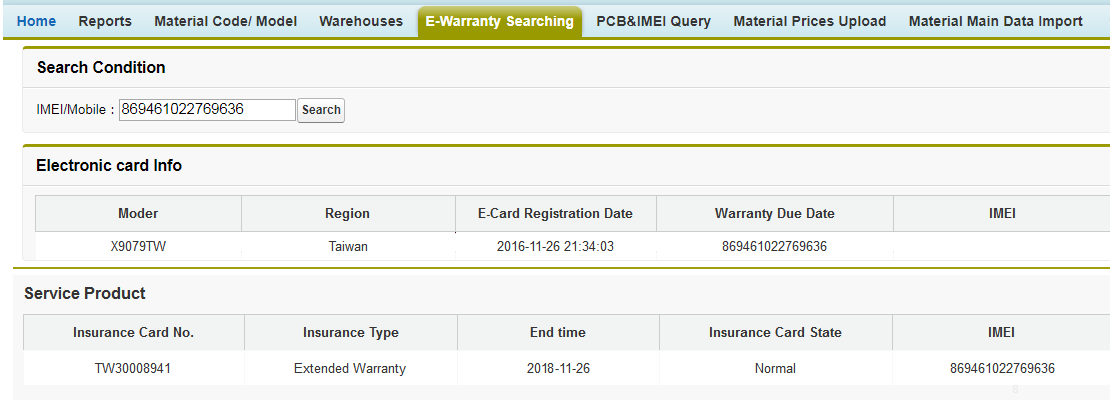
1.7 Cannot get the information normally
If there is any abnormal situations while checking in the system, please contact HQ in time, and go to procedure 1.8; if there is no abnormal situations, go to procedure 1.9.
1.8 Assist in getting information
Technical support team in HQ will help to deal with the abnormal situation in time once receiving feedback from customer service staff.
1.9 Print the hand-over form and get the signature of the customer
After recording the relevant information into repair orders, receptionists shall print the hand-over form and to ask for the approval signature from the customer.
Stage 2: Under Repair
2.1 Confirm the fault
Technicians make troubleshooting to confirm the faults.
2.2 The device is with hardware issues
According to the causes of faults, classify the type of issues: Software issues, go to procedure 2.3; hardware issues, go to procedure 2.4.
2.3 Software Issues:Upgrade
Flash the devices for customers when it’s software issue. Pay attention that whether the software packages are universal for different regions, if they are not, please contact technical team of HQ in time to get the corresponding software packages.
2.4 Hardware issues
For hardware issues, the warranty situations for the device and the versatility of the materials should be confirmed.
2.5 Judge the warranty condition and the versatility Of materials to be replaced
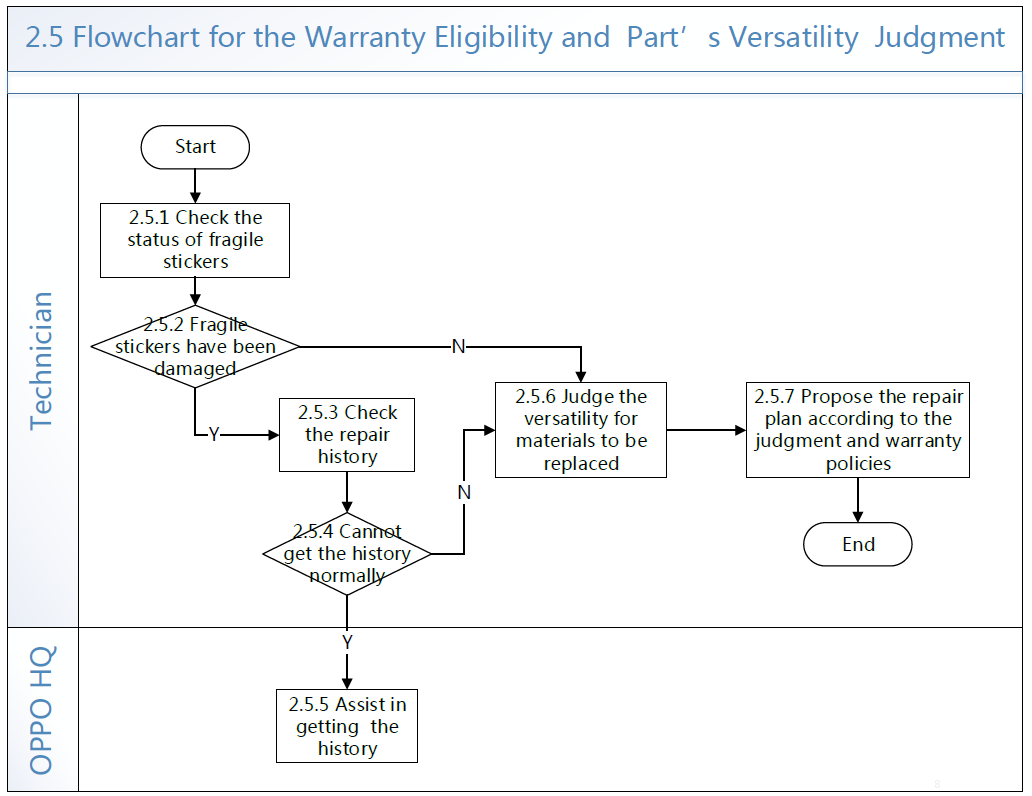
2.5.1 Check the status of fragile stickers
When technicians disassemble the device for repair, the status of fragile paste must to be checked to judge whether the device has repair records or had been disassembled by non-OPPO authorized service centers.
2.5.2 Fragile stickers have been damaged
The status of fragile pastes include:
① The fragile pastes are intact, this is the repair for the first time;
② The original fragile pastes are broken and there are OPPO maintenance fragile pastes (the black means normal maintenance, the red means liquid maintenance);
③ It’s non-OPPO fragile paste or there is no fragile paste, the device had been disassembled by non-OPPO authorized service centers, it’s out of warranty.
2.5.3 Check the repair history
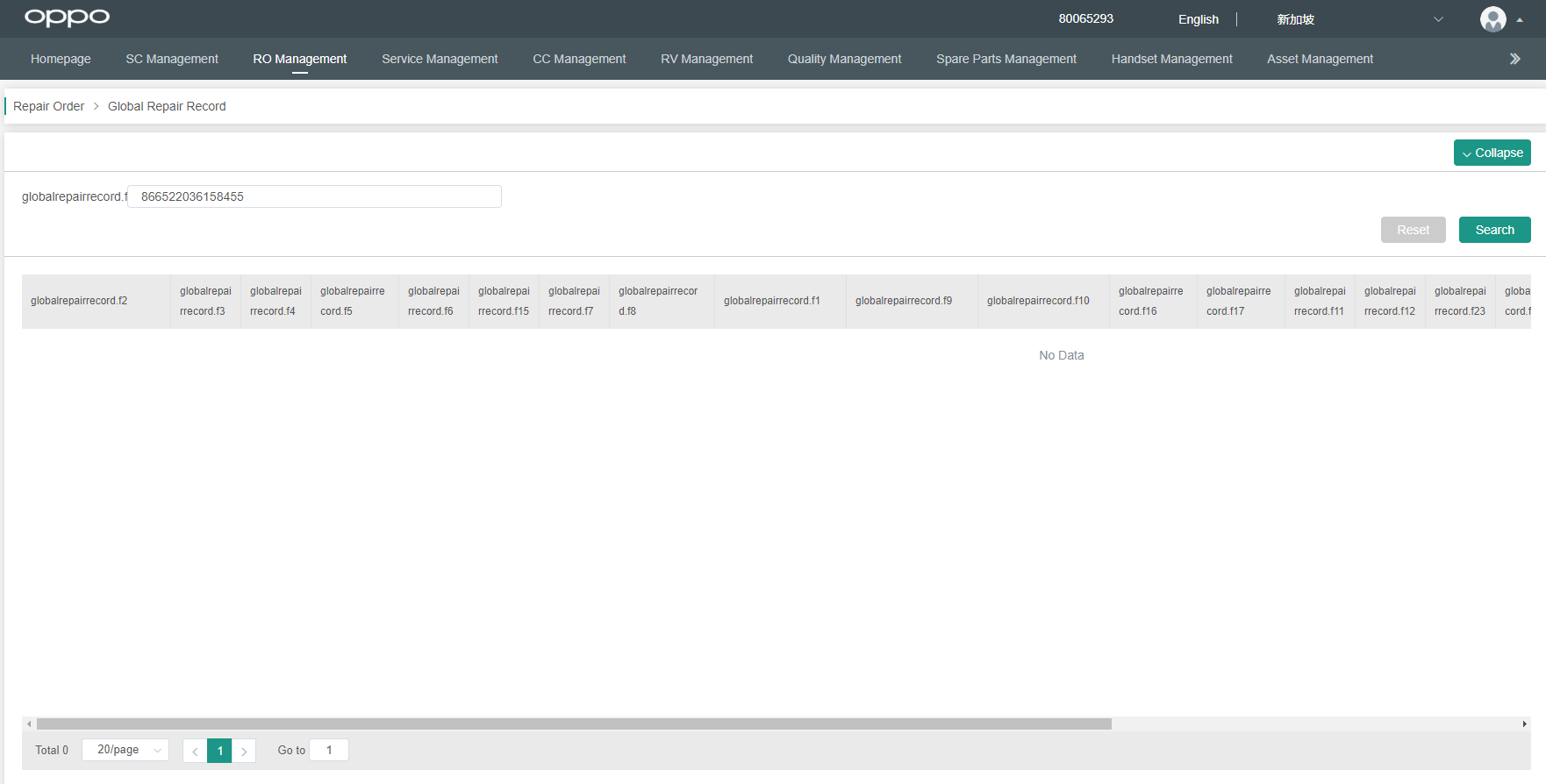
When the original fragile pastes are broken, Use the "Global repair Record " in the WCSM system & Indian ICSM system & OCSS system to check the equipment repair records, and determine the current warranty status of the devices and components based on the service policies of the devices belonging regions.
As shown:
2.5.4 Cannot get the history normally
When there is any abnormal situations while information checking such as no results showed up, please contact technical team of HQ in time.
2.5.5 Judge the versatility for materials to be replaced
The materials versatility judgement includes two aspects: appearances and functions.
Appearances: Due to the different regulations between different countries and regions, as well as the different versions on markets, there will be differences in appearance on some materials, such as silk screen on battery covers and material colors. The differences in appearance don’t affect the functions.
Functions: Due to the different requires of regulations between different countries and regions, there will be functional differences on related materials, such as adaptor, SIM card holder and mainboard.
① Adaptor: Service centers can only provide the local standard adaptor, make customers informed that they may need to use conversion sockets after going back to purchase regions.
② SIM card holder: After changing a dual-card holder for a single-card device, still only one SIM card is available. After changing a single-card holder for a dual-card device, only one SIM card is available, when the customers return to the places of purchase, the customers can go to OPPO service centers to replace the dual-card holder with single-card holder for free. (The single-card SIM card holder has no function and appearance failure).
③ Mainboard: The mainboard is quite special. Please pay more attention.
The mainboard involves the network certification regulations of each country or region. After the mainboard has been replaced at the repair region, the device may be unable to be used when customers return to the purchase region. In that case, the customer can go to the local service center for processing. The local service center judges warranty status based on the local warranty policies to process it. Areas involved: Turkey.
Find X & Reno 10X Zoom:
Mainboards from Turkey being replaced in other regions: Service centers should clearly inform the customer that due to Turkish local policy, after the device from Turkey is replaced with other regional standard mainboard, it can only be used for 6 months after returning to Turkey. After 6 months, the device cannot be used due to network lock. If the customer stays at the repair region only for a short time, it is recommended that the customer return to Turkey to get the mainboard repaired.
Mainboards from other regions being replaced in Turkey: Turkey should prepare some mainboards of Pakistan version. When replacing the Reno 10x Zoom mainboard from other regions: A. Replace the mainboard of Pakistan version in Turkey: 6 months later the device is unusable in Turkey due to the network lock, but it can be used normally in other regions; B. Replace the mainboard of Turkish version: It can be used normally in all areas except Pakistan, and the device will be locked in Pakistan after 6 months.
Find X2 series:
Mainboards from Turkey& Pakistan being replaced in other regions: Service centers should clearly inform the customer that due to Turkish& Pakistan local policy, after the device from Turkey& Pakistan is replaced with other regional standard mainboard, it can only be used for 6 months after returning to Turkey& Pakistan. After 6 months, the device cannot be used due to network lock. If the customer stays at the repair region only for a short time, it is recommended that the customer return to Turkey& Pakistan to get the mainboard repaired.
Mainboards from other regions being replaced in Turkey & Pakistan: Turkey & Pakistan should prepare some mainboards of Indonesia version. When replacing the Find X2 series mainboard from other regions: A. Replace the mainboard of Indonesia version in Turkey& Pakistan: 6 months later the device is unusable in Turkey& Pakistan due to the network lock, but it can be used normally in other regions; B. Replace the mainboard of Turkish version: It can be used normally in all areas except Pakistan, and the device will be locked in Pakistan after 6 months; C. Replace the mainboard of Pakistan version: It can be used normally in all areas except Turkish, and the device will be locked in Turkish after 6 months.
Note:
For some devices, devices of China Mainland version differ significantly from devices of other regions, so most of materials cannot be shared. When a device of China Mainland version is received for repairing, technicians should judge the material differences and provide the customer with a repair plan according to the versatility of materials. (If the repair plan involves the material transfer process, the plan can only be provided when the legal compliance of the plan has been confirmed by HQ).
2.5.6 Propose the repair plans according to the judgment and warranty policies
According to the materials versatility and devices’ warranty status, service centers provide repair plans for customers, and the charge of fee is subject to that of place of maintenance.
2.6 เตรียมแผนการซ่อมให้กับลูกค้า,ประกอบไปด้วย:ประเภทการซ่อม(ในประกัน/นอกประกัน/ใน+นอกประกัน) 、ค่าใช้จ่าย、ขอบเขตการซ่อม ศูนย์บริการใช้วัสดุในพื้นที่เพื่อให้บริการแก่ลูกค้า เพื่อให้มั่นใจว่าลูกค้าจะใช้งานตามปกติในพื้นที่นั้น หากลูกค้าไม่ยอมรับความแตกต่างของวัสดุ ศูนย์บริการแนะนำให้ลูกค้ากลับไปยังสถานที่ซื้อเพื่อทำการซ่อมแซม ในกรณีพิเศษหากลูกค้ามีปฏิกิริยารุนแรงคุณสามารถเข้าสู่กระบวนการเปลี่ยนเครื่องกรณีพิเศษ
หมายเหตุ:
การเปลี่ยนอะไหล่หรือการเปลี่ยนเครื่อง จะต้องมีการติดต่อและยืนยันกับสำนักงานใหญ่
1 การเปลี่ยนอะไหล่: หากวัสดุไม่สามารถใช้ด้วยกันได้ หากลูกค้าไม่ยอมรับความแตกต่างของวัสดุ ในกรณีพิเศษดังกล่าวสามารถจัดเตรียมอะไหล่ให้ลูกค้าได้ อะไหล่ปกติและอะไหล่ด่วน
อะไหล่ปกติ ไม่คิดค่าใช้จ่ายลูกค้า
อะไหล่ด่วน คิดค่าใช้จ่ายลูกค้า 60 ดอลลาร์สหรัฐ
อะไหล่ปกติ: จัดส่งพร้อมกับคำสั่งปกติของตัวแทน การซื้อวัสดุในแต่ละพื้นที่และเวลาที่จะจัดส่งไปยังเครือข่ายรวมเป็นเวลา 1 เดือน
อะไหล่ด่วน: เอเชียตะวันออกเฉียงใต้และเอเชียแปซิฟิกและยุโรปและเอเชียใต้ – การถ่ายโอนใช้เวลา 2 วันทำการ
การเปลี่ยนเครื่องกรณีพิเศษ ในกรณีพิเศษ หากอะไหล่มีปัญหา หรือลูกค้าไม่พอใจ สามารถให้ลูกค้าเปลี่ยนได้ ตามเอกสารบันทึกพิเศษ V1.0 เครื่องที่เปลี่ยนอาจไม่เหมือนเครื่องเดิมของลูกค้า
2.7 ยืนยันว่าลูกค้ายินยอมวิธีการซ่อมหรือไม่ หากยอมรับ 2.8 หากไม่ยอมรับ นำเครื่องคืนให้ลูกค้า
2.8 หากวิธีการซ่อม ต้องมีการถ่ายโอนอะไหล่ ให้ไปที่ขั้นตอน 2.9
2.9 ขั้นตอนการถ่ายโอนอะไหล่(ศูนย์บริการ&สำนักงานใหญ่)
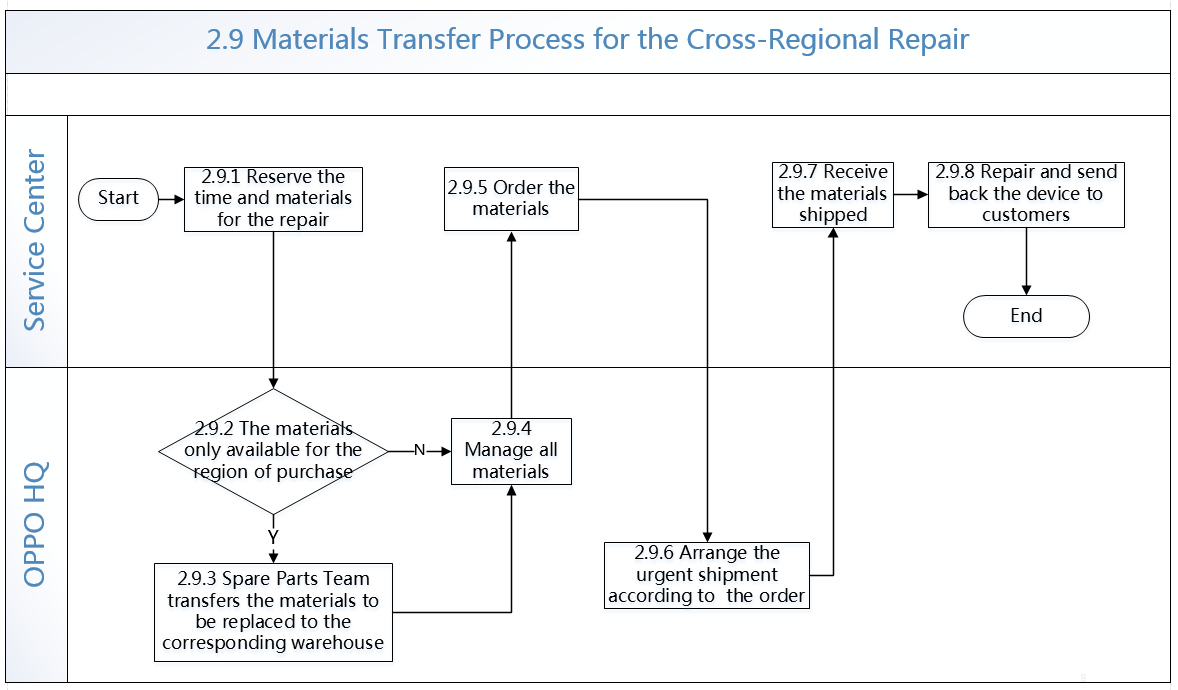
2.9.1 นัดหมายการซ่อม ตรวจสอบขอบเขตการซ่อมและอะไหล่ที่ต้องใช้ สามารถเสนอเครื่องยืมให้ลูกค้า
2.9.2 ตรวจสอบว่าการเบิกอะไหล่เป็นอะไหล่เดียวกับที่พื้นที่มีหรือไม่
หากใช่ ไปขั้นตอนที่ 2.10.3 หากไม่ใช่ไปที่ขั้นตอน 2.10.4
2.9.3 ทางทีมอะไหล่ถ่ายโอนอะไหล่
2.9.4 รวบรวมอะไหล่ที่ต้องการ
2.9.5 ศูนย์บริการเบิกอะไหล่ตามจริง
2.9.6 หลังจากที่สำนักงานใหญ่ได้รับการสั่ง จะจัดการส่งอะไหล่เร่งด่วน
2.9.7 หลังจากอะไหล่มาถึงพื้นที่ อาจมาถึงที่คลังกลางทั้งหมดก่อน แล้วจึงส่งต่อไปยังศูนย์บริการ
2.9.8 เมื่อซ่อมเสร็จ นำเครื่องคืนลูกค้า แจ้งลูกค้า หากเครื่องต้องซ่อมนาน เสนอเครื่องยืมเพื่อให้ลูกค้าใช้
2.10 นำอะไหล่ไปซ่อม ในระหว่างการซ่อม วิเคราะห์ว่าเป็นปัญหาที่เกี่ยวกับเมนบอร์ดหรือไม่ หากเป็นปัญหาที่เกี่ยวกับเมนบอร์ด หลังจากเปลี่ยนเมนบอร์ด ต้องทำตามคำแนะนำจากการมาตรฐานการซ่อม มิฉะนั้นฟังก์ชั่นที่เกี่ยวข้องอาจมีผลกระทบ
2.11 การทดสอบ หลังจากซ่อมซอรฟแวร์หรือฮาร์ดแวร์ ต้องทำตามเงื่อนไขและคู่มือ และทำการทดสอบ ในขั้นตอนนี้เป็นขั้นตอนที่สำคัญ มิฉะนั้นฟังก์ชั่นที่เกี่ยวข้องอาจมีผลกระทบ
ขั้นตอนที่ 3: การลงใบรับงานซ่อม
3.1 หลังจากซ่อมเสร็จ ต้องเปิดใบรับงานซ่อม ลงข้อมูลตามจริง อธิบายเกี่ยวกับอาการเสียและเงื่อนไขต่างๆให้ลูกค้าทราบ
ข้างต้น หากกระบวนการดำเนินงานของศูนย์บริการในการรับประกันระหว่างประเทศสิ้นสุดลง หากศูนย์บริการมีบริการพิเศษอื่นๆ การตัดสินใจและการดำเนินงาน สามารถทำได้บนประเทศที่ไม่ขัดแย้งกับการรับประกันระหว่างประเทศ
4. คู่มือเตรียมการ
แผนอะไหล่สำหรับแต่ละรุ่นและภูมิภาคจะขึ้นอยู่กับอีเมลของโรงงานเมื่อมีการเปิดตัวโมเดล
5. กฎการตรวจสอบ
5.1 การกรอกใบรับงาน
หากลงในระบบว่าเป็นการรับประกันระหว่างประเทศ แต่รหัสเครื่องเป็นรหัสประเทศเดียวกับประเทศที่เปิดใบรับงาน แสดงว่าใบรับงานนั้นเป็นเท็จ
5.2 การตรวจสอบ
การตรวจสอบและเงื่อนไข อ้างอิงตามการตรวจสอบใบรับงานปกติ หากภายหลังมีการเปลี่ยนแปลง กรุณาติดตามการอัพเดท
6. เอกสารเพิ่มเติม
6.1 The Content and Instruction of International Warranty Service
6.2 The Flow Chart of International Warranty Service for Service Center
6.3 OPPO Customer Service Warranty
6.4 Stipulations of OPPO Overseas Customer Service Center on Special Filing_V1.0
6.5 OPPO Overseas Customer Service System Assessment Guidance 2019
If you have any questions, please contact HQ Max, WeChat ID:13532648225, e-mail: wst@oppo.com.
Sponsored Deals
Advertisement · Hand-picked offers, refreshed regularly
These are paid/affiliate advertisements from our partner store and are not related to OPPO or OPPO spare parts.
Related Articles
ข้อกำหนดการจัดการลูกค้าฝ่ายบริการลูกค้าของ OPPO ในต่างประเทศสำหรับเครื่องยกเลิก V1
Sponsored Deals
Advertisement · Hand-picked offers, refreshed regularly
These are paid/affiliate advertisements from our partner store and are not related to OPPO or OPPO spare parts.