OPPO Enco M31 FAQ
Views: 5 • Likes: 0
Contents
1 Product Information2 Charging & Power Consumption & Lighting
3 Appearance & Structure & Accessories
4 Features & Tips
5 Other Questions
1 Product Information
1.1 product weight
The whole product weighs about 22g.
1.2 Product Size
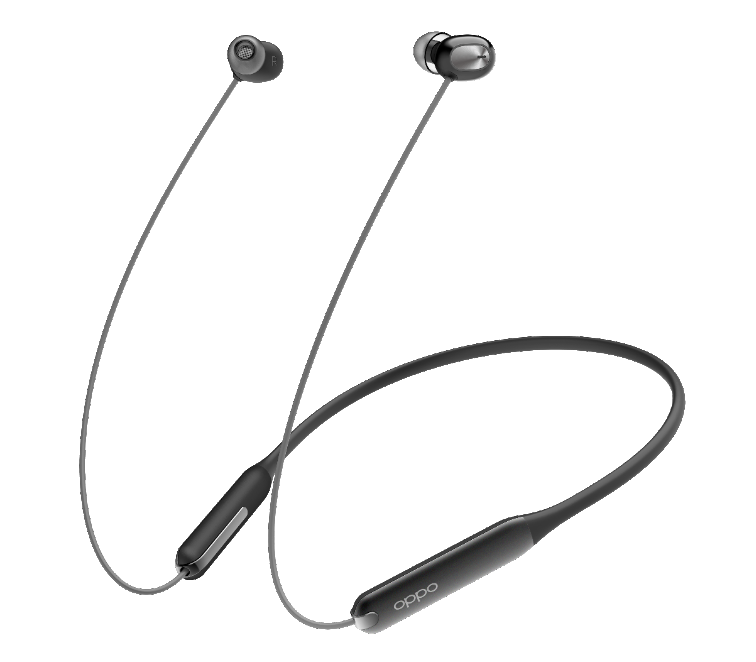
Headphone total length:860mmTotal neck ring length:280mm
Headphone cable length:225mm
Headphone length * width * height:17.3*12.8*19mm
Electronic warehouse thickness:8mm
Electronic warehouse length:52mm
1.3 Bluetooth version
Bluetooth v5.0 is backward compatibleAndroid system and IOS system can be connected, no APP is needed to connect to Bluetooth.
Audio, Bluetooth protocol:
Audio decoding protocol:LDAC,AAC,SBC
Bluetooth transmission protocol:BLE/HFP/A2DP/AVRCP
1.4 Bluetooth search name
The Bluetooth name found was:OPPO Enco M31
1.5 Certified product
The product has passed SRRC, CE safety certification and BQB Bluetooth certification.
1.6 Environmental requirements
Products meet ROHS, HF, REACH environmental requirements.
1.7 Headphone sensitivity,frequency and impedance
Horn sensitivity: 101.9dB在1kHzFrequency response:20Hz--20kHz
Speaker rated impedance:32Ω
1.8 Version & Color & Coding
| Domestic sales | 6670001 | EWN10 Black |
| 6670002 | EWN10 Green | |
| 6670003 | EWN10 Pink | |
| IN | 6670064 | EWN10 Black IN |
| 6670065 | EWN10 Pink IN | |
| 6670066 | EWN10 Green IN | |
| UN | 6670071 | EWN10 Black UN |
| 6670072 | EWN10 Pink UN | |
| 6670073 | EWN10 Green UN | |
| ID | 6670074 | EWN10 Black ID |
| 6670075 | EWN10 Pink ID | |
| 6670076 | EWN10 Green ID | |
| VN | 6670077 | EWN10 Black VN |
| 6670078 | EWN10 Pink VN | |
| 6670079 | EWN10 Green VN | |
| VNS | 6670080 | EWN10 Black VNS |
| 6670081 | EWN10 Pink VNS | |
| 6670082 | EWN10 Green VNS |
1.9 Compatibility and support
Supported mobile phones: all OPPO mobile phones, some mobile phones of other brands(Huawei,Xiaomi,Apple,Vivo and other mainstream mobile phone manufacturers basically support)
2 Charging & Power Consumption & Lighting
2.1 Endurance
Normal audio format music playback: 12h (AAC and SBC audio format, 50% absolute volume)High-quality audio format music playback: 8h (LDAC audio format, bit rate 660k, 50% absolute volume)
Call duration: 6h
The above is laboratory test data. The actual use time will fluctuate due to actual use. The factors affecting the battery life are:
(1)Playback volume: the larger the volume, the higher the power consumption, the shorter the actual use, the laboratory press 50% absolute volume for testing,
(2)Encoding format: LDAC high-definition encoding format will consume more power. Android 8.1 phones enter the OPPO Enco M31 in the phone-Settings-Bluetooth-PAIRED DEVICES, turn off the High-quality Audio switch, the encoding format will be reduced to SBC, and there will be longer battery duration. .
Apple phones use the AAC encoding format by default and are not affected by this. (3)Music Played: The power consumed to play passionate music is slightly higher.
(4)Mode selection: Switching to the Bass mode will consume more power, and the endurance time marked on the product is the endurance time measured in the Balance mode in the laboratory.
2.2 Charging speed
2C fast charge, the time from charge 0 to full (green light on) is 1 hour. You can listen to songs for about 3 hours after charging for 10 minutes (with high-quality audio format music playback).
2.3 Charging operation
When the phone ’s status bar shows that the headset ’s power is low (requires the phone to support the display of Bluetooth headset power), please charge the headset.The headset supports a type-c charging cable and a charger with an output of 5V. It is recommended that you use the original charging cable and a charger with an output of 5V-1A to charge the headset. The indicator will light up while charging, indicating that charging has started.
2.4 Charging environment
Battery-related parameters: The battery capacity of the headset is 88mAh, the input current is 5V-1A, and the charging speed is 2C.It is recommended that you charge the headset in an environment between 15 ° C and 45 ° C. Between 0 ° C and 15 ° C, the charging speed will slow down. When the temperature is below 0 ° C or above 45 ° C, the headset will not be charged.
The charging speed of the headset under different stability is as follows:
| Temperature/℃ | Specification charging current/(c) |
| <2 | Not charging |
| 2~17 | 0.5 |
| 17~43 | 2 |
| 43~50 | 0.5 |
| >50 | Not charging |
2.5 Light display
| LED Status | LED display | Description | |
|---|---|---|---|
| Green light | Red light | ||
| Power on |
Flash 1s | Light off | In low power state, only display boot UI |
| Off state | The indicator lights for 1 second | Light off | When shutting down, the green light is on for 1s, then shut down Only display shutdown UI in low power state |
| Pairing status | The indicator flashes 3 times every 1 second | Light off | In low power state: only display pairing UI, not display low power UI |
| Waiting for reconnect status | The indicator lights 330ms every 1 second | Light off | After manually disconnecting on the phone, wait for the phone to connect for 10 minutes In the low-power state: only display the low-power UI, do not display the waiting to connect back to the UI |
| Overreaching reconnect state | The indicator lights 330ms every 1 second | Light off | The overreaching reconnect state continues for 10 minutes In the low-power state: only display the low-power UI, do not display the over-the-counter UI |
| Reset state | Light off | The indicator flashes 3 times per second for 2 seconds | Clear Bluetooth device list, reset settings Low battery UI is not displayed in low battery state |
| Low power state | Light off | The indicator lights 150ms every 5 seconds | |
| Charging state | Light off | The indicator light is always on | Plug in USB to charge, it will shut down. Does not turn on during charging |
| Fully charged state | The indicator light is always on | Light off | |
| Abnormal charging | Light off | The indicator lights 330ms every 1 second | |
| Switch tone | The indicator lights for 200ms each time | The indicator lights for 200ms each time | Green and red lights flash alternately 5 times |
| USB upgrade UI | The indicator lights 5 times, 200ms each time | Light off | |
Reason:
2.6 Why does the indicator light not turn on when the headphones is charging?
(1) Headphones run out of baterry due to non-use for a long time(2) The indicator light has failed
Solution:
(1) After a period of normal charging, the battery is activated and the indicator light returns to normal.
(2) Press and hold the volume up and down keys simultaneously for 5s to restore the factory settings.
2.7 Why is the headset available only for a short time?
Reason:(1) Low headset power
(2) Higher volume will consume power faster
(3) The battery capacity will be relatively reduced in a low temperature environment
(4) Power consumption will be higher when playing music in high-quality audio formats
solution:
(1) It is recommended that you use the headset after it is fully charged
(2) It is recommended that you turn down the volume to see if the use time is normal
(3) Confirm the time difference after returning to normal temperature (25 ° C)
(4)You can switch off the High-quality Audio option in the mobile phone-settings-Bluetooth -PAIRED DEVICES (Android 8.1 or higher phones only support High-quality Audio. The High-quality Audio music playback time is 8 hours. Turning off subsequent flights will reach 12 hours, a 50% increase. No impact on call duration)
(5)Switch to balanced mode for longer battery duration
2.8 How to check the power of the headset on your phone
After the headset is connected to the mobile phone, the battery level of the headset will be displayed in the notification bar icon of the mobile phone. You can check the remaining battery level through the status of the battery compartment.Note: Some phones do not support the function of checking the power of the Bluetooth device in the notification bar. It is known that OPPO ColorOS 6.0 and above models support checking the power.
2.9 Is it possible to use the headset during charging?
No, the headset cannot be turned on during charging.
2.10 Is the headset battery replaceable?
No, the headset battery is a built-in lithium-ion battery and cannot be replaced.
2.11 Can all Type-C versions charge the headset?
All Type-C versions of the charging cable can be charged, but the power adapter uses a regular brand 5V / 1A charger as much as possible.
2.12 Can I charge it with a power bank?
Most charging treasures have a 5V1A output that can charge the headset, but you need to use a Type-C interface charging cable.Some power banks may not be able to charge the headset because they do not support low current output.
2.13 What should I pay attention to when charging?
(1) It is recommended to use a 5V / 1A regular brand charger;(2) Do not charge in high temperature, high heat, high humidity or low temperature environment;
(3) Do not use the headset after it is fully charged. The battery will run out after about 150 days of storage. It is recommended to charge it once every month to avoid battery damage.。
2.14 Can I charge the headset directly on my computer?
Yes, you can use the Type C charging cable to plug in your computer to charge the headset.
2.15 Can I charge my headset with a tablet or laptop charger?
The 5V / 1A charger can charge the headset. Some tablet or laptop chargers can charge the headset, but some tablet or laptop charger charging protocols are not supported, it is recommended to use a mobile phone charger to charge the headset.
3 Appearance & Structure & Accessories
3.1 What accessories are included?
The accessories include a Type-C interface charging cable. One pair of large, medium and small (L, M, S) ear tips, of which M has been assembled on the headset.Note:
(1) The included Type C charging cable only supports the charging function and does not support the data transmission function.
(2) No power adapter in accessories
3.2 How to choose ear tips and change ear tips?
There is a size difference between the left and right ears of each person, especially the ear canal. Some people may have large differences between the left and right ear canals, so the ear tips may not fit the ears. Different sizes of ear tips can be selected according to the size of the ear canal, not necessarily paired ear tips. Different size ear tips can be selected for the left and right ears. After replacing the appropriate ear tips, you will feel comfortable after inserting the earphones into the ear canal. There is no swelling caused by too large ear tips, or the ear tips are too small and easily fall off.Replacement method: Remove the ear tips from the horn holes, clean the dust from the horn holes, and choose the appropriate ear tips.
4 Features & Tips
4.1 Button operation
| Volume up button | Press | volume up |
| Press and hold | next track(1s) | |
| Volume down button | Press | volume down |
| Press and hold | previous track(1s) | |
| Multi-function button | Press | play/pause/answer the phone/hang up the phone |
| Press and hold | Pairing (3s) / Rejecting a call (2s, when being called) | |
| Press the Multi-function Button twice | Switching sound effects (Bass mode /Balance mode) | |
| Press the Multi-function Button three times. | Activate Voice Assistant | |
| Button combination | Multi-function & volume up button | Switch between Chinese and English prompts (10s) |
| Multi-function button & volume down button | Restore factory settings (5s) | |
| Volume Up button & Volume Down button | Switch to the last connected device (3s)v |
4.2 Magnetic switch
The headset does not have a power on / off button. Pulling on the magnetic head of the headset will turn it on, or it attract together will turn off .If the mobile phone is not connected when you pull the head of the headset, the headset will automatically enter the pairing mode;
If you have already connected a phone, it will automatically connect to the last connected phone.
Note:
(1) It will not shut down immediately after closing, but it will immediately disconnect the connection with the mobile phone. After 1 minute, it will automatically shut down if the headset is not turned on again. The startup sound is because the headset is not turned off, but just disconnected.
(2) When the headset is low on power or disconnected, disconnected at a distance, and fails to connect back, it will automatically shut down. If the headset needs to be restarted after the automatic shutdown, you need to turn off the headset and pull it again.
4.3 Bluetooth connection instructions
4.3.1 How to connect Bluetooth?(1)First you need to open your phone's Bluetooth settings;
(2)When using the headset for the first time, pull off the headset and press and hold the multifunction key for 3s. The headset will automatically enter the pairing state.
(3)When not pairing the headset with a new phone for the first time, long press the multi-function key for 3s while the headset is on. After the LED light flashes from slow to fast, the headset enters pairing state.
(4)Normal pairing: The name of the Bluetooth headset (OPPO Enco M31) will be searched, click to pair.
Quick pairing: Close to the OPPO phone that supports quick pairing, the phone will pop up a quick pairing prompt, and follow the on-screen instructions to complete the pairing.
* ColorOS 7.0 and above support the quick pairing function. For other models, please pay attention to subsequent OTA upgrades (but not including A series, F series, Reno2 Z, Reno2 F, R15, Reno3 (4G) and Reno3 Pro (4G) models).
4.3.2 How do I disconnect?
(1)The magnetic connection of the left and right earphone heads will disconnect the earphone and the mobile phone.
(2)Click the Bluetooth name after the device is connected, select Unpair and disconnect.
(3)Turn off the device's Bluetooth switch and disconnect.
4.3.3 Automatically reconnect (paired phones)
If the mobile phone that needs to be connected is the one that the earphone was connected to last time, pull the left and right earphone headphone and the earphone will automatically connect back.
note:
(1) The mobile phone must be within the transmission distance of the Bluetooth headset, and ensure that Bluetooth is turned on.
(2) Due to the characteristics of the Bluetooth headset, electromagnetic waves in your area may interfere with the Bluetooth connection, and the headset may appear silent or disconnected.
4.3.4 Connect / Switch other devices
(1) When the headset has been connected to a device, long press the multi-function key for 3s to pair with another device. At this time, the headset will record the two devices;
(2) When the headset is connected to a device, and the headset is not in a scene where sounds such as music, games, videos, calls are made, open the Bluetooth list of the other device, and click the name of the connected headset (such as OPPO Enco M31) Can switch to the device;
(3) On the premise that the headset has been connected to two devices, if one of the devices is connected at the time, press and hold the volume plus and volume keys simultaneously for 3s, the headset will switch to connect to the other device.
4.4 Why can't I pair Bluetooth headset when I find it out?
Reason:If you connect to 2.4GHz WiFi when using Bluetooth, since Bluetooth and WLAN share the same antenna and work in the same 2.4GHz band, when the amount of data transmitted by WLAN is large, Bluetooth will be interfered and the connection will be unstable.
Solution:
(1) It is recommended that you temporarily turn off the WLAN and reconnect the Bluetooth headset.
(2) Long press the headset multi-function key for 3s, then search for the headset Bluetooth on the mobile phone and reconnect.
(3) If none of the above works, please try to restore the factory settings.
4.5 What is the effective transmission distance of Bluetooth?
(1)Under the condition of no obstruction and no interference, the effective transmission distance of Bluetooth is about 10 meters.(2) When the effective transmission distance is exceeded, the connection between the headset and the mobile phone will be automatically disconnected, and it will be automatically connected when it comes back to the mobile phone within 10 minutes.
4.6 Why doesn't my headset automatically reconnect after pulling it off?
Reason:(1) Due to the particularity of Bluetooth headsets, the electromagnetic waves in your area may interfere with the Bluetooth connection. The headset may be silent or disconnected and cannot be reconnected automatically.
(2) The headset automatically reconnects to the last connected device by default, and your headset was not connected to this phone last time.
(3) The mobile phone is far away from the headset and exceeds the effective transmission distance (10m), or there is an obstacle between the headset and the mobile phone.
(4) The Bluetooth of the mobile phone is not turned on
Solution:
(1) Please confirm whether your headphones are in a strong interference environment, and keep away from objects with large electromagnetic interference such as microwave ovens.
(2) If it is not the last connected phone, please pair and connect again.
(3) Put the phone and headset together and reconnect.
(4) Turn on Bluetooth on the mobile phone.
(5) If none of the above can be resolved, please try to restore the factory settings.
4.7 How do I use a headset to answer / hang up?
(1) Answer the phone:When you call, click the multi-function key or press the answer key on the mobile phone to answer the call; long press the multi-function key for 2s to reject the call.
When going out, wear a headset and dial directly on the mobile phone to use the headset for calls. Or you can use the voice assistant to call the contact and enter the call state.
(2) Hang up the phone:
During a call, double-click the left or right headset to hang up, click the multi-function key, or press the hang up key on the mobile phone to hang up.
You can answer the call during music or video. After the call is hung up, it will automatically enter the music or video state.
4.8 What should I do if the other party hears a low sound / noise during a call?
(1) If there is an obstacle or a long distance between your mobile phone and the headset, it may cause the other party to hear low noise and noise.(2) Please ensure that there are no obstacles between the phone and the headset, such as taking the phone out of the trouser pocket and putting it in the jacket pocket.
(3) If the signal at your call location is weak, the network instability will affect the call quality. Please move to the area with good signal before calling.
(4) If there is a large electromagnetic interference object next to you, it may cause the other party to hear a small sound and noise. It is recommended that you stay away from objects with large electromagnetic interference such as microwave ovens during use.
4.9 Why can't I listen to music when the headset is connected normally?
Reason:Bluetooth is connected, but the "Media Audio" option of the phone is not checked, and "No Media" is displayed.
The phone media volume is not turned on.
solution:
(1) After the headset is connected to the phone, click "Settings"-> "Bluetooth", find "OPPO Enco M31" and click the icon on the right to open "Media Audio".
(2) Turn up the media volume of the mobile phone before using it.
(3) If none of the above can be resolved, please try to restore the factory settings.
4.10 Why is the headset connected but there is no sound or hang?
Problem phenomenon:The headset is connected to the mobile phone, there is no sound in the headset after wearing the headset.
Problem causes:
(1) Due to the special nature of the Bluetooth headset, the electromagnetic waves in your area may interfere with the Bluetooth connection and appear silent.
Please check your phone's volume setting, if the phone volume is not turned on, it is muted.
(2) The mobile phone is far away from the headset and exceeds the effective transmission distance (10m), or there is an obstacle between the headset and the mobile phone, for example, the mobile phone is placed in a pocket.
(3) When the mobile phone is connected to two Bluetooth devices at the same time, the sound is emitted from the second device, and the first connected device has no sound.
Solution:
(1) Please confirm whether your headphones are in a strong interference environment, and keep away from objects with large electromagnetic interference such as microwave ovens.
Turn on the volume on the phone.
(2) Use the phone and headset together, or reconnect.
(3) Disconnect and re-pair.
(4) If none of the above works, please try to restore the factory settings.
4.11 The headphone is connected, why is the sound still sound out?
Problem phenomenon:The headset and mobile phone are connected, but the sound of music, video, and calls are still put out.
Problem causes:
Bluetooth is connected, but the "Media Audio" or "Mobile Audio" option is not checked.
Solution:
(1) After the headset is connected to the phone, click "Settings"-> "Bluetooth", find "OPPO Enco M31" and click the icon on the right to open "Media Audio" and "Mobile Audio".
(2) On the Bluetooth settings page of your phone, disconnect Bluetooth and connect to Bluetooth again. Can recover
(3) Turn off Bluetooth on the mobile phone and turn on Bluetooth again. After the headset and mobile phone automatically connect back successfully, you can resume.
(4) Long press the multifunction key for 3s to re-pair Bluetooth
(5) If none of the above can be resolved, please try to restore the factory settings.
4.12 Is the headset or the phone's microphone used for video and audio recording?
Different mobile phones and software have different settings when recording video and recording, depending on the specific scene you use.The headset, microphone is used for calling, listening to music, WeChat voice, and video. The mobile phone microphone may be used for recording and recording.
You can test by:
After the headset is connected to the mobile phone, open the recording software, wear the headset and leave the phone for a distance (about 3-5 meters), and start recording. After the recording is stopped, check whether the recorded video or audio has sound. If there is no sound or the sound is low, it means that the phone microphone is used for recording, and if the sound is clear, the headphone microphone is used for recording.
4.13 Headphone Function Consulting Summary
(1)The headset does not need to consume data.(2)The headset does not support file transfers.
(3)The headset does not have a storage function and cannot download and play music alone.
(4)Headphones can listen to e-books.
(5)The headset does not support heart rate monitoring.
(6)The headset uses Bluetooth to connect with the mobile phone, and the radiation is very small. The headset has passed strict safety and environmental certifications. Please rest assured.
(7)The headset can listen to the sound of the navigation software.
4.14 Why the headset is silent during use?
Problem phenomenon:Single or both ears are silent when talking, listening to music, and listening to WeChat voice.
Problem causes:
(1) The Bluetooth switch of the mobile phone was touched by mistake, and the Bluetooth of the mobile phone was turned off.
(2) Due to the special nature of the Bluetooth headset, your area is in a strong electromagnetic interference environment, and there will be a silent situation.
(3) You have moved away from the mobile phone and exceeded the effective transmission distance of Bluetooth.
Solution:
(1) Check if the Bluetooth switch on the mobile phone is turned off. If it is turned off, please turn it on immediately to resume.
(2) Please keep away from microwave oven, monitor and other objects with large electromagnetic interference when using.
(3) Please try to connect the phone and headset together again.
(4) If none of the above works, please try to restore the factory settings.
4.15 Are the headphones waterproof?
This headset uses IPX5 waterproof design to prevent water from splashing in all directions. Splash, water, and dust protection are not permanently effective, and protective performance may be reduced due to daily wear and tear. Do not charge the headset in a wet state, do not swim with the headset on; damage caused by immersion in liquid is not covered by the warranty.
4.16 Does the headset have noise reduction?
(1) This headset does not support active noise reduction, but when using suitable ear caps for this headset, the noise isolation effect is also excellent.(2) Support uplink noise reduction during a call, effectively reduce the surrounding noise, and bring high-quality call effects.
4.17 Can't find or recognize the headset
When the mobile phone searches for a Bluetooth headset, the Bluetooth headset also needs to be paired.First, please make sure that the headset has sufficient power. Press and hold the multi-function key for 3 seconds while the power is on. The indicator light will flash continuously. At this time, the Bluetooth headset is in the pairing state.
If none of the above works, try resetting the headset to factory settings.
4.18 Bluetooth suddenly breaks while the headset is in use
Problem phenomenon:The headset is suddenly disconnected from the phone.
Problem causes:
(1) The battery of the headset is insufficient.
(2) The mobile phone is far away from the headset and exceeds the effective transmission distance (10m).
(3) Due to the special nature of the Bluetooth headset, the electromagnetic waves in your area may interfere with the Bluetooth connection.
solution:
(1) Please try to charge the headset.
(2) Put the headset and mobile phone together and reconnect.
(3) Please confirm whether your earphones are in a strong interference environment. Keep away from microwave ovens, monitors and other objects with large electromagnetic interference.
(4) If none of the above works, re-pair the headphones or restore the factory settings.
Reference talk:
Please check whether the power of the headset is insufficient, whether the mobile phone is far away from the headset, and whether there is strong electromagnetic interference in the surrounding area (such as airports, high-speed rail stations, etc.). These have certain effects on the Bluetooth headset.
4.19 Will there be adverse reactions after wearing the headset for a long time?
(1) The power of the earphones is very small, and there will be no heating. Please rest assured.(2) The earphone adopts in-ear design, which will cause fatigue and a little pain when worn for a long time. It is recommended that you choose the right earmuffs, which can increase ear comfort and reduce pain.
(3) The volume of the earphones should not be too high. Excessive volume for a long time will fatigue your hearing and ear canal nerves, and easily make your ears feel pain and soreness. It is recommended that you turn down the volume and take off the headphones every 2 hours to give your ears a relaxing or kneading massage.
4.20 How is the sound insulation of the headphones?
The earphone adopts in-ear design, the sound insulation effect belongs to the industry's excellent level, but because each person's ear shape is different, the wearing effect is different, and the sound insulation effect will be better with a suitable ear cap.Considering safety issues, it is recommended that you do not wear headphones when you need to pay attention to the external environment, such as cycling and crossing the road.
4.21 After the headset is connected to the Apple phone, the call sound is on the phone side
Problem phenomenon:The headset is connected. Slide the answer button on the phone. Voice is transmitted through the phone. The headset is silent.
Problem causes:
When an Apple phone calls, you need to choose the answering method (mobile phone or headset).
Solution:
(1) When an Apple phone calls, you can answer the call through the headset by clicking the headset multi-function key, or manually select whether the phone or headset answers on the mobile phone.
(2) When the mobile phone of the Apple phone is disconnected, you can also choose to use the mobile phone or headset.
4.22 How do I restore the headset to factory settings?
In the power-on state, press and hold the multi-function key and the volume down key for 5s until the red indicator light flashes three times and release, and the factory reset is completed.
4.23 How do I care for headphones?
(1) Do not expose the headset to liquid or humid places;(2) Do not use abrasive solvents to clean the headphones;
(3) Please try to avoid placing the headphones in low temperature (below 0 ° C), high temperature (above 45 ° C) or a large temperature difference for a long time. In these environments for a long time, the battery's activity is easily damaged, resulting in Battery is damaged;
(4) Do not expose the headset to open flames to avoid the danger of explosion;
(5) Do not contact the earphones with sharp objects, which will cause scratches or damage;
(6) Do not insert anything into the headset, as it will damage the internal components;
(7) Do not attempt to disassemble the headphones;
(8) If you do not use the headset for a long time, please make sure to place it in a dry place. If it is left for more than one month, please charge it on time to ensure the working performance of the battery and the headset.
(9) Clean the earphones in time after exercise to prevent sweat from entering, resulting in failure to charge;
(10) Regularly clean the earphones to avoid the poor contact caused by the backlog of dust and paint, which prevents charging.
4.24 Does the headset support LDAC, AAC decoding?
This product can support LDAC and AAC decoding.
4.25Train station, substation or some environmental headphones hang
The impact on the RF performance of the headset in a strong interference environment causes the headset to stutter when listening to music. This problem exists in Bluetooth products.The current RF anti-interference effect of products is better than that of other companies in different environments. It can be used in offices, cafes, and homes where there is no strong interference, and there is no problem.
4.26 When WeChat / QQ voice is on, the voice assistant is turned on, and the headphone sound is released
When WeChat / QQ voice is turned on, the voice assistant is turned on and the HFP protocol is turned on at the same time. HFP conflicts cause the sound of the headset to be released. Airpods headsets have the same problem and cannot be improved currently.
4.27 Double-click the right ear to open the built-in music player. How to change to open the Kugou music?
When the phone is on the desktop, the headset gives a start playback command, and the phone starts the player by default instead of launching a third-party APP. Other settings).
4.28 There is no problem with sound quality when listening to music, and the sound quality deteriorates when playing games
When listening to music, the A2DP protocol is started. When playing a game, the game app starts the HFP call protocol. When the HPF protocol is used, the audio bandwidth is narrow and the sound quality is slightly worse.
4.29 Why does the pop-up window appear when the headset is pulled open?
This model supports the pop-up function of OPPO mobile phones. Only supports quick connection to OPPO phones.
5 Other Questions
5.1 Earphones will hurt after wearing the headphones for a long time
There is a size difference between the left and right ears of each person, especially the ear canal. Some people may have large differences between the left and right ear canals, so the earmuffs may not fit the ears. Different sizes of earmuffs can be selected according to the size of the ear canal, not necessarily paired earmuffs. Different size earmuffs can be selected for the left and right ears. After replacing the appropriate earmuffs, you will feel comfortable after inserting the earphones into the ear canal. There is no swelling caused by too large earmuffs, or the earmuffs are too small and easy to fall off.
5.2 Watching videos and playing games are delayed
(1) The headset itself has been optimized for low latency, and both video and games can enjoy low latency.(2) There are two main reasons for the delay in watching video:
Some player apps have a certain data processing time, such as potatoes, beep, and the player itself has a delay of 100 ~ 200ms;
(1)There are problems in the production and release of individual small videos, and the sound and the picture of the video itself are out of sync. When this kind of problem occurs, you can disconnect the headset and use the mobile phone to put it out to confirm whether there is a problem with the video itself.
5.3 What sources of interference in life can cause headphone sound to freeze?
Due to the special nature of the Bluetooth headset, the electromagnetic waves in your area may interfere with the Bluetooth connection and appear silent and intermittent.When using it, please keep away from the following types of objects with large electromagnetic interference (often appear in railway stations, airports, commercial streets, etc.):
Radio transmitting buildings such as radio stations and airport towers
Wireless transmission devices such as wireless routers, WiFi transmitters, wireless bridges, wireless monitoring equipment, wireless cameras, high-power cordless phones, etc.
High-power electromagnetic-related equipment such as microwave ovens and certain medical equipment
5.4 Easy deformation of ear tips
In order to ensure wearing comfort, the earphone ear caps are made of a very soft liquid silicone material. Frequent disassembly of the ear caps may cause deformation of the ear caps. We have prepared a variety of ear caps for you, and we recommend that you choose one that is most suitable for you and do not change it frequently.
5.5 The sound quality of listening to music is not good
(1) Due to the special nature of the Bluetooth headset, the electromagnetic waves in your area may interfere with the Bluetooth connection and appear silent and intermittent. Please keep away from microwave ovens, monitors and other objects with large electromagnetic interference when using(2) The Bluetooth audio encoding format has a greater impact on the sound quality. Please turn on the high-definition music button on your phone or set it to LDAC encoding format.
5.6 The caller hears a low sound
(1) Due to the special nature of the Bluetooth headset, the electromagnetic waves in your area may interfere with the Bluetooth connection and appear silent and intermittent. Please keep away from microwave ovens, monitors and other objects with large electromagnetic interference when using(2) Noise reduction during a call can eliminate common daily noise, but for some special scenes, such as on strong winds or fast-moving motorcycles, the MIC acquisition effect will be disturbed by wind pressure, and the noise reduction effect will decrease. Please try to avoid Talking with a headset where there is strong airflow
5.7 WeChat call voice amplification
Refer to 4.11, 4.26
5.8 The game is silent and exaggerated
Refer to 4.11, 4.26
5.9 How does the headset upgrade software?
The headset needs to be connected to ColorPO 7.0 and above OPPO phones that support fast pairing. If the automatic OTA switch is not turned off, after detecting the firmware update, it will perform a non-perceptual upgrade without user operation. You can confirm whether the upgrade is complete by checking the headset firmware version number. (Some wifi single antenna models are not supported)
5.10 The Bluetooth headset has been matched with the A phone before. At this time, the A and B phones are turned on at the same time. Can the B phone be connected to the Bluetooth headset normally? Can I connect multiple devices at the same time?
If A phone is not connected to the headset, B phone can be connected normally. The headset does not currently support the connection of two or more mobile phones at the same time, but when a headset is already connected to a device, another headset-connected device can preempt the headset (the headset cannot preempt while playing music or during a call).
5.11 Are the various modes and functions of Bluetooth headsets suitable for all OPPO phones? Models that did not fit before have been upgraded after upgrading ColorOS 7?
The basic Bluetooth headset function supports all OPPO mobile phones: music, video, call, sound effect switching and other operations. Quick pairing, firmware OTA, headset settings, etc. only support some new OPPO phones, other OPPO phones are continuously being upgraded.
5.12 Are other brands of mobile phones compatible?
The basic Bluetooth headset function supports three-party smartphones: music, video, call, audio switching, etc.
5.13 What to do if the noise floor is loud and the current is loud?
(1) Due to the special nature of the Bluetooth headset, the electromagnetic waves in your area may interfere with the Bluetooth connection and appear silent and intermittent. Please keep away from microwave ovens, monitors and other objects with large electromagnetic interference when using(2) The sensitivity of the OPPO Enco M31's speaker is 101.9dB. The current noise inside the line is likely to interfere with the speaker. After multiple shielding designs, the noise floor of the OPPO Enco M31 has reached the industry's superior headphone level, which will not affect users Listen to music and calls.
5.14Game sound is poor
When listening to music, the A2DP protocol is started. When playing games, the game app starts the HFP call protocol. When the HPF protocol is used, the audio bandwidth is narrow and the sound quality is slightly worse. You can choose different earplug sizes and adjust the amount of bass to a suitable range
5.15 Can I wake up the voice assistant through the headset? If yes, which models? What about other brands?
Voice assistant can be awakened by three-click multi-function buttons, supporting mainstream Android and iOS models.
5.16 What codecs does the headset support?
The headset supports three encoding formats: LDAC, AAC, and SBC. The phone also needs to support this encoding format to take effect.
5.17 How to achieve noise reduction during a call? Friends say that the noise here is still very loud
Call noise reduction is achieved through AI algorithms. Due to the special nature of the Bluetooth headset, the electromagnetic waves in your area may interfere with the Bluetooth connection and appear silent and intermittent. Please keep away from microwave oven, monitor and other objects with large electromagnetic interference when using it. Call noise reduction can eliminate common daily noise, but for some special scenarios, such as strong winds or fast-moving motorcycles, the MIC acquisition effect will be disturbed by wind pressure, and the noise reduction effect will decrease. Use headphones to talk where air flows
5.18 Why doesn't the remaining battery charge show when connected to other brands of mobile phones?
OPPO Enco M31 will report the remaining power to all smart phones, but the system interface design of each brand of mobile phone is different, and the remaining power may be displayed in different places in the mobile phone system. For details, please consult the customer service staff of this brand of mobile phone.
5.19 Why is the noise of the headset louder than some unilateral Bluetooth headsets? Why not use a mobile phone directly?
(1) Due to the special nature of the Bluetooth headset, the electromagnetic waves in your area may interfere with the Bluetooth connection and appear silent and intermittent. Please keep away from objects with large electromagnetic interference such as microwave ovens and monitors when using;(2) Noise reduction during a call can eliminate common daily noise, but for some special scenes, such as on strong winds or fast-moving motorcycles, the MIC acquisition effect will be disturbed by wind pressure, and the noise reduction effect will decrease. Please try to avoid Use the headset to talk in a place with strong airflow.
5.20 What's going on with the unstable / disconnected / stuck Bluetooth connection?
Due to the special nature of the Bluetooth headset, the electromagnetic waves in your area may interfere with the Bluetooth connection and appear silent and intermittent. Please keep away from microwave ovens, monitors and other objects with large electromagnetic interference when using
5.21 Earphones are painful, uncomfortable, and easy to drop?
There is a size difference between the left and right ears of each person, especially the ear canal. Some people may have large differences between the left and right ear canals, so the earmuffs may not fit the ears. Different sizes of earmuffs can be selected according to the size of the ear canal, not necessarily paired earmuffs. Different size earmuffs can be selected for the left and right ears. After replacing the appropriate earmuffs, you will feel comfortable after inserting the earphones into the ear canal. There is no swelling caused by too large earmuffs, or the earmuffs are too small and easy to fall off.
5.22 How long does the headset last?
The specifications of OPPO Enco M31 are designed in accordance with the warranty standard far exceeding one year. With the use of the product for many years, the performance of the lithium battery will be lost, and the battery life of the headset will be slightly shortened. This is a normal physical phenomenon.
5.23 Why the sound of LDAC / SSB / AAC Bass mode is different?
Under the SSB and AAC encoding formats, the motion mode introduces OPPO's self-developed sound algorithm, which will bring you a more shocking listening experience. Under the LDAC format, the sound quality of the headphones reaches the Hi-RES standard. In order to respect the third-party high-quality audio product design standards, we have not interfered too much with the sound to try to maintain the original authenticity of the sound.
5.24 Why does the earphone lose 10% after only listening for a while?
Our headphones support 8 hours of music playback in high-definition audio playback format, 12 hours of music playback in non-high-definition audio format, and the volume is separated by a range of 10%. It is possible that your headset's battery is at a critical value of a battery range , So it feels like 10% of battery power is lost after just listening for a while, please fully charge the headset or continue to use, and observe if there is still an abnormality in battery power.
5.25 Why do I have a phone call when I use zoom (online conference software), and the sound goes out after the call is hung up?
This is a bug in zoom. We have reported the problem to the developer of zoom, and it will be upgraded and fixed in subsequent versions.
5.26 Why does the high frequency in the detailed page extend to 40KHz, but the frequency response range in the manual is 20 ~ 20kHz?(Only the manuals of the early overseas small batch products were written 20 ~ 20kHz, and subsequent versions were changed to 20 ~ 40kHz)
According to the requirements of Hi-Res certification, "high frequency extension to 40kHz" refers to the attenuation of -20dB relative to 1kHz, but the frequency response range marked by competitors in the industry generally defaults to -10dB relative to 1kHz. These two values We are all reachable.Ad
Sponsored Deals
Advertisement · Hand-picked offers, refreshed regularly
These are paid/affiliate advertisements from our partner store and are not related to OPPO or OPPO spare parts.
Related Articles
Ad
Sponsored Deals
Advertisement · Hand-picked offers, refreshed regularly
These are paid/affiliate advertisements from our partner store and are not related to OPPO or OPPO spare parts.