How to Enable Pop-up Camera Movement Sound Effect
Observe that certain OPPO smartphone models feature a pop-up camera. Its futuristic design is enhanced by the pop-up front camera, but imagine adding an interesting sound effect to it! The sound effect of the camera emerging adds a great final touch and would certainly astonish anyone snapping selfies alongside you! If you’re interested in learning how to enable the sound effects for the pop-up camera, continue reading below!
Note: Applicable only for OPPO Reno2 Z, OPPO Reno 10X Zoom, OPPO Reno 5G, OPPO Find X.
Set up camera lifting sound effect
You can pick from three different sound effects —Technology, Mechanical, and Musical. You can also choose None to mute.

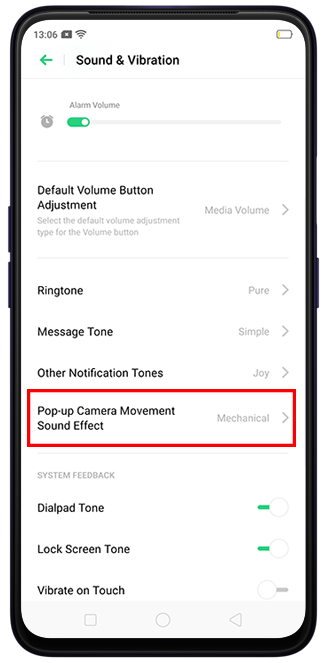
To change the camera pop-up sound, go to the [Settings] > [Sound & Vibration] > [Pop-up Camera Movement Sound Effect] and choose to the desired sound. You will hear the selected sound effect.
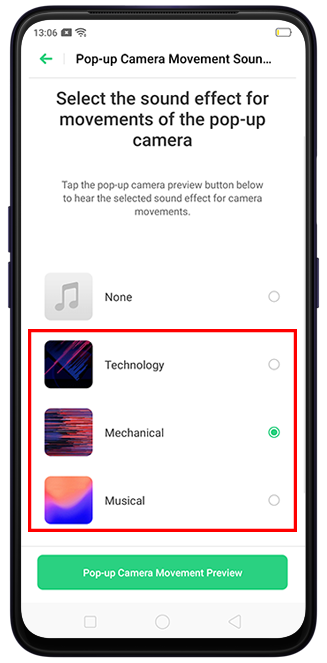
You can also preview the sound effect by tapping [Pop-up Camera Movement Preview].

* Pictures, settings, and paths might differ from those of your phone, but these won't affect the description in this article.
Sponsored Deals
Advertisement · Hand-picked offers, refreshed regularly
These are paid/affiliate advertisements from our partner store and are not related to OPPO or OPPO spare parts.
Related Articles
What are the Dual Sound Effect Modes in OPPO Enco W31 Headphones?
Why Is There an Abnormal Sound When Shaking the Phone or Exiting Camera?
Sponsored Deals
Advertisement · Hand-picked offers, refreshed regularly
These are paid/affiliate advertisements from our partner store and are not related to OPPO or OPPO spare parts.