Dream Big with Google's Daydream
Dream Big with Google's Daydream
Learn more about Google's Daydream.
Applicable for ColorOS 2.1. Check your ColorOS version in [Settings] > [About Phone].
What is Google's Daydream?
Daydream is a virtual reality platform developed by Google that is built into the Android mobile operating system. Daydream feature is an “interactive screensaver mode” that can activate automatically when your device is docked or charging
To Enable Daydream
Go to: [Settings] > [Display] > enable [Daydream] > Select [Colours/Photo form/Photos/Picture frame/Video screen saver]
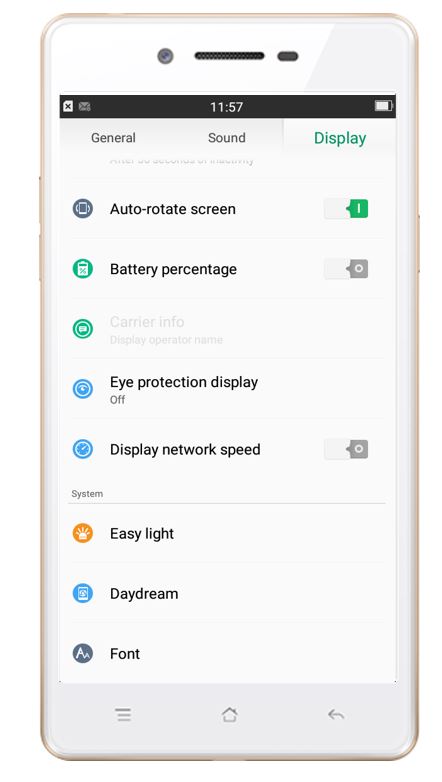
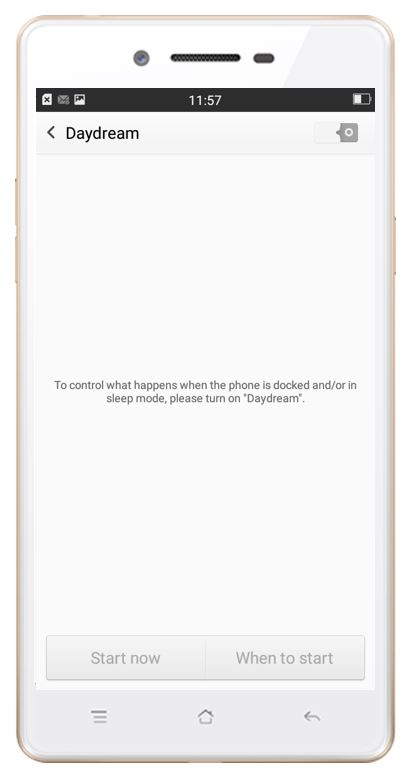
* Pictures, settings, and paths might differ from those of your phone, but these won't affect the description in this article.
Sponsored Deals
Advertisement · Hand-picked offers, refreshed regularly
These are paid/affiliate advertisements from our partner store and are not related to OPPO or OPPO spare parts.
Sponsored Deals
Advertisement · Hand-picked offers, refreshed regularly
These are paid/affiliate advertisements from our partner store and are not related to OPPO or OPPO spare parts.