Display Data Usage in Notification Drawer
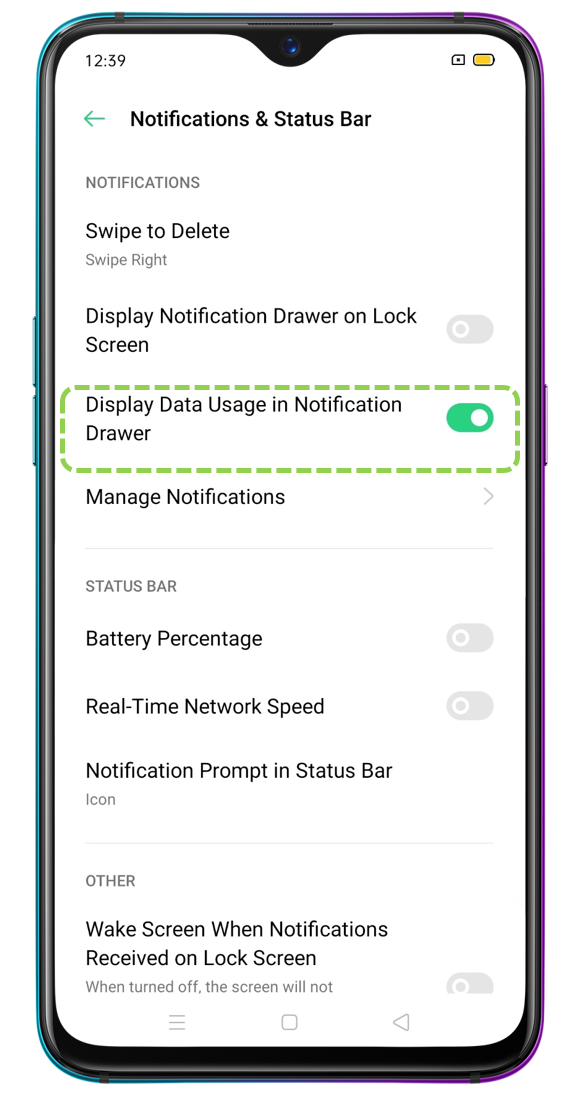
Nowadays most of the application on our devices uses the Internet. Sometimes when we are not even using our device internet is getting used from applications in the background like Google Play Store updating apps in the background. By enabling display data usage your device will show SIM card data used this month in the current data network in the notification drawer. Follow the article below to learn how you can display data usage in the notification panel.
Applicable to: ColorOS 7 and above devices. Check your ColorOS version in [Settings] > [About phone/About Device].
How to Enable Display Date Usage in the Notification Drawer
For ColorOS 12 and above:
Go to [Settings] > [Notification & status bar] > [More] > Enable [Display Data usage in notification drawer].
For ColorOS 7 to 11:
Go to [Settings] > [Notification & Status Bar] > Enable [Display Date Usage in Notification Drawer].
Related articles:
* Pictures, settings, and paths might differ from those of your phone, but these won't affect the description in this article.
Sponsored Deals
Advertisement · Hand-picked offers, refreshed regularly
These are paid/affiliate advertisements from our partner store and are not related to OPPO or OPPO spare parts.
Related Articles
Why is Get Up Reminder Not Showing on OPPO Watch's Notification Drawer?
Sponsored Deals
Advertisement · Hand-picked offers, refreshed regularly
These are paid/affiliate advertisements from our partner store and are not related to OPPO or OPPO spare parts.