Capture Dazzling Photos with Dazzle Color Mode
Capture Dazzling Photos with Dazzle Color Mode
Learn about the Dazzle Color mode in F11 Pro.
Applicable for OPPO F11 Pro.
Understanding Dazzle Color Mode
Dazzle Color mode identifies the scene of the photo and restore the real details, brightness and colors—with the help of AI technology.
Skin tones are processed separately from the background to make the images seem more natural, yet vibrant.
This mode works best for early morning, sunset, indoor and low-light shots.
Turn on the Dazzle Color Mode
Open the [Camera] app, and tap [Dazzle Color] mode on the top of your screen. You're all set to shoot photos with a dash of dazzle.
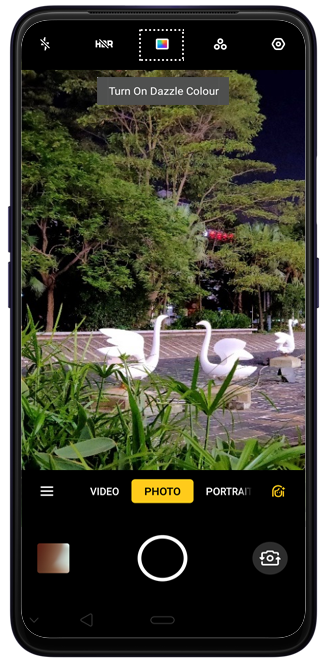
Tips: You can even combine Dazzle Color mode with Ultra Night mode to create much beautiful night shots.
* Pictures, settings and paths might differ from those of your phone, but that do not affect the description in this article.
Sponsored Deals
Advertisement · Hand-picked offers, refreshed regularly
These are paid/affiliate advertisements from our partner store and are not related to OPPO or OPPO spare parts.
Related Articles
A Beginner's Guide on Capturing Droste Effect Photos on OPPO Phones
How to Capture Amazing Water Reflections at Night with OPPO Phones?
Sponsored Deals
Advertisement · Hand-picked offers, refreshed regularly
These are paid/affiliate advertisements from our partner store and are not related to OPPO or OPPO spare parts.