A5 2020/A9 2020/Reno2 ပုံမွန္မဟုတ္ေသာ After-Sales Calibration ျပႆနာ
| Version | Date | Drafted | Verified | Approved | Modified content |
|---|---|---|---|---|---|
| V1.0 | 2019-11-25 | Zhou Yangguang | Huang Guoxin | Leo | 1.First Edition |
1.ေနာက္ခံ
လတ္တေလာ Feedback မ်ားအရ အခိ်ဳ႕ Model မ်ားတြင္ ဖုန္းျပင္ပီးေနာက္ after-sales calibration လုပ္ရာတြင္ “The file (Distance.bin or mwDAC_code.bin) is not exist! So calibration is disable!” ဟု System မွ Error ေပၚလာေၾကာင္း သိရသည္။ စစ္ေဆးခ်က္မ်ားအရ ပထမအသုတ္ထုတ္ေသာ အခိ်ဳ႕ device မ်ားတြင္ camera components ၏ built-in parameters မပါရွိေသာေၾကာင့္ျဖစ္ပါသည္။
2. နယ္ပယ္
ပါ၀င္ေသာ Model မ်ား: A5 2020/A9 2020/Reno2
3. သက္ဆုိင္ရာသို႕
Service Center ၀မ္ထန္းမ်ား
4. အက်ဥ္းခ်ဳပ္
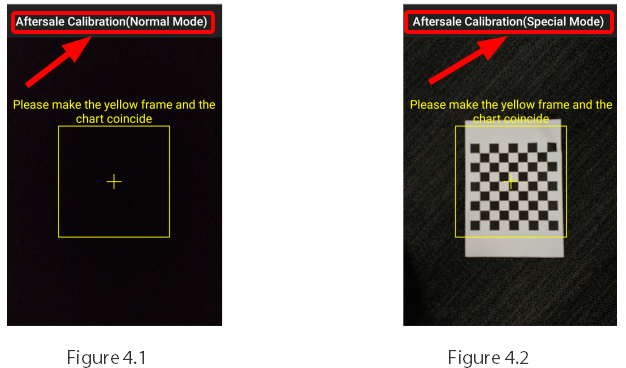
4.1 after-sales calibration မွ "Aftersale Calibration (Normal Mode)" ဟု Figure 4.1 အတိုင္းျပပါက calibration ပံုမွန္အတိုင္း ျပဳလုပ္၍ ရသည္။အေသးစိတ္ကို Service Manual ထဲမွ "Dual Camera Calibration" ကိုၾကည့္ပါ။
4.2 after-sales calibration မွ"Aftersale Calibration (Special Mode)" ဟု Figure 4.2 အတိုင္းျပပါကe photographing page (က်ားကြက္) ျဖင့္ calibration လုပ္ပါ။မေအာင္ျမင္ပါက
4.2.1 main camera ျပႆနာျဖစ္ပါ၍ main camera လဲရမည္ဆိုပါက : wide-angle camera ကို အလကားလဲေပး၍ calibrate ျပဳလုပ္ပါ;
4.2.2 wide-angle camera ျပႆနာျဖစ္ပါ၍ wide-angle camera လဲရမည္ဆိုပါက: main camera ကို အလကားလဲေပး၍ calibrate ျပဳလုပ္ပါ ။
4.2.3 mainboard လဲရမည္ျဖစ္ပီး portrait mode မရပါက main camera ႏွင့္ wide-angle camera အလကားလဲေပး၍ calibrate ျပဳလုပ္ပါ ။
5. Recording specification
ျပဳျပင္ရာတြင္ အဆင့္ 4.2 အတိုင္းျဖစ္လာ၍ main camera သို႔ sub-rear camera လဲရပါက repair orderထဲမွ "quality record" yes ျဖည့္ပါ။ number of the quality record document: oppocs2019112501
6. FAQ
ေမး၁။ ပင္ပီးေနာက္ camera ကို calibrate မလုပ္ရင္ဘာျဖစ္မလဲ?
ေျဖ၂။ portrait image မရျခင္း (သို႕) poor effect ျဖစ္ႏိုင္သည္။
7. သတိျပဳရန္
အဆင့္ 4.2 case ကိုထပ္ေပါင္းရလွ်င္ after-sales calibration fails မွ pass တခါျဖစ္သြားပါက ေနာက္ထပ္ calibrations မ်ား စမ္းၾကည့္ပါ။
Sponsored Deals
Advertisement · Hand-picked offers, refreshed regularly
These are paid/affiliate advertisements from our partner store and are not related to OPPO or OPPO spare parts.
Related Articles
Sponsored Deals
Advertisement · Hand-picked offers, refreshed regularly
These are paid/affiliate advertisements from our partner store and are not related to OPPO or OPPO spare parts.