97.Important Notice about Screen Fingerprint Calibration And Reset after Repair
Model Involved
Models feature light-sensitive screen fingerprint technology.
Background
Recently, we found that some customers feedback that the fingerprint function on their phone is not reliable after repair. After investigation, we found that some aftersales technicians did not perform fingerprint calibration or suggested customer to reset their fingerprint after completing the calibration. The calibration method is now released and monitoring of this issue will be strengthened in future.
Solution
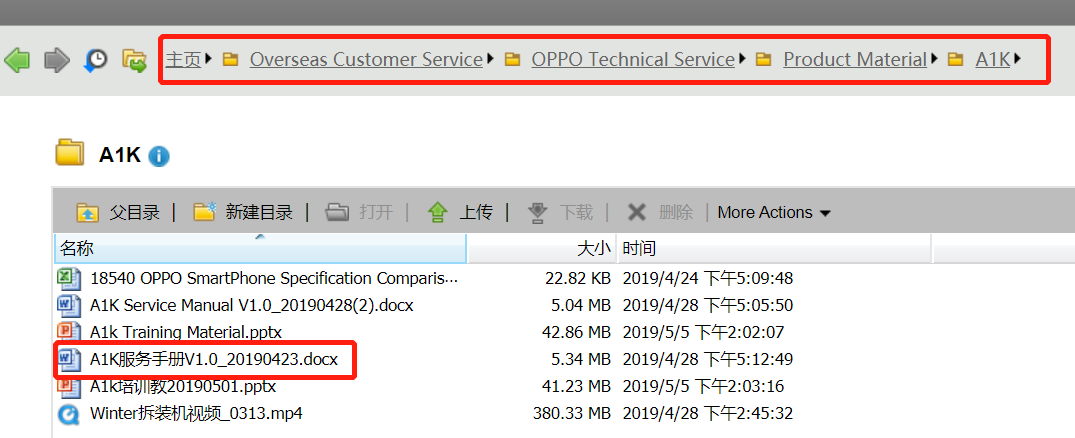
Please refer to FTP for the calibration guidelines of the corresponding model. After completing the calibration, please advise the customer to reset their fingerprint and delete the previous one.
(FTP:Overseas Customer Service-OPPO Technical Service -Product Material- XXmodel -XX service manual).
Script
Q: Why do I have to reset my fingerprint?
A: Dear customer, the XX component on your handset has been replaced. We have recalibrated your fingerprint component to ensure the reliability of the fingerprint function, we recommend that you reset your fingerprint and delete the previous one. Thanks for your understanding and support.
Sponsored Deals
Advertisement · Hand-picked offers, refreshed regularly
These are paid/affiliate advertisements from our partner store and are not related to OPPO or OPPO spare parts.
Related Articles
How to Reset Lock Screen Passcode Using Your Fingerprint on OPPO A92
Important Notice about The Flashing Screen on Side Border in Call of Duty
Sponsored Deals
Advertisement · Hand-picked offers, refreshed regularly
These are paid/affiliate advertisements from our partner store and are not related to OPPO or OPPO spare parts.