Camera

Add and Remove Date & Time Stamp in Photos on OPPO A6c

9 steps · OPPO A6c · Android OS v16

  1. 1

    Swipe Up.

    Step 1: Swipe Up.
  2. 2

    Tap on Camera icon.

    Step 2: Tap on Camera icon.
  3. 3

    Tap on Menu.

    Step 3: Tap on Menu.
  4. 4

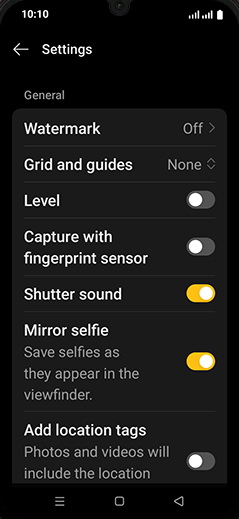
    Tap on Settings.

    Step 4: Tap on Settings.
  5. 5

    Tap on Watermark.

    Step 5: Tap on Watermark.
  6. 6

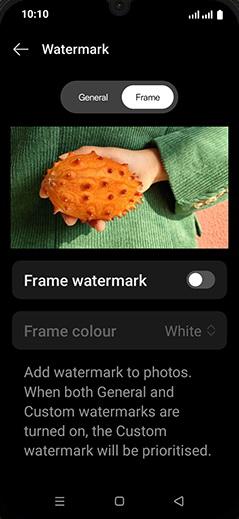
    Tap on General.

    Step 6: Tap on General.
  7. 7

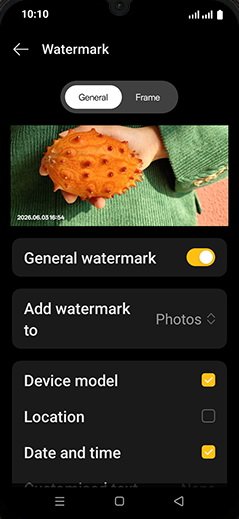
    Tap on General watermark to turn ON.
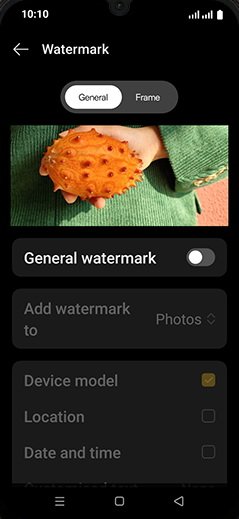
    Step 7: Tap on General watermark to turn ON.
  8. 8

    Check mark on date and time.

    Step 8: Check mark on date and time.
  9. 9

    Tap on Home.

    Step 9: Tap on Home.